




















.png)




Whoxa Business – CRM Chat Messenger Node.js Script for WhatsApp with Admin Panel
Whoxa Business is a complete WhatsApp CRM SaaS Node.js script that combines a full WhatsApp CRM system with a real WhatsApp-like chat messaging experience — bot

Whoxa Business is a complete WhatsApp CRM SaaS Node.js script that combines a full WhatsApp CRM system with a real WhatsApp-like chat messaging experience — both in one product. Built on NodeJS, ReactJS, NextJS, and PostgreSQL, it is the only WhatsApp CRM solution on CodeCanyon that supports both the official WhatsApp Cloud API and normal WhatsApp-like chat messaging in a single platform. Whether you are an agency, entrepreneur, or developer, Whoxa Business gives you a complete multi-tenant SaaS platform — sell WhatsApp CRM access to unlimited clients, manage all WhatsApp communications, run bulk campaigns, automate chatbot flows, and let your business teams chat in real time — all from one powerful Node.js dashboard.
– Live Demo: https://whoxacrmbusinessweb.vercel.app/
– Documentation: Online Documentation
– Version: 1.0.0 | Backend: NodeJS, PostgreSQL, ReactJS, NextJS
– Panels Included: Super Admin Panel | User Panel | Agent Panel
– Buy Mobile App: Whoxa Business Chat – Flutter Mobile App
– Contact Us: primocys.com/contact
– This is Exclusive Product License from Envato
Demo Accounts
Super Admin Panel URL: https://whoxa-super-admin.vercel.app/ Email: admin@admin.com Password: Admin@123 User Panel URL: https://whoxacrmbusinessweb.vercel.app/ Email: alicejohn@yopmail.com Password: 123456 Agent Panel URL: https://whoxacrmbusinessweb.vercel.app/ Email: agent@yopmail.com Password: 123456


Server Requirements
This product requires a VPS or Dedicated Server with root/sudo access. Shared hosting is not supported.
Runtime and Database
Node.js Version: 20.0.0 or higher
PostgreSQL Version: 16.14 or higher
npm Version: 9.0.0 or higher
Server Specifications
Operating System: Ubuntu 20.04 LTS or higher
Server Type: VPS or Dedicated Server with root/sudo access (shared hosting not supported)
RAM: Minimum 2GB (4GB recommended)
Storage: Minimum 20GB SSD
Root/Sudo Access: Required for deployment and configuration
Important Notice – WhatsApp Business API Costs
⚠️ WhatsApp Business API Pricing Warning: This product integrates with the official Meta WhatsApp Cloud API, which is a paid third-party service provided by Meta. WhatsApp messaging fees are charged directly by Meta based on their conversation-based pricing model. These API usage charges are not included in the purchase price of this item and are billed separately by Meta.
Customers are responsible for:
- Creating and maintaining their own WhatsApp Business API account with Meta
- Paying all applicable Meta conversation fees directly to Meta
- Reviewing and accepting Meta’s WhatsApp Business API terms and pricing before use
Please review Meta’s official WhatsApp pricing page before purchase to understand the cost structure.
Important Notice – AI Features
⚠️ AI Features Cost Warning: AI-powered features in this product — including intelligent chatbot responses, smart reply suggestions, and automated conversation handling — require external AI services such as OpenAI, DeepSeek, or Gemini. These services operate on a pay-per-use basis and incur separate costs not included in the item price. You will need to create your own API account and manage billing directly with the AI service provider of your choice.
Why Whoxa Business is Different from Every Competitor
WhatsApp Cloud API + Normal WhatsApp Messaging — both supported
Competitors offer Cloud API only. Whoxa Business gives you both modules in one purchase — no other WhatsApp CRM product on CodeCanyon offers this combination.
Built with NodeJS — faster and more scalable
All competitors (Wapi, WhatsCRM, OvoWpp) use Laravel. NodeJS handles real-time communication at scale with superior performance and lower server load.
Real WhatsApp-like chat experience for business teams
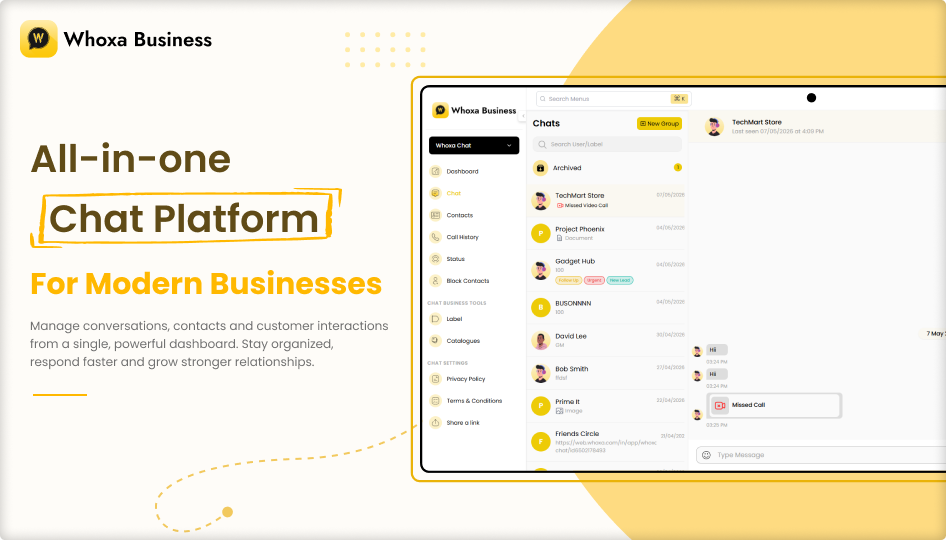
Not just a CRM dashboard — your team chats exactly like they are on WhatsApp, with media sharing, group chat, audio/video calls, and read receipts.
Two complete modules in one purchase — CRM + Messenger
Buy once and get a full WhatsApp CRM SaaS platform and a complete real-time messaging system. No separate purchases needed.
Multi-tenant SaaS ready from day one
Register unlimited clients, assign subscription plans, and monetize your platform instantly with the built-in multi-tenant subscription system.
Module 1 — WhatsApp CRM SaaS
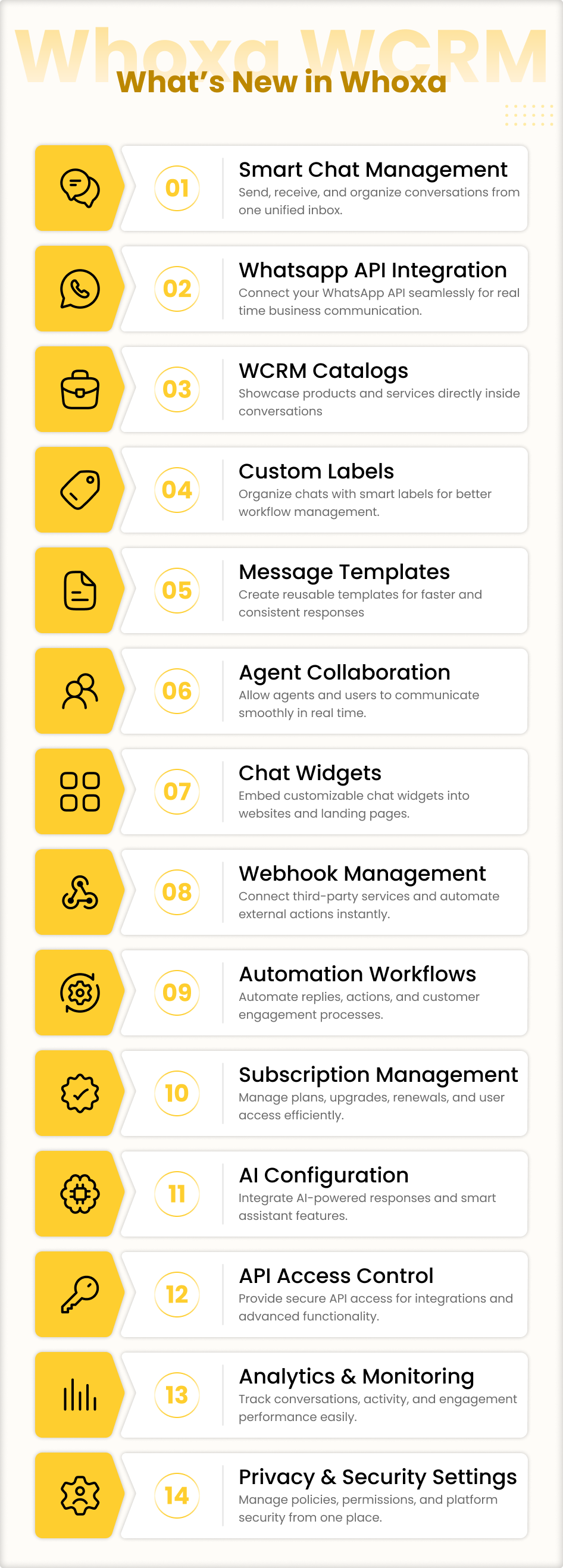
A complete WhatsApp CRM and automation platform powered by the official WhatsApp Cloud API. Manage all customer conversations, automate replies, run bulk campaigns, and grow your business on WhatsApp.
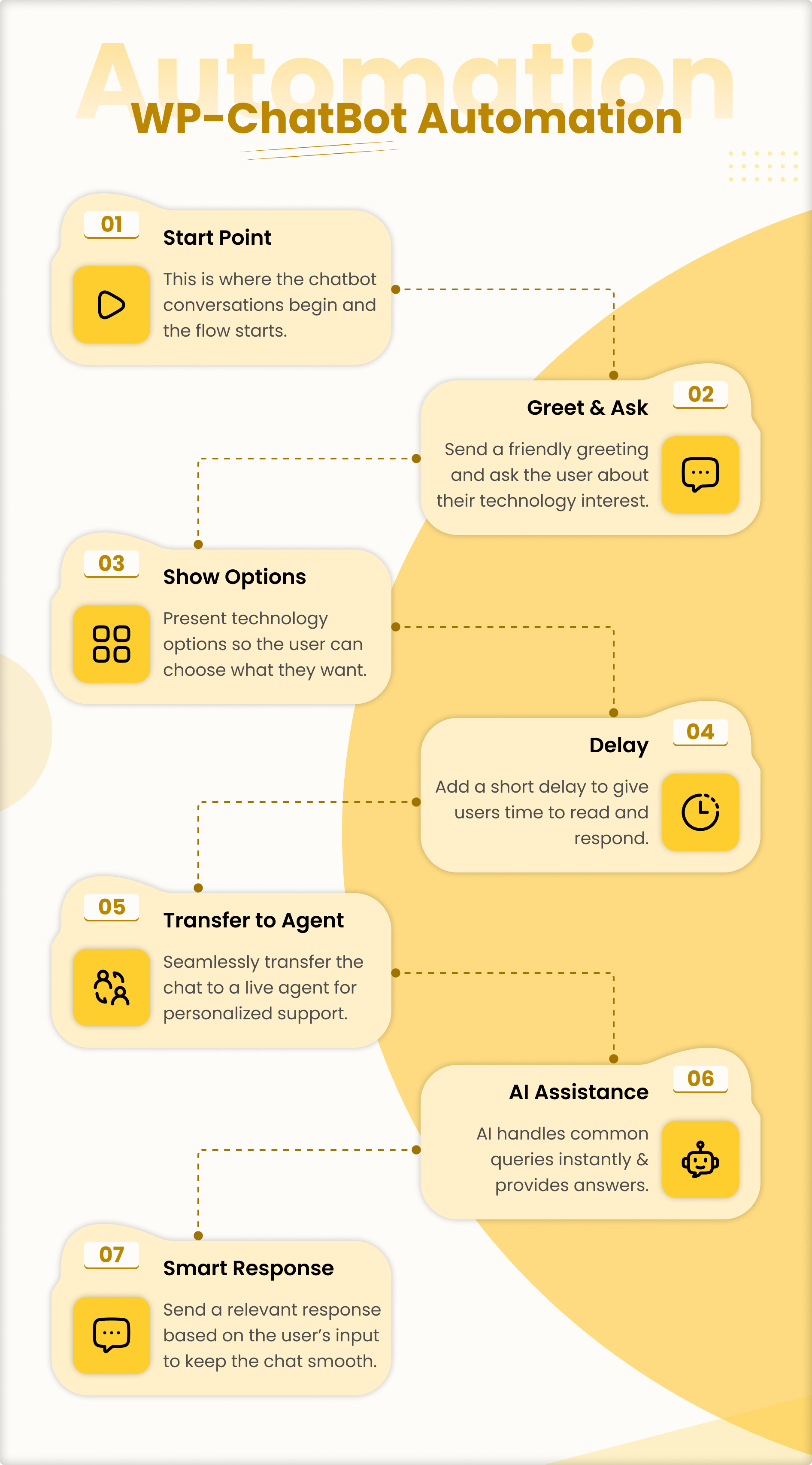
Chatbot Flow Builder
Build drag-and-drop automation flows to handle customer queries 24/7 without any manual effort. Create complex conversation trees with conditions, triggers, and automated actions.
Bulk Message Sender
Send personalized WhatsApp campaigns to thousands of contacts instantly. Schedule campaigns in advance and track delivery with real-time analytics.
WhatsApp Automation
Set up auto-replies, drip sequences, and trigger-based workflows for leads, customers, and support queries — all running automatically.
Multi-Agent Team Inbox
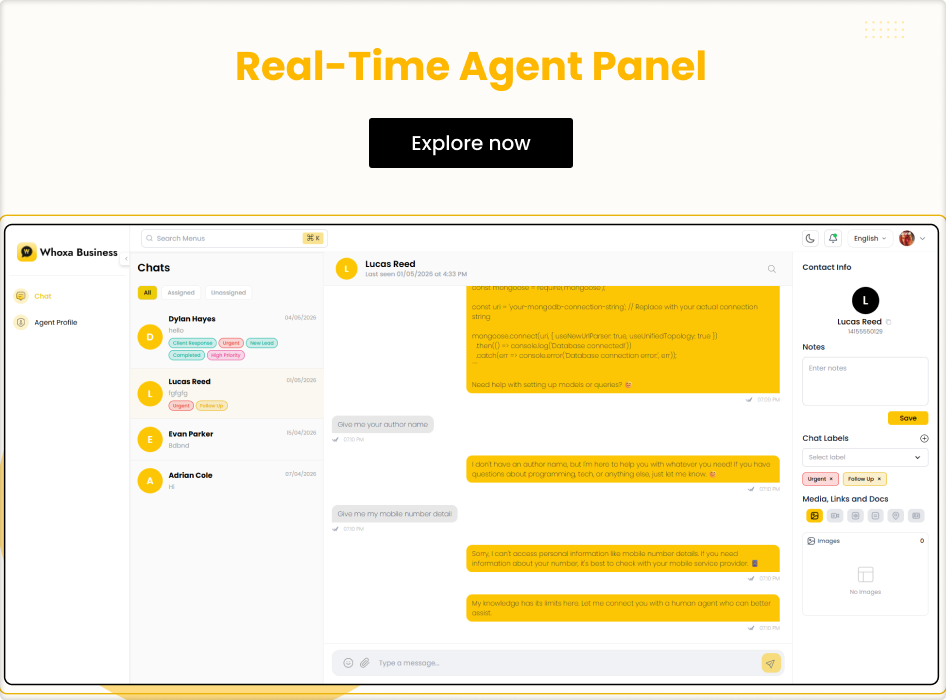
Assign conversations to agents, manage team workload, track response times, and collaborate from one shared WhatsApp inbox. View new, assigned, and unassigned chats at a glance.
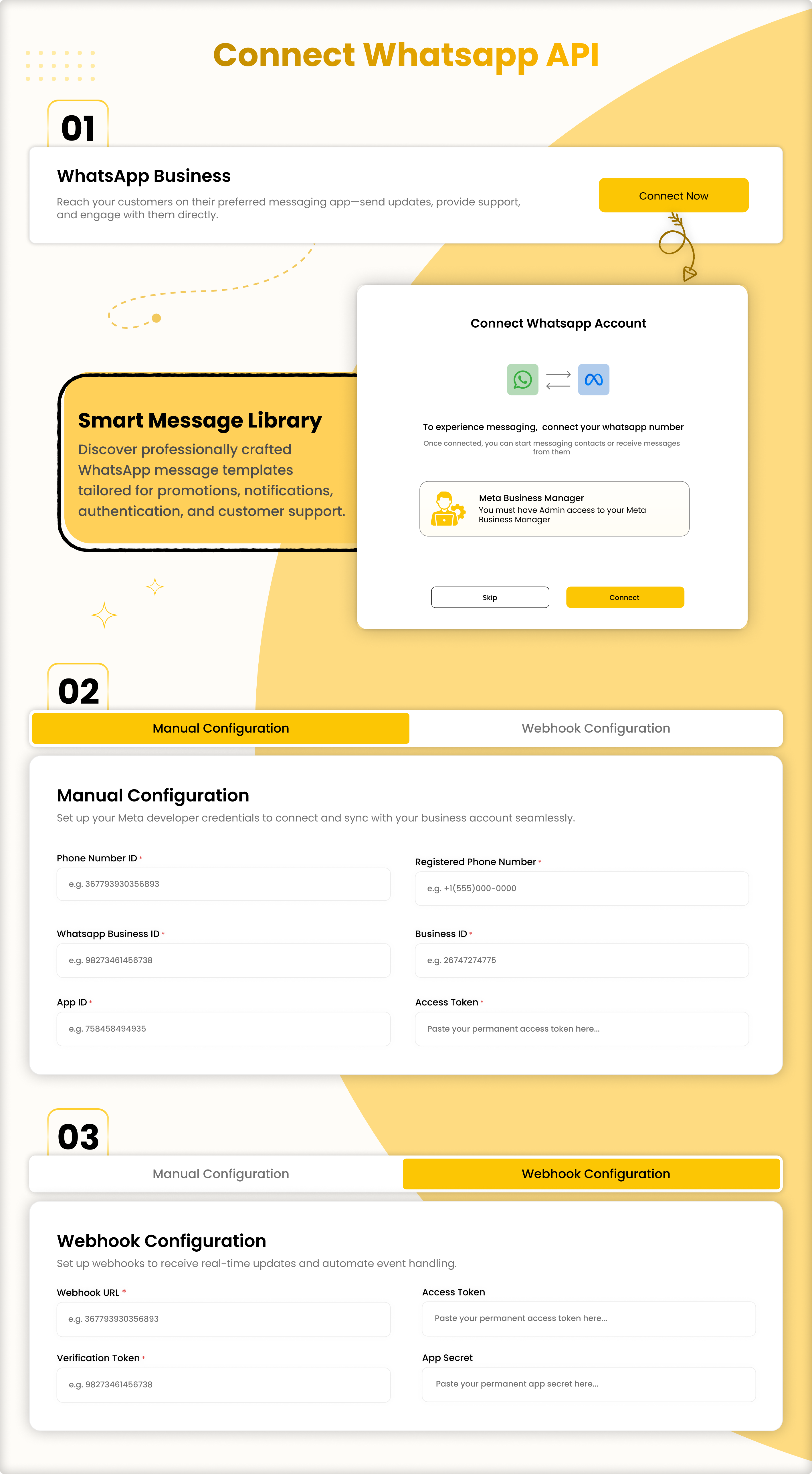
WhatsApp Cloud API Integration
Supports manual connection, automatic connection, and webhook-based WhatsApp API connection — giving users full flexibility in how they connect their WhatsApp account.
Campaign Analytics
Track delivery rates, open rates, response rates, and full campaign performance with real-time reports and actionable insights from the dashboard.
Contact Management
Organize, import, segment, and group contacts for targeted WhatsApp messaging campaigns with full CRM data management.
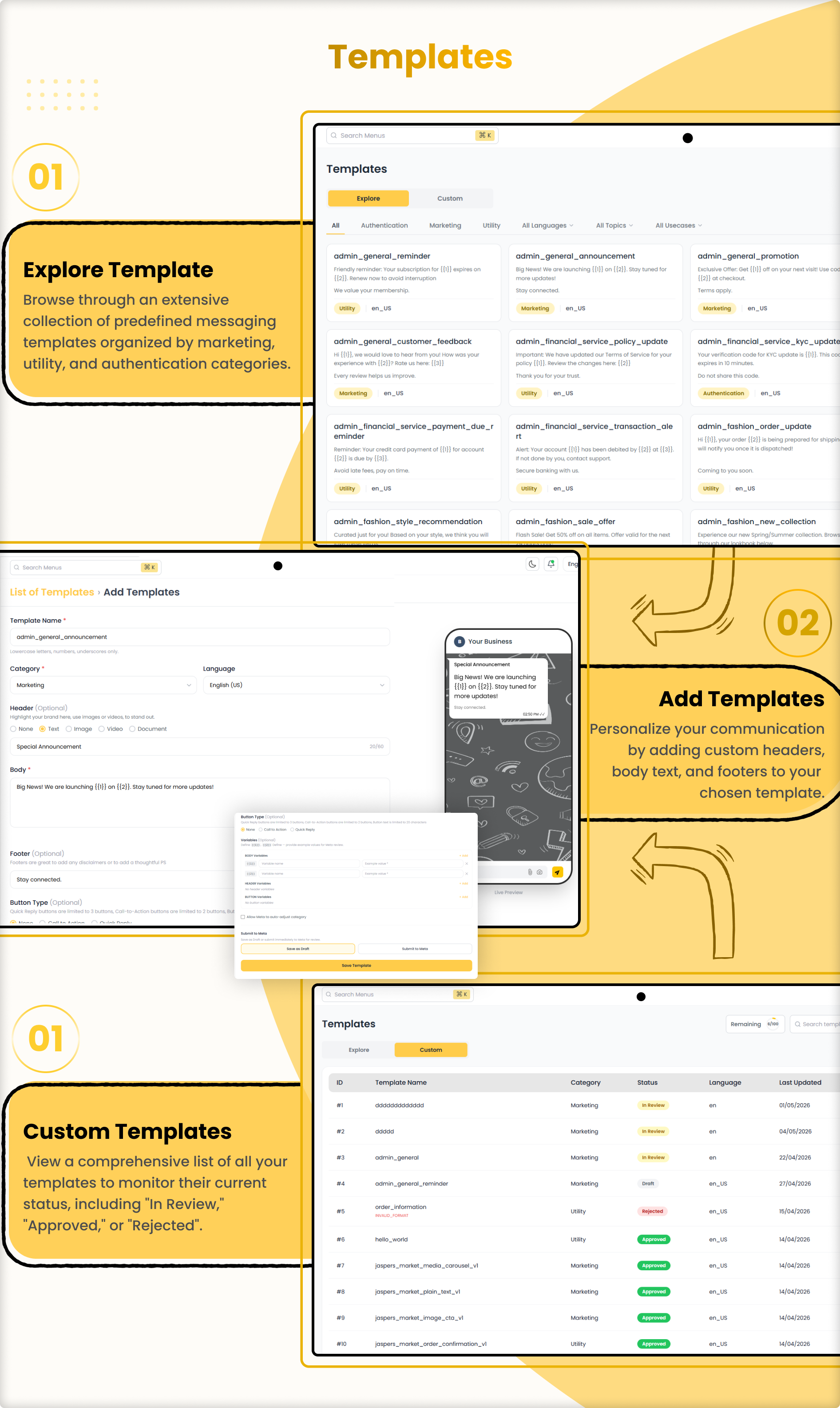
WhatsApp Message Templates
Create and manage approved WhatsApp message templates for fast, consistent, and compliant customer communication at scale.
WCRM Catalog
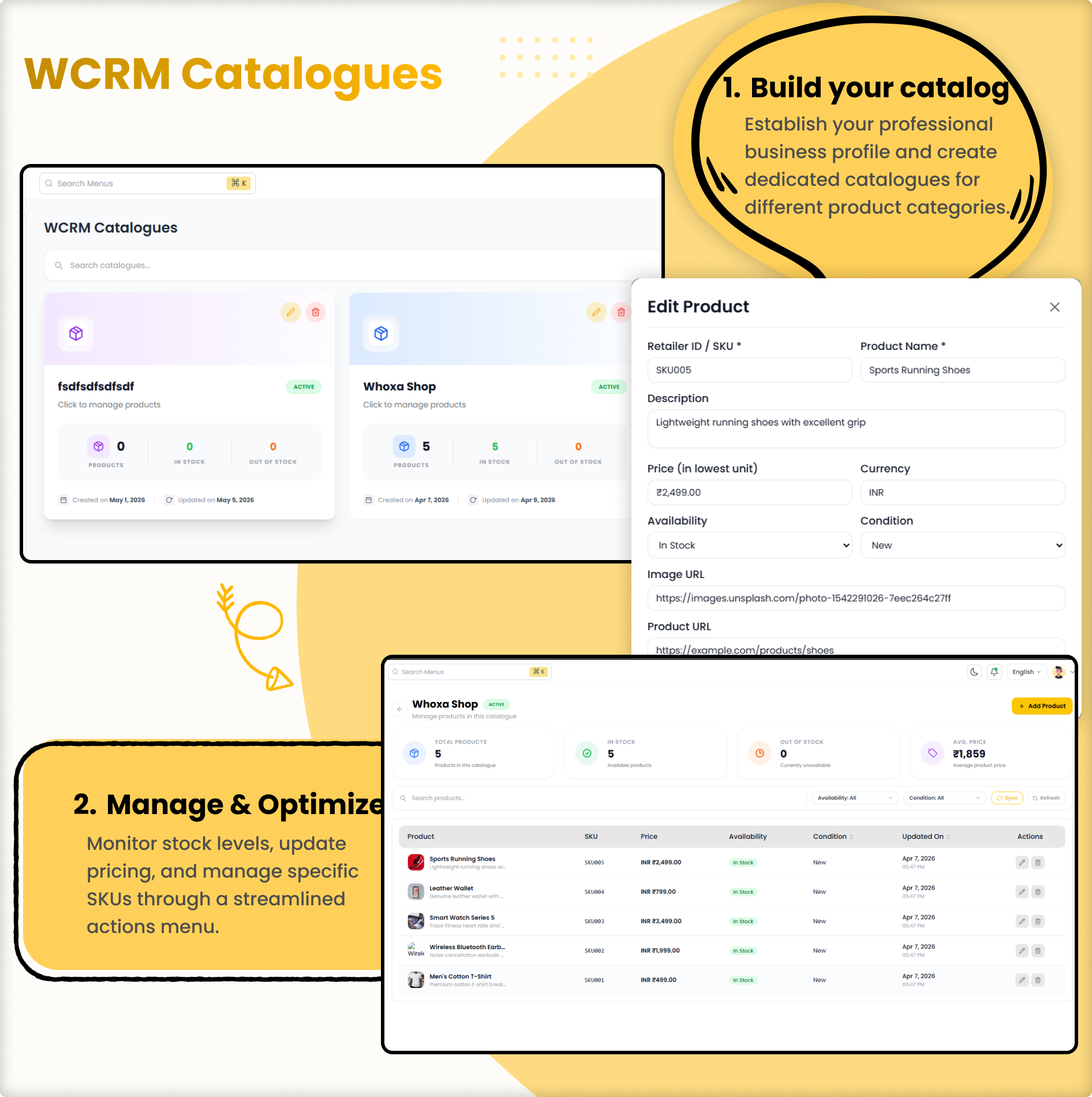
Manage your WhatsApp product catalog directly from the CRM panel. Showcase products and services to customers via WhatsApp conversations.
Label Management
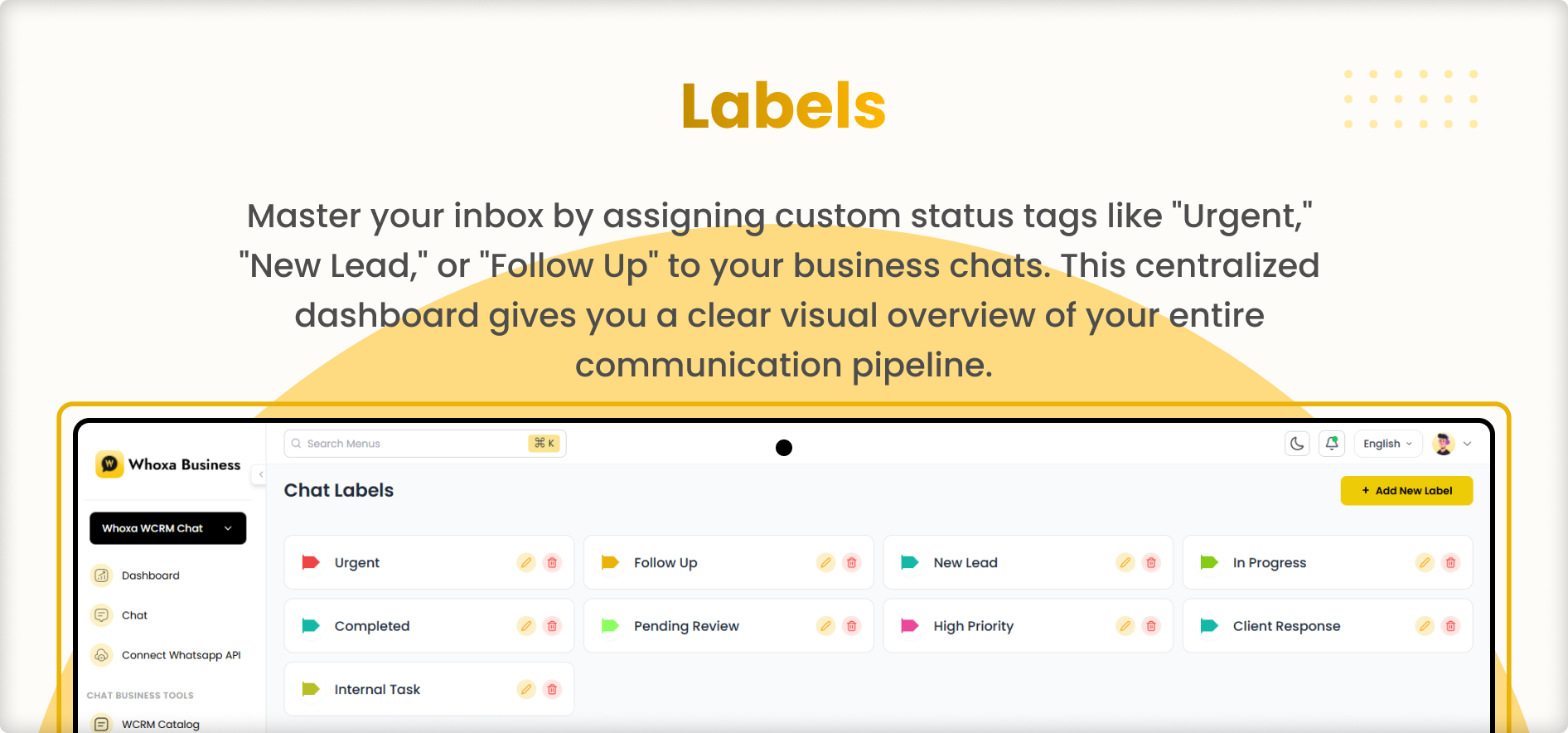
Organize and categorize WhatsApp conversations using custom labels for easy filtering, team assignment, and workflow management.
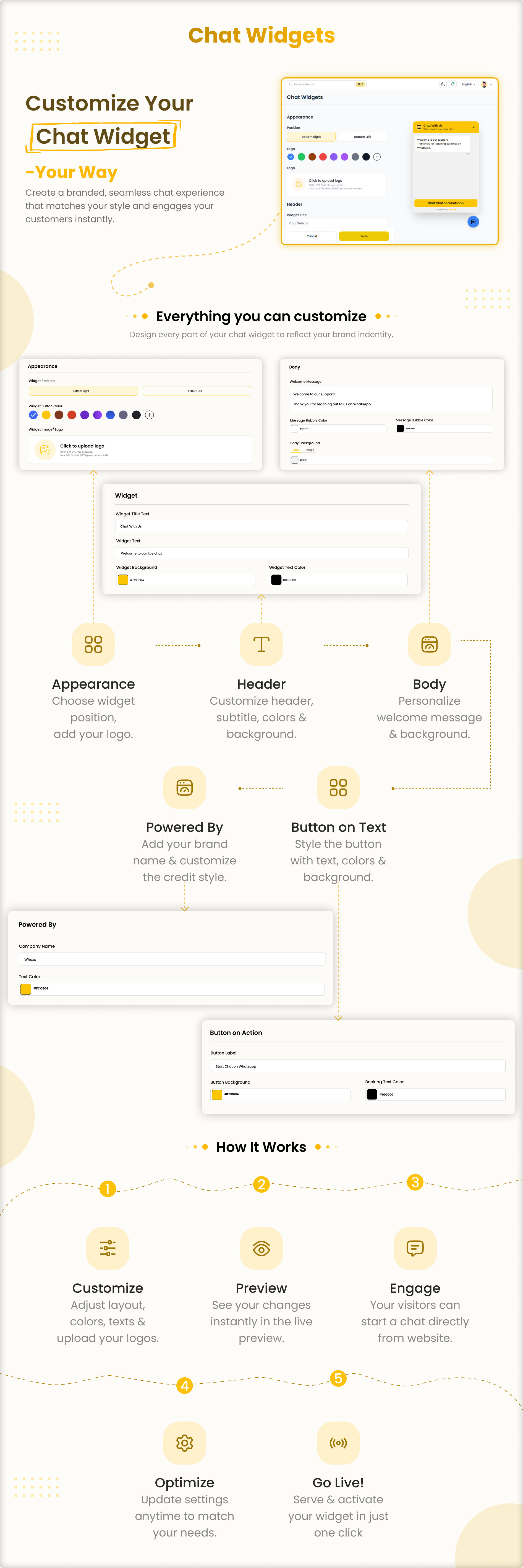
Chat Widget
Fully customizable WhatsApp chat widget for your website — configure position, logo, colors, button text, widget title, subtitle, text color, and embed script. Multiple customization options for a fully branded experience.
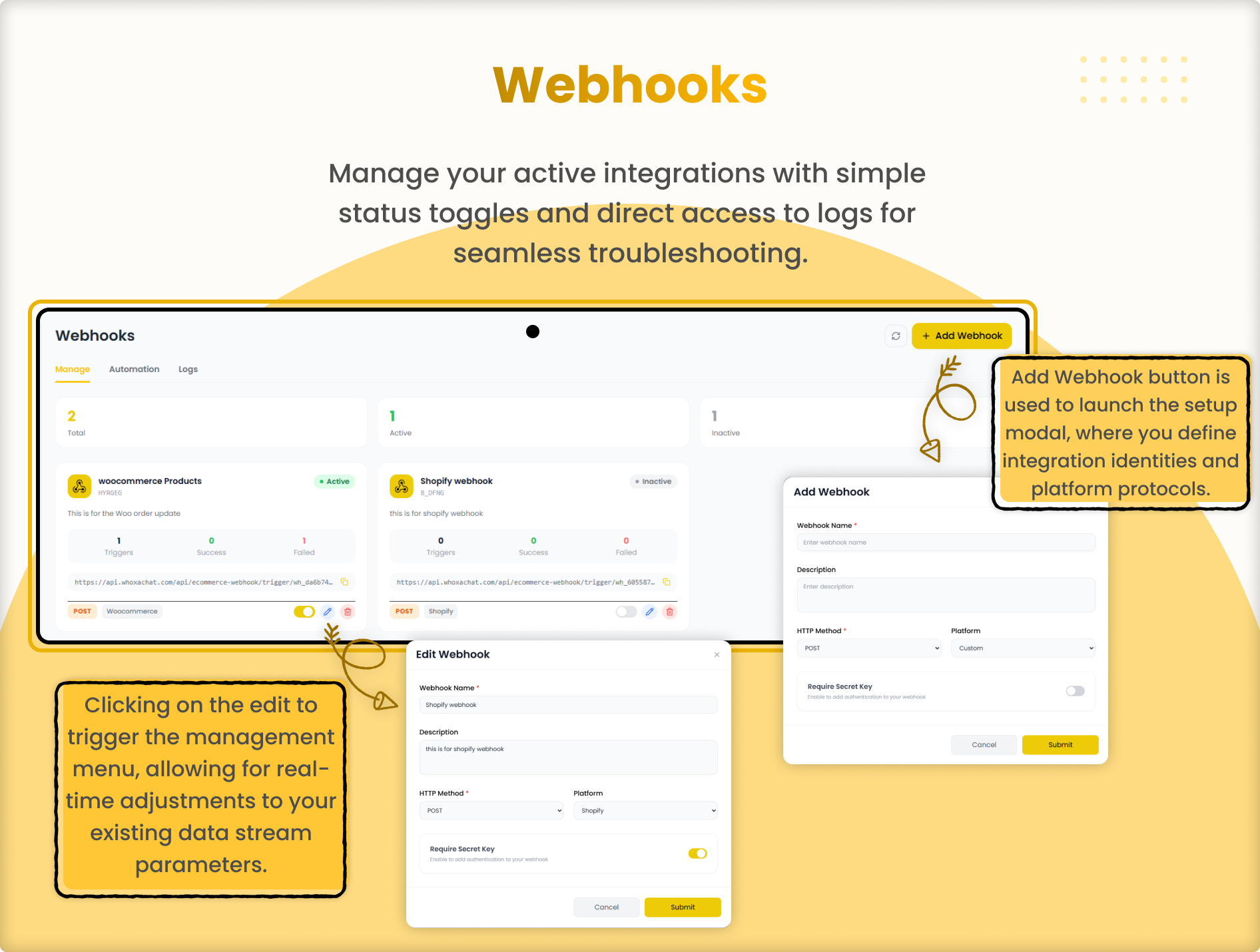
Webhook Management
Configure and manage webhooks to connect Whoxa Business with your existing tools, CRMs, and third-party platforms for seamless data flow.
Full API Access
Complete API access for developers to integrate Whoxa Business with any external system, application, or custom workflow.
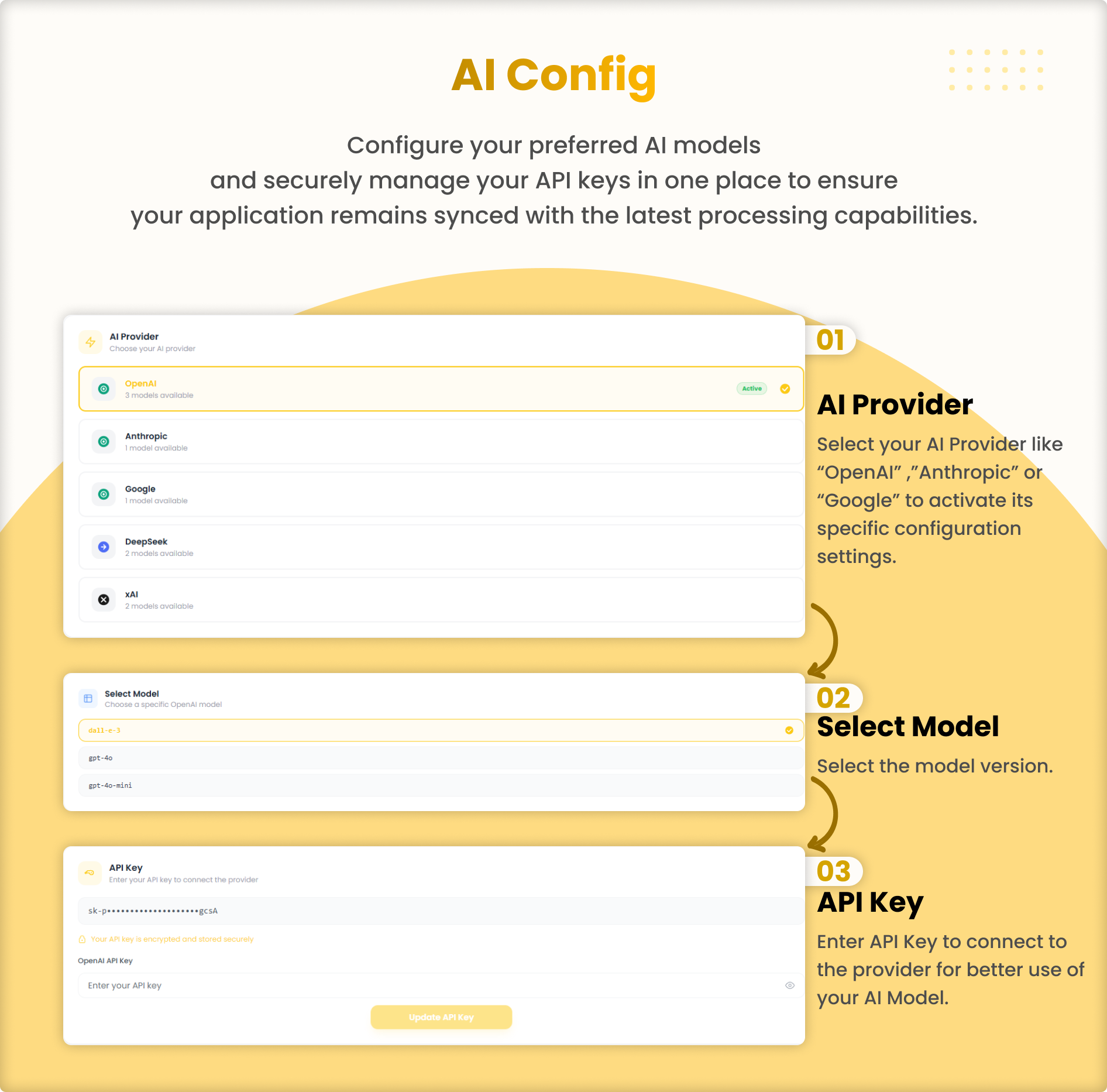
AI Configuration
Configure AI models to power intelligent chatbot responses, smart reply suggestions, and automated conversation handling. Requires external AI service subscription — see AI notice above.
CMS Pages
Built-in CMS page management so you can create and publish custom content pages directly from the user panel.
Multi-Tenant SaaS Architecture
Full multi-tenant support — users register, choose a subscription plan, and start using the platform instantly with full tenant isolation.
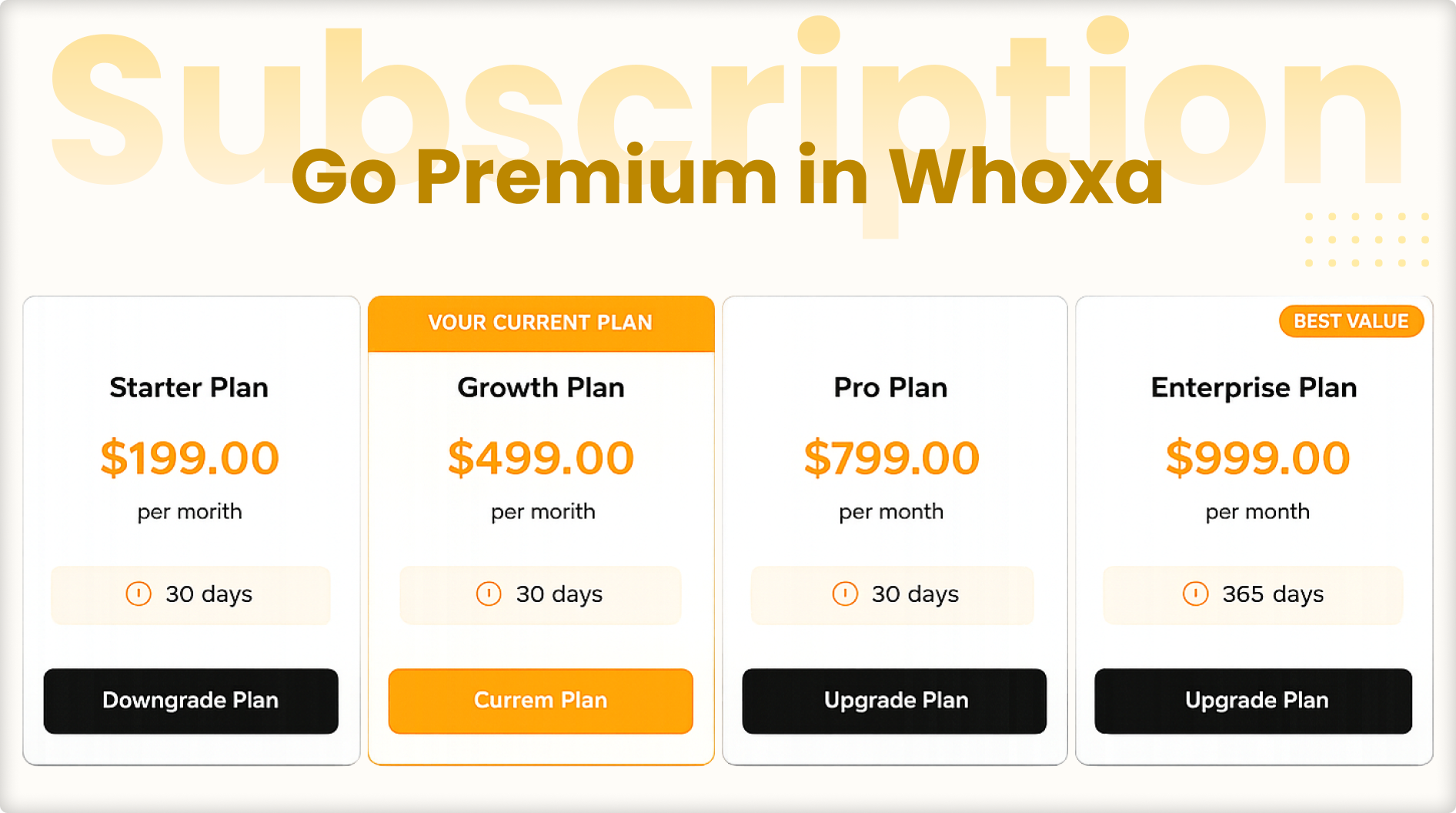
Subscription Plan Management
Users can view available subscription plans with full feature limits and upgrade or downgrade their plan directly from the panel.
User Panel Features — WhatsApp CRM
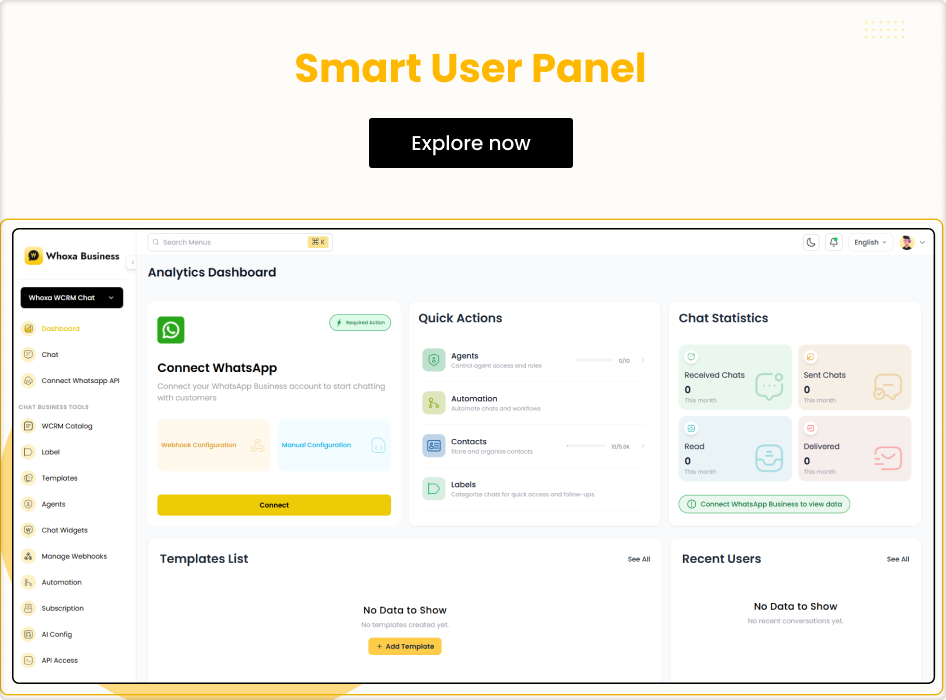
Each SaaS subscriber gets a dedicated user panel with full access to all WhatsApp CRM tools and messaging features.
Dashboard and Analytics
Complete dashboard with total chats, new chats, assigned chats, and unassigned chats — all displayed with real-time analytics and performance graphs.
WhatsApp Connection
Connect WhatsApp manually, automatically, or via webhook — flexible connection options to suit any business setup.
WCRM Catalog
Manage WhatsApp product catalog listings directly from the user panel for showcasing products in customer conversations.
Manage Labels
Create, edit, and assign custom labels to organise and categorise WhatsApp conversations efficiently.
Chat Templates
Create and manage reusable WhatsApp message templates for quick, consistent replies and campaign messaging.
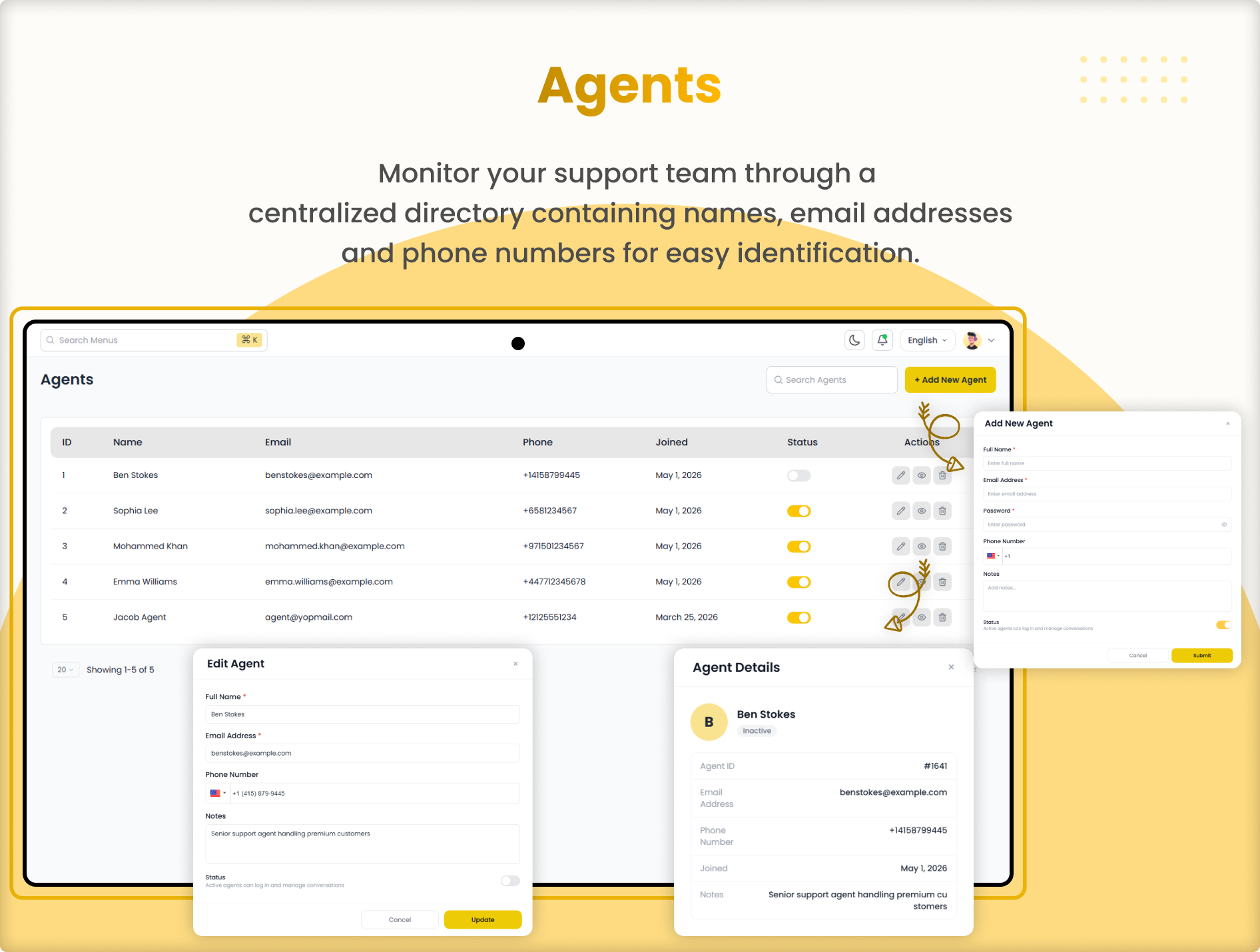
Agent Management
Add and manage agents under your account, assign conversations, set permissions, and track agent performance.
Chat Widget
Generate a fully branded WhatsApp chat widget for your website — customise position, logo, colors, button text, title, subtitle, and get the embed script with one click.
Manage Webhooks
Set up and manage webhook connections to send WhatsApp data to external systems and trigger actions in third-party platforms.
Automation Flow
Build and manage automation flows using the visual drag-and-drop flow builder — automate replies, lead qualification, and customer journeys.
Subscription Plan
View current subscription plan, check feature limits and usage, and upgrade or change plans directly from the user panel.
AI Configuration
Configure AI model settings and connect AI to chatbot flows for intelligent automated conversation handling. Requires external AI service — see AI notice above.
Full API Access
Access complete API documentation and credentials from the user panel to integrate with any external system.
CMS Pages
Create and manage custom CMS pages from the user panel for landing pages, terms, privacy policy, and other content needs.
Agent Panel Features
Dedicated agent panel for team members to manage assigned WhatsApp conversations and respond to customers efficiently.
Agent Dashboard
Clean dashboard showing total chats, new chats, assigned chats, and unassigned chats — giving agents a clear view of their workload at all times.
Chat Management
Agents can view, respond to, and manage all assigned WhatsApp conversations from one organised inbox with full chat history.
Module 2 — Real-Time Chat Messaging System
A fully featured WhatsApp-like messaging system for business teams — powered by Socket.IO for instant real-time communication. No Firebase. All chat data is securely stored in your own PostgreSQL database with full data ownership.
Real-Time Messaging
Instant message delivery powered by Socket.IO — no third-party services, no Firebase dependency. Full control over your data and infrastructure.
Group Chat
Create group conversations with multiple team members, assign admins, manage participants, and collaborate in real time.
Audio and Video Calls
One-to-one and group audio/video calling with call duration display, call history, microphone and camera controls, and in-call chat support.
Media Sharing
Share images, videos, documents, contacts, voice recordings, and live location in individual or group chats.
Read Receipts
Double tick for delivered messages, blue tick when the message is read — exactly like WhatsApp. Full delivery status tracking.
Online and Last Seen
See if contacts are online or check their last seen timestamp in real time across all active sessions.
Message Reactions
React to messages with emojis and view all reactions from team members in real time.
Reply, Forward and Delete
Reply to specific messages, forward multiple messages to individual or group chats, and delete messages for everyone simultaneously.
Pinned Messages
Pin important messages for a specific duration — 1 day, 7 days, 1 month, or lifetime — with real-time sync across all devices.
Starred Messages
Star important messages and access them instantly from the starred messages screen without searching through chat history.
Status Updates
Users can post and view status updates, reply to statuses, and react — exactly like WhatsApp Stories.
Archived Chats
Archive conversations to keep the chat list clean and organised. Archive updates live in real time.
Block and Report
Block contacts with real-time block notifications. Report users with reason selection — all reports are visible to admin for review and action.
Search
Search users, messages, and chat history quickly for fast access to any conversation or contact.
Dark and Light Mode
Full dark and light mode support with custom theme color selection — users pick their preferred theme, admin sets the system default.
RTL and Multi-Language Support
Fully supports Arabic, Hebrew, Persian, Urdu, and all RTL languages. Admin can add new languages with auto-translate from the panel.
Notification Center
Admin-sent notifications appear in the user panel. Browser push notifications alert users when new messages arrive on other tabs or devices.
Multi-Device Support
One user can connect from multiple devices or browsers simultaneously. Chat list and messages sync in real time across all active sessions.
Super Admin Panel Features — WhatsApp CRM
Full control over the entire SaaS platform — manage all tenants, subscriptions, payments, settings, and system configuration from one powerful super admin dashboard.
Dashboard and Analytics
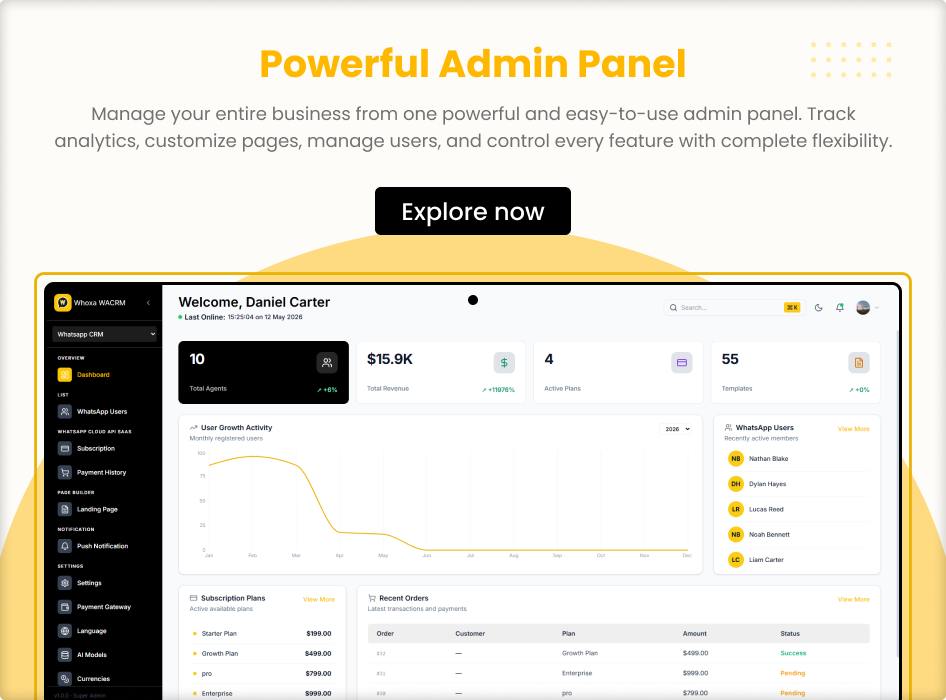
Comprehensive dashboard showing total agents, total revenue, active plans, and templates count with percentage growth indicators. User growth activity graph by month, recently active WhatsApp users list, active subscription plans overview, and recent orders with payment status.
WhatsApp Users Management
View and manage all WhatsApp CRM users across all tenants. Monitor activity, manage accounts, and take action on any user from the admin panel.
Subscription Plan Management
Create, edit, and manage subscription plans with custom feature limits and pricing. Control what each plan includes and set limits for messages, agents, and campaigns.
Payment History
Full payment history with order details, customer information, plan name, amount, and payment status — success, pending, or failed — all in one view.
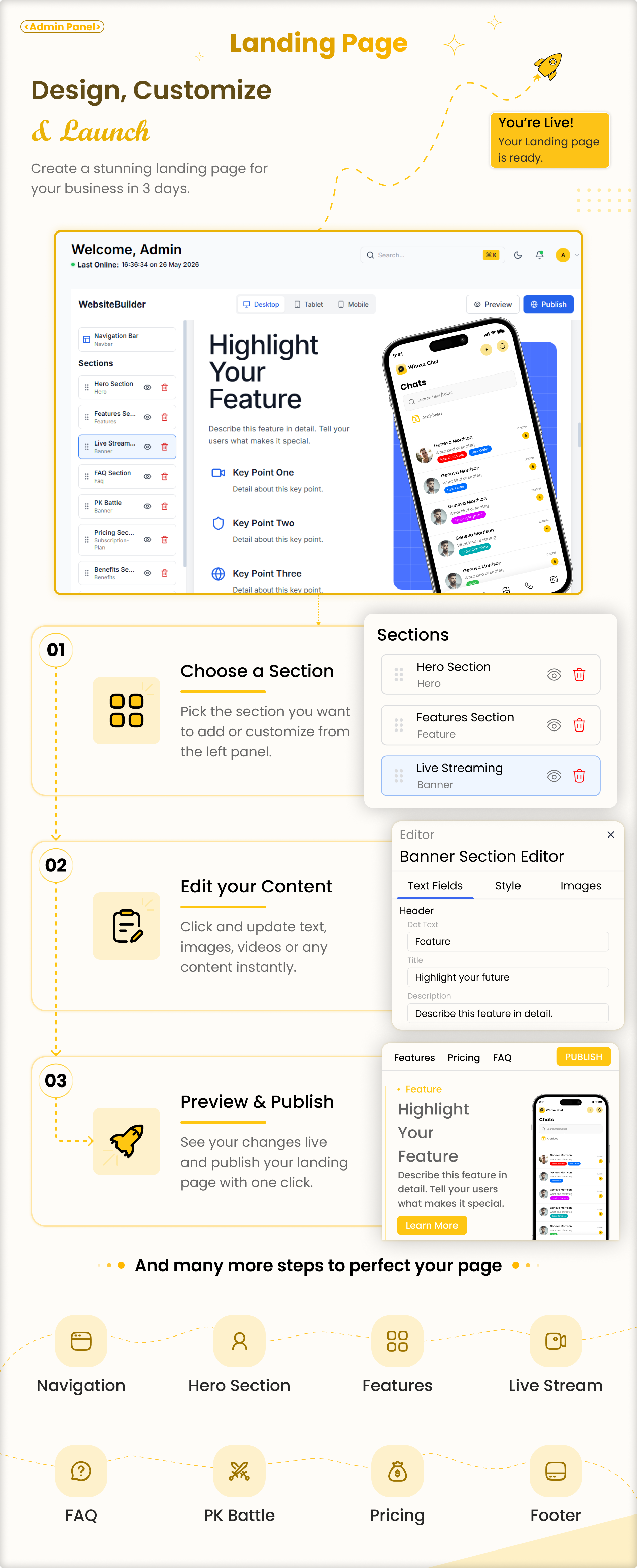
Landing Page Builder
Built-in landing page builder to create and publish a custom marketing page for your WhatsApp CRM SaaS platform without any coding.
Push Notification Management
Send custom push notifications to all users or specific segments directly from the super admin panel with full targeting control.
Payment Gateway Management
Configure and manage multiple payment gateways for subscription billing. Add, enable, or disable payment methods from the admin settings.
Language Management
Manage all system languages, set the default language, add new languages, and configure RTL or LTR layout with auto-translate support.
AI Module Management
Manage AI model configurations, add new AI providers, and control AI feature availability across tenant plans. External AI service costs apply — see AI notice above.
Currency Management
Configure supported currencies for subscription billing across different regions and markets.
Settings and Configuration
Full system settings including SMS configuration, SMTP email configuration, push notification configuration, and Meta app configuration for WhatsApp Cloud API setup.
Super Admin Panel Features — Chat Module
Separate admin control for the real-time WhatsApp-like chat messaging module.
Chat Dashboard
Overview of all chat activity across the platform with key metrics and real-time data.
All Users
View and manage all registered chat users with full account details, status, and activity information.
Country-Wise Users
Breakdown of all users by country with analytics for geographic distribution of your user base.
Report List
View all user reports submitted by other users, including the reporter, reported user, reason, and timestamp — take moderation action directly.
Block List
View and manage all blocked users across the platform. Unblock users or take further action as needed.
Category List
Manage chat categories and classification settings for organising user conversations and content.
General Settings
Configure all general chat module settings including registration, OTP, notifications, media limits, and platform behaviour from one settings panel.
Tech Stack
Frontend: ReactJS, NextJS
Backend: NodeJS
Database: PostgreSQL
Real-Time Engine: Socket.IO
WhatsApp API: Official WhatsApp Cloud API (Meta)
Panels Included: Super Admin Panel, User Panel, Agent Panel
Files Included
Full Source Code
Complete ReactJS and NextJS source code for the user panel, agent panel, and super admin panel — along with full NodeJS backend source code and PostgreSQL database schema.
Documentation
Thorough installation, configuration, and usage documentation available at whoxa-crm-documentation.vercel.app. Covers server setup, environment configuration, and full deployment steps.
Also Available — Flutter Mobile App
Looking for the companion mobile app? The Whoxa Business Chat mobile app for iOS and Android — built in Flutter — is available separately on CodeCanyon. Your business teams get full access to CRM and real-time messaging on the go.
View Whoxa Business Chat – Flutter Mobile App on CodeCanyon
Support and Contact
Documentation: whoxa-crm-documentation.vercel.app
Contact Us: primocys.com/contact
WhatsApp Support: Chat with us on WhatsApp
Discord Community: Join our Discord
Change Log
V1.0.0 | Initial Release – WhatsApp CRM SaaS with full multi-tenant architecture – WhatsApp Cloud API integration (manual, automatic, webhook) – Chatbot flow builder with drag-and-drop automation – Bulk message sender with campaign analytics – Multi-agent team inbox with assignment management – Real-time chat messaging system powered by Socket.IO – Audio and video calls (one-to-one and group) – Super Admin Panel, User Panel, and Agent Panel – Landing page builder, payment gateway management – AI model configuration support – RTL and multi-language support – PostgreSQL database — no Firebase dependency
Whoxa Business is an exclusive product licensed through Envato. All real-time chat data is stored securely in your own PostgreSQL database using Socket.IO — no Firebase, no third-party chat service dependencies. Full data ownership guaranteed. WhatsApp is a trademark of Meta Platforms Inc. Whoxa Business is not affiliated with or endorsed by Meta.
What's Your Reaction?
 Like
0
Like
0
 Dislike
0
Dislike
0
 Love
0
Love
0
 Funny
0
Funny
0
 Angry
0
Angry
0
 Sad
0
Sad
0
 Wow
0
Wow
0