


































Websktop Builder – Convert Any Website to Native Desktop App
Launch Offer – Limited Time Regular price: $34 Current Launch Price: $19 Note: Price will be increased after 20 sales (13 more sales left), hurry up!!! We
Launch Offer – Limited Time
Regular price: $34
Current Launch Price: $19
Note: Price will be increased after 20 sales (13 more sales left), hurry up!!!
Websktop Builder
Convert Any Website into a Native Desktop Application
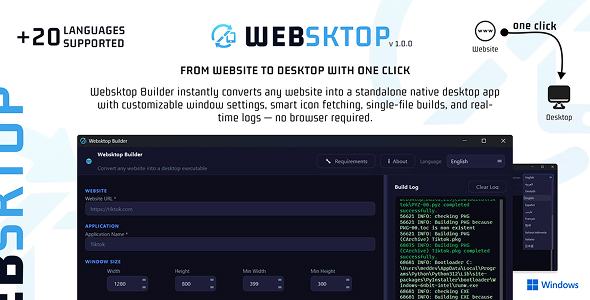
Websktop Builder is a powerful desktop application that transforms any website or web app into a standalone native executable.
No browser.
No tabs.
No URL bar.
Just your app — running like real desktop software.
Perfect for:
- SaaS founders
- Internal company tools
- Web app developers
- Agencies
- Startups
- Offline app wrappers
- Private enterprise dashboards
Why Websktop Builder?
Instead of asking users to:
“Open Chrome → Go to this link → Don’t close the tab”
You deliver:
A real .exe or binary file they double-click and run.
Professional. Clean. Native.
✨ Key Features
Website to Desktop Conversion
- Wrap any public or private URL
- No browser chrome
- Native OS window
- Fully standalone build
- Python runtime included automatically
Configurable App Window
- Custom width & height
- Minimum window size
- Resizable toggle
- Always-on-top mode
- Frameless window option
- Close confirmation dialog
Single File or Folder Build
- One portable .exe (PyInstaller—onefile)
- Or faster directory build option
- Works on Windows, macOS & Linux
Smart Icon Fetching
Automatically fetches high-quality icons:
- Google Favicon API (256px)
- Website
- /favicon.ico fallback
Auto-converts to multi-resolution .ico file.
Custom Output Directory
Choose any folder.
Open it instantly after build.
Real-Time Build Logs
Color-coded build system:
- Info
- Success
- Errors
- ⚫ Detailed logs
Runs in background thread — UI never freezes.
20 Language Support
Fully internationalized UI with RTL support.
English, Arabic, French, German, Spanish, Portuguese, Russian, Chinese, Japanese, Korean, Turkish, Hindi, Italian, Dutch, Polish, Thai, Vietnamese, Indonesian, Ukrainian, Persian.
Language switches instantly — no restart required.
⚙ Persistent Settings
- Remembers selected language
- Saves preferences automatically
- Professional splash screen included
Modern Dark UI
- Clean professional interface
- Blue accent theme
- Consistent Qt styling
- Startup splash screen
Perfect For
- Converting SaaS to desktop apps
- Internal company tools
- Client deliverables
- Private dashboards
- Local web systems
- White-label desktop products
What You Get
- Full source code
- Requirements file
- Build instructions
- Documentation
- Lifetime updates
No Coding Required to Use
1. Enter URL
2. Configure window
3. Click Build
4. Get executable
That’s it.
Source Code Policy:
The product is delivered as a ready-to-use compiled Windows application (.exe), and the source code is not included in the standard package.
Source code is available only through private agreement — contact us for details if you want a customized version or special offer.
What's Your Reaction?
 Like
0
Like
0
 Dislike
0
Dislike
0
 Love
0
Love
0
 Funny
0
Funny
0
 Angry
0
Angry
0
 Sad
0
Sad
0
 Wow
0
Wow
0