
















































POSpro SaaS - Advanced POS & Inventory Management System | POS SaaS Solution
POSpro App – POS Inventory Flutter App with Laravel Admin Panel POSpro Web Add-on – POSpro Web Add-on is a cutting-edge Point of Sale (POS) solution delivered
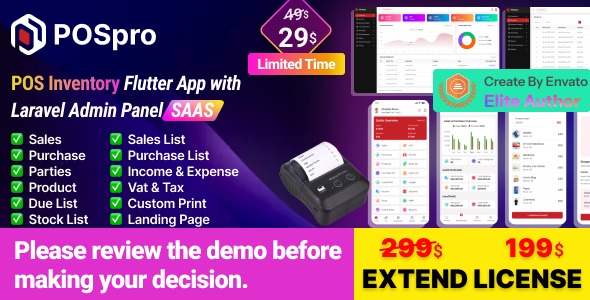
POSpro App – POS Inventory Flutter App with Laravel Admin Panel
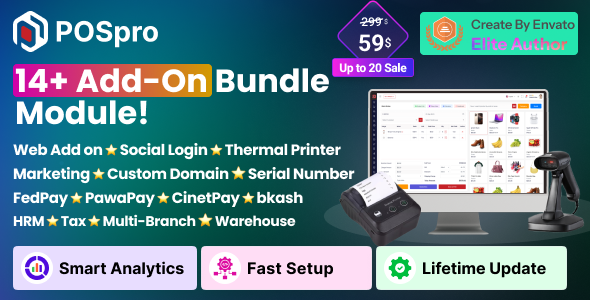
POSpro Web Add-on – POSpro Web Add-on is a cutting-edge Point of Sale (POS) solution delivered as a Software as a Service (SaaS) application. Developed using Flutter (App) and Laravel (Admin Panel) for a seamless cross-platform experience, it integrates effortlessly with existing POS systems to provide a robust and scalable backend.

POSpro works with Bluetooth POS printers and features a subscription system. The app boasts stunning screens covering the Mobile POS Inventory app. Additionally, it includes functionalities for managing products, sales, purchases, parties, loss/profit, stock, ledger, sales lists, purchase lists, due lists, reports, and expenses.


Offer: If you buy the extended license you will get free reskin service and full setup.
Envato suggests buying an extended license for a SaaS project.
Note: You can now print a sale invoice using any Bluetooth thermal printer. All new sales invoices will print automatically. You can also print previous sales invoices from the sales report.

 |  |  |  |  |
Demo Url: https://pospro.app/
Admin Url: https://pospro.app/login
App Demo user: shopowner@acnoo.com
Pass: 123456
Super Admin Credentials
superadmin@acnoo.comsuperadmin
Admin Credentials
admin@acnoo.comsuperadmin
Shop Owner Credentials
shopowner@acnoo.com123456


Key Features
Admin Dashboard
- Dashboard: Overview of the system’s performance and key metrics.
- Advertising: Manage and track your advertising campaigns.
- Business List: View and manage all registered businesses/shops.
- Business Category: Organize businesses for better management.
- Subscription Plans: Create and manage subscription plans.
- Staff Management: Add, remove, and manage staff permissions.
- Reports: Generate various business operation reports.
- Messages: View messages sent from the website contact page.
- CMS Manage: Manage website content.
- Roles & Permissions: Define roles and assign permissions.
- Settings: Configure system settings.
App Features
- Product Catalog: Easily add, edit, and organize products.
- Sales Processing: Smooth POS transactions with receipt printing/digital sharing.
- Parties: Profiles for customers (dealers, retailers) and suppliers.
- Sales & Purchase List: Dynamic lists of completed transactions.
- Sales Edit: Easily edit sales.
- Reports: Overview of sales/purchases/due; print or share.
- Loss/Profit: Automated profit/loss statements and visual representation.
- Stock: Monitor product movement in real-time.
- Inventory Management: Real-time tracking and low stock alerts.
- User-Role: Assign roles and permissions.
- Subscription Plan: Select and upgrade plans.
- Multi-User Access: Team collaboration with security control.
- User-Friendly Interface: Intuitive design and customizable UI.
Benefits of POSpro
- Scalability: Grow your business effortlessly.
- Reliability: Robust and secure Laravel backend.
- Cost-Effective: SaaS model with no upfront infrastructure costs.
- Real-Time Insights: Informed decisions with real-time analytics.
- Efficiency Boost: Streamline operations from inventory to sales.
- Centralized Control: Super Admin capabilities over your entire business network.
POSpro is not just a POS system; it’s a comprehensive solution that empowers super admins and admins alike to streamline operations, enhance efficiency, and drive business growth.
Application Features
- SaaS Ready Application with Laravel backend
- Easy to modify subscription package
- Clean Code and well-structured project
- Single code base for both Android & iOS
- Thermal Bluetooth printer integration (automatic/manual printing)
- Fully responsive UI & Best UI/UX
- Great animation & Easy to customize
- Free lifetime updates & stunning customer support
Flutter and Android Studio Setup Guide
Follow these steps to set up your development environment for Flutter:
Step 1: Install Flutter
Step 2: Install Android Studio
Step 3: Set Up Android Studio
- Open Android Studio.
- Go to File > Settings (or Android Studio > Preferences on macOS).
- Navigate to Appearance & Behavior > System Settings > Android SDK.
- Ensure Android SDK and necessary tools are installed.
Step 4: Configure Flutter in Android Studio
- Open Android Studio.
- Go to Plugins and search for “Flutter”.
- Install the Flutter plugin and restart Android Studio.
- Open File > New > New Flutter Project to start.
Step 5: Set Up Your Device
- Enable Developer Mode and USB Debugging on your Android device.
- Connect your device via USB.




Changelog (Recent Versions)
Version: 6.4 ( 14 May 2026 ) Sidebar and design issues fixed. License verification updated.
Version: 6.3 ( 12 May 2026 ) Cron job configuration added. Minor bug fixes and improvements. Improved theme settings configuration.
Version: 6.2 (17 April 2026) - Language dynamic translation web added. - Updated general & website settings. - Integrated SerialCodeAddon, TaxInvoiceAddon, MarketingAddon, PawapayAddon, FedapayAddon. - Instamojo payment gateway issue fixed. - AWS issue fixed, app product search issue fixed. - More details: https://doc.pospro.app/#change-logs Version: 6.1 (10 January 2026) - Fixed installation & subscription issues. - Invoice settings updated in mobile app. - Business profile update feature added. - More details: https://posprodoc.acnoo.com/#change-logs [Previous versions 6.0 down to 1.0.0 available in full documentation]
What's Your Reaction?
 Like
0
Like
0
 Dislike
0
Dislike
0
 Love
0
Love
0
 Funny
0
Funny
0
 Angry
0
Angry
0
 Sad
0
Sad
0
 Wow
0
Wow
0