










































.png)








Lead Finder- Google Map Data Extractor Scraper Software - Best Google Map Data Scraper
Lead Finder — Google Maps Data Extractor for Desktop Automate B2B lead generation, extract unlimited business profiles, and export data directly to CSV from

Lead Finder — Google Maps Data Extractor for Desktop
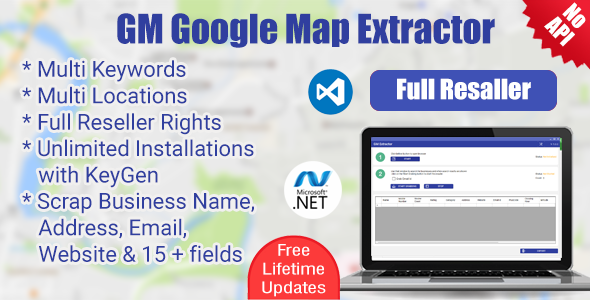
Automate B2B lead generation, extract unlimited business profiles, and export data directly to CSV from a single desktop app. Widely recognized as the Best Google Maps Scraper for fast, reliable data gathering. Runs locally. No Expensive Google Maps scraper API required. Can Extract 2000-3000 Data From One City If Available as this one of the best google map data scraper.
Need Help or Have Questions?
Connect with our team on WhatsApp for licensing, support, and updates.
WhatsApp Support (+91 7375092569)
What Lead Finder Does
Lead Finder centralizes your lead generation process and turns Google Maps into a predictable source of B2B contacts. As a premier Google Map lead Extractor, it autonomously navigates, scrolls, and extracts business names, phone numbers, websites, addresses, and ratings, bypassing the usual search limits. This is the ultimate Google map data extractor online alternative, built right into a high-performance desktop format.
Inclusions and Special Notes
- Main application installation files for Windows (.exe)
- Each purchase code is valid for one machine ID activation
- Extract unlimited leads using google map data scraper— No recurring costs or pay-per-lead fees
- Documentation & setup guide for google map data extractor included
- Full support available via Email and WhatsApp (+91 7375092569)
Key Benefits
- Scale outreach without buying expensive lead lists — generate your own highly targeted contacts on demand with our built-in Maps Scraper map data extractor.
- Bypass API restrictions — our Deep-Scan AI forces the map to reveal every hidden business beyond the standard 120-result cap.
- Stay safe from bans — built-in human-behavior mimicking delays and scrolling logic to prevent Google IP blocks.
- Get clean, organized data — One-click export directly into a perfectly formatted CSV Excel spreadsheet for your CRM. Superior to a basic Google map data Extractor Chrome extension, which can often crash on large datasets.
- Modern UI Design and robust technology stack makes Lead Finder the best, most reliable Google map data extractor app on the market.
How to Get Started (Google map data extractor download)
Getting started with Lead Finder is simple. Follow these steps to install, activate, and start generating leads:
- Download & Install
Download the Lead Finder package from CodeCanyon. Run the Windows Setup (.exe) to install it on your computer. The installation process is quick and completely secure.
- Get Your Machine ID
After installation, launch the app. It will display a unique “Machine ID” on the Activation Window. Copy this unique code.
- Request License Key
Email your Machine ID and your Envato Purchase Code to our support team at info@wappblaster.com (or via WhatsApp) for google map data scraper. Our team will verify your purchase.
- Enter Activation Code
Enter the License Activation Code you received from our team into the app to unlock all premium features and unlimited scraping!
- Start Extracting Leads
Once activated, type in your niche and location, hit “Start Extracting”, and watch the software build your B2B list in real-time.
Top Features
- Cross-Platform Native Apps: Smooth performance on both Windows 10/11 and Apple MacOS (Intel & Apple Silicon).
- Intelligent Category Explorer: Discover and target exact Google Business Categories for laser-focused lists.
- Auto-Save & Session Recovery: Never lose hours of scraping. The internal database auto-saves after every record.
- Adjustable Engine Core: Fine-tune minimum and maximum wait parameters to match your internet connection speed.
Who Should Buy Lead Finder?
- Marketing Agencies running cold whatsapp or cold calling campaigns..
- B2B Sales Teams looking for a massive, predictable pipeline of local business contacts.
- Freelancers & Consultants selling enriched lead lists to clients.
⚠️ Important Notice & Disclaimer
Lead Finder does not strictly use the Google Maps Official API. The application relies on web-DOM automation and Chromium-based embedded browsers to read publicly available data precisely as a human would.
Users are solely responsible for ensuring compliance with Google’s Terms of Service and all applicable local data privacy laws (such as GDPR or CCPA) before utilizing the exported data for marketing outreach.
In the event of major Google Maps UI/DOM updates, the extraction process may experience temporary interruptions until a software patch is published. We actively monitor these changes and provide swift updates.
Lead Finder is provided “as-is”, and extraction speeds are ultimately dependent on the user’s internet connection and local machine capabilities.
Changelog
All notable changes to Lead Finder are documented here.
v10.0.0
2026-03-13- 17 Languages — English, Spanish, Portuguese, French, German, Russian, Italian, Polish, Ukrainian, Chinese, Japanese, Korean, Vietnamese, Thai, Indonesian, Arabic, Turkish
- Email Extraction — Automatically extract emails from business websites in the background
- ⚡ Performance Improved — Faster processing, lower memory usage, optimized workers
- ️ Live Data View — See extracted results in real-time inside the app
v6.0.0
2026-03-01✨ Enhancements
- Deep-Scan AI Engine integration for bypassing 120 limits
- Category Explorer UI added for targeted searches
- Overall performance optimizations & memory management
Fixes
- Dynamic DOM shifting logic stabilized
- Auto-scroll delays refined to prevent infinite loops
What's Your Reaction?
 Like
0
Like
0
 Dislike
0
Dislike
0
 Love
0
Love
0
 Funny
0
Funny
0
 Angry
0
Angry
0
 Sad
0
Sad
0
 Wow
0
Wow
0
.png)