























PlayHub – Ultimate Video CMS, Shorts, Communities & Live Streaming Platform
SELF-HOSTED VIDEO CMS • CREATOR COMMUNITY • MULTI-PARTICIPANT LIVE STREAMING LIVE DEMO • DOCUMENTATION • ALL FEATURES • CHANGELOG PlayHub –



SELF-HOSTED VIDEO CMS • CREATOR COMMUNITY • MULTI-PARTICIPANT LIVE STREAMING
LIVE DEMO • DOCUMENTATION • ALL FEATURES • CHANGELOG
PlayHub – Video CMS, Creator Community & Live Streaming Platform
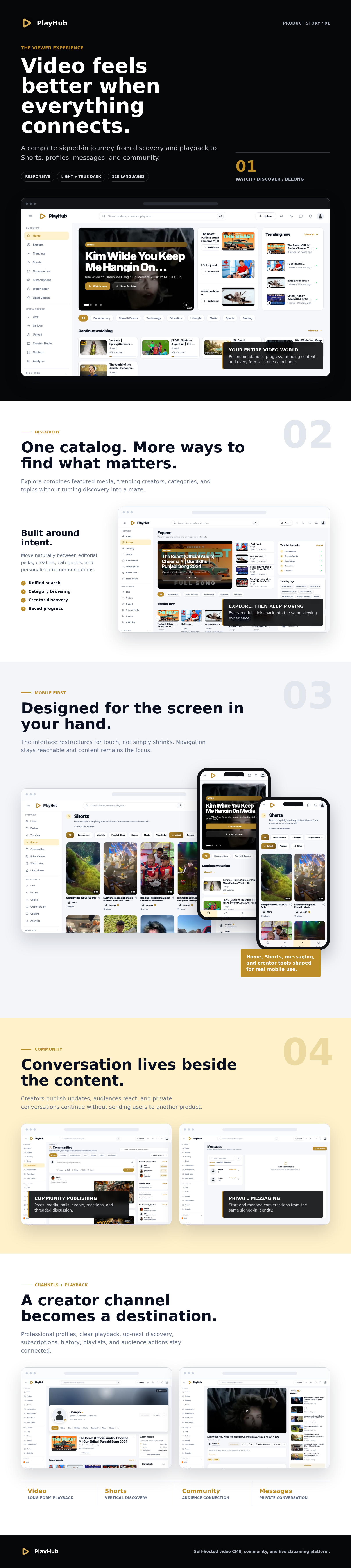
PlayHub is a self-hosted platform for publishing video, building creator channels and communities, and producing multi-participant live streams. One installation covers uploads, Shorts, live rooms, replays, messaging, monetization, moderation, and administration.
Viewer Experience
- Responsive discovery pages for trending videos, categories, creators, live streams, and recommended content.
- Search across videos, channels, playlists, live streams, and tags.
- Video playback with quality selection, captions, saved progress, and watch history.
- Dedicated vertical Shorts feed with creator and engagement controls.
- Public creator channels with cover images, social links, verification, statistics, subscriptions, and notification settings.
- Public and private playlists, Watch Later, liked videos, favorites, bookmarks, history, and personal library collections.
- Comments, replies, reactions, mentions, stickers, media attachments for signed-in users, and content reporting.
Publishing & Creator Studio
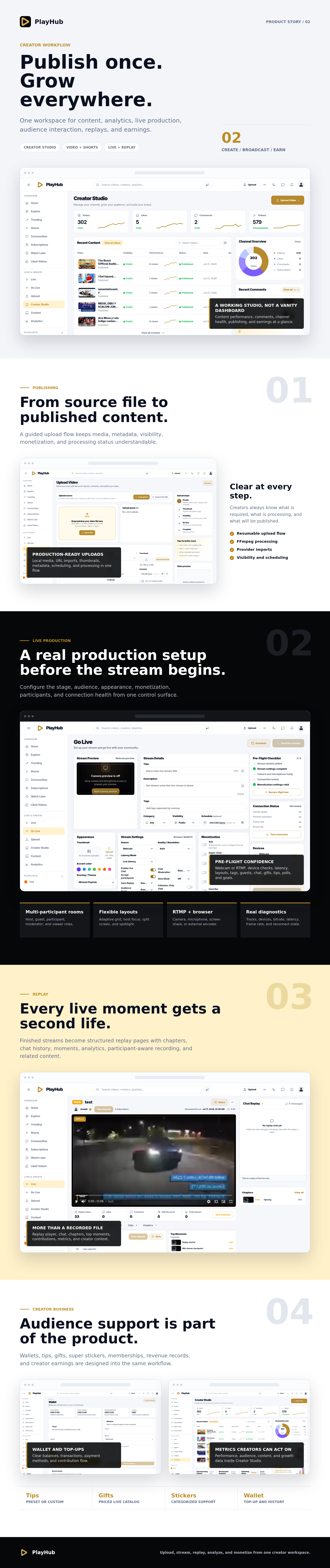
- Guided local upload with resumable transfers, validation, progress, and processing status.
- FFmpeg and FFprobe processing for media details, orientation, thumbnails, and configured renditions.
- Custom thumbnails, categories, tags, language, audience settings, visibility, scheduling, and monetization controls.
- Direct URL import plus provider settings for YouTube, Vimeo, Dailymotion, and Twitch.
- Admin mass import with category, visibility, tags, duplicate handling, and error controls.
- Creator Studio for managing videos, Shorts, comments, playlists, channel details, analytics, and earnings.
- Local media storage or configured S3-compatible object storage.
Communities & Messaging
- Creator community posts with text and media.
- Post reactions, threaded comments, reports, and categorized stickers.
- Community discovery and channel subscriptions.
- Private conversations opened directly from creator profiles.
- Notifications for account activity, content, live streams, replays, moderation, and participant events.
Multi-Participant Live Streaming
- Broadcast from a browser camera and microphone, screen share, or external RTMP encoder.
- Configure title, description, category, tags, visibility, schedule, thumbnail, and participant access before going live.
- Host, guest, participant, moderator, and viewer roles within the same room.
- Viewer join requests for audio-only or audio-and-video participation, subject to host or moderator approval.
- Guest invitations, username suggestions, backstage management, acceptance, and removal.
- Adaptive grid, host focus, split screen, screen share, and spotlight layouts.
- Automatic reconnect, media republishing, muted local host preview, and diagnostics for connections, devices, tracks, bitrate, latency, and frame rate.
Live Interaction & Moderation
- Live chat, reactions, pinned messages, slow mode, message deletion, and viewer restrictions.
- Polls and goal bars that update for hosts, participants, and viewers during the stream.
- Moderators can manage chat, ban viewers, restrict comments, approve join requests, and remove participants.
- Join, leave, removal, poll, gift, sticker, tip, and system events are retained for the replay.
Replay Experience
- Room-composite recording of the active stage, including participant labels and designed audio-only identity tiles.
- Replay processing, media inspection, thumbnail generation, and optional cloud replication.
- Responsive playback for portrait and landscape recordings inside a stable player area.
- Chat replay, chapters, top moments, stream events, comments, likes, clips, and contribution history.
- Replay analytics, creator details, related streams, tags, sharing, and replay-ready notifications for streamers, viewers, and participants.
Monetization
- Wallet balances, transaction history, and top-up checkout through configured Stripe or PayPal workflows.
- Preset and custom tips with configurable minimum and maximum values.
- Gifts and categorized super stickers with prices, wallet checks, live animations, and replay history.
- Memberships, creator earnings, platform commission, contribution totals, and payout records.
- Revenue reports with date filters, source breakdowns, creator performance, and export actions.
- Image, media, or trusted HTML advertisements with placement, scheduling, targeting, display rules, performance data, and VAST pre-roll settings.
Administration & Operations
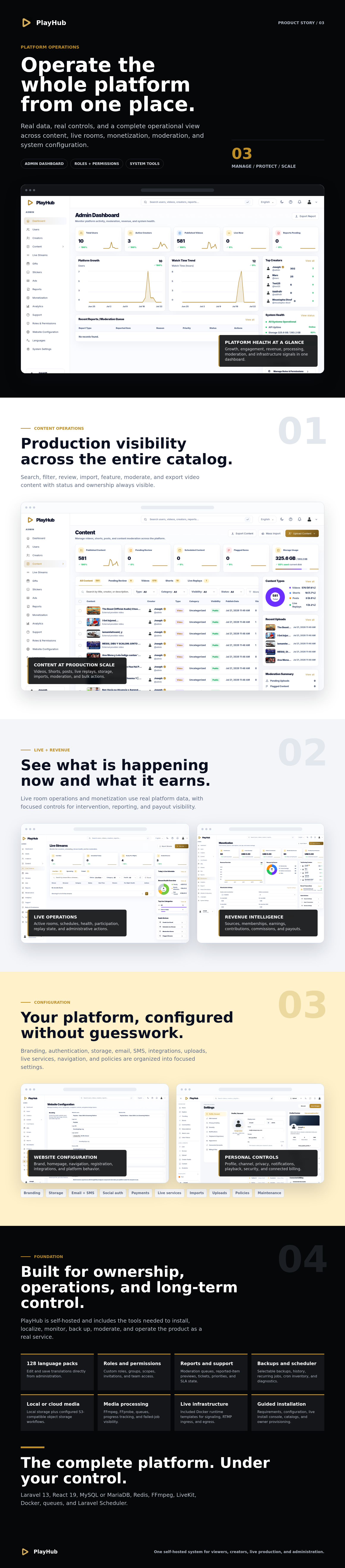
- Dashboard and analytics: platform activity, growth, engagement, revenue, system health, recent changes, and exports.
- Users and creators: account status, roles, verification, quotas, bans, email actions, creator applications, suspension, and deletion controls.
- Content and live streams: videos, Shorts, posts, categories, approvals, featuring, bulk actions, imports, active rooms, scheduled streams, and replays.
- Moderation and support: reports with reported-item previews, assignments, priorities, resolutions, customer tickets, incidents, agents, and SLA status.
- Roles and permissions: custom admin roles, permission groups, invitations, scopes, team members, and access status.
- Commerce: ads, memberships, payments, commissions, creator earnings, gifts, stickers, and catalog management.
- Website settings: branding, navigation, authentication, email, SMS, uploads, imports, storage, live services, integrations, and maintenance.
- System tools: cache controls, logs, diagnostics, scheduler inventory, cron configuration, backups, and failed-job visibility.
Design, Branding & Localization
- Responsive layouts for desktop, tablet, and mobile.
- Light and true-dark themes with configurable accent palettes, including Obsidian Gold.
- Uploaded logo and favicon support, plus editable homepage presentation copy.
- 128 bundled language packs with an admin translation editor.
- Consistent dialogs, dropdowns, mobile bottom sheets, notifications, loading states, and empty states.
Storage, Backups & Background Work
- Local storage and S3-compatible object-storage workflows.
- Selectable database, source, media, file, and folder backups with size inspection and large-file handling.
- Scheduled automatic backups with backup history and status summaries.
- Queue workers for media processing, replay finalization, notifications, and background tasks.
- Laravel Scheduler support for publishing, maintenance, backups, and recurring jobs.
- System logs, failed-job tracking, diagnostics, cache management, and administrative change history.
Guided Installation
- Requirements: checks PHP, extensions, database access, Redis, Node.js, npm, FFmpeg, Docker, storage, HTTPS, disk capacity, and required process functions.
- Configuration: collects website, database, Redis, timezone, license, and administrator details.
- Installation: displays dependency installation, frontend build, migrations, gift and sticker catalogs, and administrator provisioning in a live console.
- Complete: verifies the installation and opens the website.
The package also provides a Docker runtime installer and templates for LiveKit signaling, RTMP ingress, room-composite egress, configuration, and service startup.
Technology Stack
- Laravel 13
- React 19 and Vite
- MySQL or MariaDB
- Redis
- FFmpeg and FFprobe
- LiveKit, RTMP ingress, and room-composite egress
- Docker Engine and Docker Compose v2
- Background queues and Laravel Scheduler
Server Requirements
Please review these requirements before purchasing. PlayHub is a media-processing and real-time streaming application. Standard shared hosting is usually not suitable unless it provides all required binaries, background processes, Docker access, Redis, and open media ports.
- PHP 8.3 or newer with required PHP extensions
- MySQL or MariaDB
- Redis with private, authenticated access
- Node.js 20.19.0 or newer and npm 9 or newer
- FFmpeg and FFprobe
- Docker Engine and Docker Compose v2 for live streaming
See the full server requirements and installation guide before deployment.
Package Includes
- Laravel application source and Composer dependencies
- React and Vite frontend source
- Four-step web installer
- Database migrations and bundled catalog importers
- Gift and sticker catalog files
- Default logo and favicon
- LiveKit Docker runtime installer and templates
- Apache rules and Nginx configuration examples
- Online and package documentation
Third-Party Services & Important Notes
- Payment features require your own supported Stripe and/or PayPal credentials.
- Cloud storage requires a compatible provider account, bucket, credentials, and network configuration.
- External imports, email delivery, and SMS delivery depend on the corresponding third-party services and credentials.
- Live streaming requires the included Docker runtime to be installed and configured after the web installer finishes.
- Demo videos, images, users, transactions, and presentation statistics are for preview only and are not included as production content.
- Third-party trademarks belong to their respective owners. PlayHub is not affiliated with or endorsed by those providers.
Direct license

Documentation & Support
Documentation covers installation, server configuration, live streaming, storage, queues, scheduling, backups, security, troubleshooting, and application settings.
Read Documentation • View Changelog • Open Live Demo • Get direct license
What's Your Reaction?
 Like
0
Like
0
 Dislike
0
Dislike
0
 Love
0
Love
0
 Funny
0
Funny
0
 Angry
0
Angry
0
 Sad
0
Sad
0
 Wow
0
Wow
0