



















































Perfex CRM Renewal Manager – Track Contracts, Subscriptions & Revenue Recovery
Perfex CRM Renewal Manager – Track Contracts, Subscriptions, Services & Revenue Recovery Renewal & Revenue Recovery Manager for Perfex CRM is a professional re
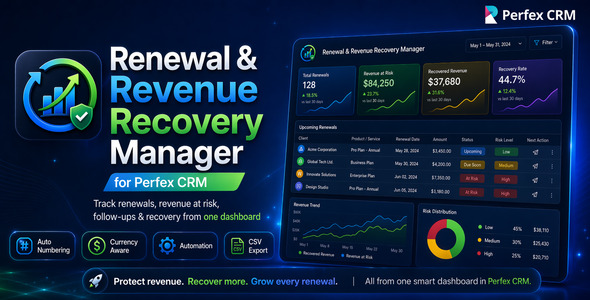
Perfex CRM Renewal Manager – Track Contracts, Subscriptions, Services & Revenue Recovery
Renewal & Revenue Recovery Manager for Perfex CRM is a professional renewal tracking and revenue recovery module built for businesses that want to stop losing recurring revenue because of missed follow-ups, forgotten contract expiry dates, manual spreadsheets, and poor renewal visibility.
This Perfex CRM module helps you manage contract renewals, subscription renewals, AMC renewals, service agreement renewals, hosting renewals, software license renewals, maintenance renewals, policy renewals, support package renewals, customer service renewals, and recurring customer revenue directly inside your CRM.
Instead of depending on scattered notes, Excel sheets, calendar reminders, or manual staff follow-ups, your team gets a dedicated renewal management dashboard inside Perfex CRM with renewal stages, owner assignment, follow-up dates, revenue amount tracking, service/item selection, customer notifications, email templates, at-risk monitoring, automation support, and CSV reporting.
What’s New in the Latest Version
The latest update adds powerful customer-requested improvements for service-based businesses, web agencies, IT companies, hosting providers, subscription teams, and any business that needs to notify customers before and after renewal dates.
- Perfex Items/Services Support: select services/items from the Perfex CRM items table and attach them to renewal records.
- Customer Reminder Schedule: configure multiple reminder days before the renewal date, such as 30, 15, 5, and 1 day before renewal.
- After-Renewal Follow-up Schedule: configure reminders after the renewal date, such as 3, 7, 10, and 20 days after renewal.
- Email Template Support: create customer-facing renewal reminder email content from module settings.
- Dynamic Email Fields: use renewal, customer, amount, date, and service-related placeholders inside email templates.
- Perfex Date Format Compatibility: renewal dates are displayed according to the Perfex CRM installation date format.
- Cron-Based Notification Processing: reminder emails are processed through the Perfex cron workflow.
- Duplicate Notification Prevention: the same reminder is not repeatedly sent for the same renewal, contact, and reminder offset.
- Upgrade-Safe Migrations: existing users can upgrade safely while new users can install the module cleanly.
Stop Losing Revenue from Missed Renewals
Many businesses lose repeat revenue not because the customer says no, but because the renewal was not followed up at the right time. This module gives your sales, support, account management, and customer success teams a simple way to track every renewal before it becomes overdue.
With clear renewal stages such as Upcoming, Due Soon, At Risk, Renewed, Lost, and Churned, your team can instantly see which customers need attention and which revenue needs to be protected.
Who Should Use This Perfex CRM Module?
- IT support companies managing AMC and service contracts
- Web agencies managing hosting, maintenance, care plans, and support retainers
- Web hosting companies managing domain, hosting, SSL, and software license renewals
- Software agencies managing recurring support plans and retainers
- SaaS resellers and subscription-based businesses
- Maintenance companies managing annual service agreements
- Insurance, policy, and membership renewal teams
- Customer success teams tracking retention and churn risk
- Any Perfex CRM business that manages recurring customer revenue
Without This Module vs With This Module
Here is how your renewal workflow improves after installing Renewal & Revenue Recovery Manager for Perfex CRM.
Without Renewal Manager
- Renewals are tracked manually in spreadsheets
- Staff may forget important customer follow-ups
- There is no clear view of revenue at risk
- Renewal status is difficult to monitor
- Services being renewed are not clearly visible in the renewal record
- Customers are not automatically reminded before and after renewal dates
- Managers depend on manual updates from staff
- Overdue renewals are often discovered too late
With Renewal & Revenue Recovery Manager
- Renewals are managed directly inside Perfex CRM
- Each renewal has an owner and next follow-up date
- Dashboard highlights at-risk renewals and open pipeline
- Services/items can be selected from the Perfex items table
- Customer reminder emails can be scheduled before and after renewal dates
- Email templates support dynamic renewal and customer fields
- Stage-based workflow shows Upcoming, Due Soon, At Risk, Renewed, Lost, and Churned
- CSV export and dashboard KPIs make reporting easier
- Automation can move renewals into Due Soon and At Risk stages
Key Business Benefits
- Recover more recurring revenue by tracking renewals before they expire
- Reduce customer churn risk with structured follow-up planning
- Improve team accountability by assigning each renewal to a staff owner
- Increase visibility with dashboard KPIs for open, upcoming, at-risk, and renewed items
- Replace spreadsheets with a dedicated Perfex CRM renewal workflow
- Show services clearly by attaching Perfex items/services to renewal records
- Notify customers automatically before and after renewal dates
- Improve customer communication with email templates and dynamic fields
- Save management time with filters, export, automation, and clear renewal stages
- Improve customer retention by giving your team a proactive renewal process
Main Features
- Dedicated Renewals module inside Perfex CRM
- Central renewal dashboard with key renewal metrics
- Create, edit, view, and manage renewal records
- Auto-generated renewal numbers
- Configurable renewal number prefix, padding, and next number
- Renewal title and detailed description
- Customer assignment for each renewal
- Staff owner assignment for accountability
- Renewal date tracking
- Next follow-up date tracking
- Priority management
- Reference type and manual reference support
- Amount tracking for renewal value
- Customer currency inheritance
- Perfex base currency fallback
- Save offer amount support
- Churn reason capture
- Internal notes support
- Activity timeline area for renewal records
- Perfex items/services selection inside renewal records
- Renewal services/items table support
- Customer notification schedule before renewal date
- Customer notification schedule after renewal date
- Email template support for renewal reminders
- Dynamic email fields for renewal and customer information
- Perfex CRM date-format-aware renewal date display
- Cron-based customer reminder processing
- Duplicate reminder prevention for the same renewal/contact/reminder offset
- Advanced dashboard filters
- Search by renewal number, title, customer, or reference
- Filter by stage, priority, customer, owner, and renewal date range
- CSV export for reports and management review
- Settings screen for operational defaults
- Default owner configuration
- Days-before-due configuration
- Default follow-up gap configuration
- Native Perfex cron automation support
- Manual automation run button
- Automatic movement of upcoming renewals into Due Soon
- Automatic movement of overdue renewals into At Risk
- Upgrade-safe migrations for existing users
- Fresh installation support for new users
- Staff permission compatibility for view, create, edit, delete, and export workflows
- Currency-safe dashboard logic to reduce misleading mixed-currency totals
Perfex Items / Services Support
The module now allows renewal records to include services/items from the Perfex CRM items table. This is especially useful for web agencies, IT companies, hosting providers, maintenance companies, and service businesses that need to show exactly what the customer is being asked to renew.
For example, a renewal can include services such as:
- Website maintenance plan
- Annual hosting package
- SSL certificate renewal
- Domain renewal
- Monthly support retainer
- Software license renewal
- Annual maintenance contract
- Managed IT support service
This makes renewal communication more transparent and helps the customer understand what service or package the renewal amount is related to.
Flexible Customer Reminder Schedule
Administrators can configure multiple reminder days before and after the renewal date.
Before Renewal Date
Example:
30,15,5,1
This means the customer reminder email can be sent:
- 30 days before the renewal date
- 15 days before the renewal date
- 5 days before the renewal date
- 1 day before the renewal date
After Renewal Date
Example:
3,7,10,20
This means follow-up reminder emails can be sent:
- 3 days after the renewal date
- 7 days after the renewal date
- 10 days after the renewal date
- 20 days after the renewal date
This gives businesses full control over how often they want to remind customers and follow up on unpaid or unconfirmed renewals.
Email Template with Dynamic Fields
The module includes a customer reminder email template section so administrators can prepare renewal reminder content according to their business tone and process.
Dynamic fields can be used inside the email template to personalize renewal messages with renewal, customer, service, and date information.
Example dynamic fields may include:
{renewal_number}{renewal_title}{customer_name}{company}{renewal_date}{next_followup_date}{amount}{currency}{services}
This makes customer communication more professional and reduces the need to manually write renewal reminder emails again and again.
This helps avoid confusion for international users and reduces date-format issues during renewal tracking and customer notification workflows.
Renewal Dashboard Highlights
The module includes a practical and easy-to-use renewal dashboard designed for managers, sales teams, support teams, account managers, and customer success teams.
- Total Open / Tracked Renewals overview
- Upcoming 30 Days renewal visibility
- At Risk renewal monitoring
- Renewed Value tracking
- Search bar for quick lookup
- Stage, priority, customer, owner, and date filters
- Renewal table with owner, amount, follow-up date, renewal date, stage, and actions
- Quick action buttons for Add Renewal, Run Automation, Settings, and Export CSV
Supported Renewal Stages
Renewal & Revenue Recovery Manager uses a clear lifecycle-based workflow to help your team understand the status of every renewal.
- Upcoming – Renewal is scheduled for a future date
- Due Soon – Renewal needs attention soon
- At Risk – Renewal is overdue or needs urgent follow-up
- Renewed – Customer has renewed successfully
- Lost – Renewal opportunity was not recovered
- Churned – Customer has cancelled or discontinued
Simple End-to-End Workflow
- Open the Renewals section inside Perfex CRM
- Click Add Renewal
- Select customer, owner, priority, stage, and reference details
- Select the relevant Perfex items/services for the renewal
- Enter renewal date and next follow-up date
- Add amount, currency, save offer amount, description, notes, or churn reason
- Save the renewal and let the system generate the renewal number
- Monitor all renewals from the dashboard
- Use filters to focus on upcoming, due soon, at-risk, renewed, lost, or churned records
- Configure customer reminder schedules before and after renewal dates
- Use the renewal email template with dynamic fields
- Run automation manually or let Perfex cron process date-based stage movement and customer reminders
- Export renewal data to CSV whenever needed
Native Perfex CRM Friendly Experience
This module is designed to work naturally inside Perfex CRM. It follows a clean admin-side workflow and gives your team a familiar experience without forcing them to use an external platform.
- Works inside the Perfex CRM admin area
- Uses Perfex-style customer and staff assignment
- Supports services/items from the Perfex items table
- Supports customer currency inheritance
- Falls back to the Perfex base currency when needed
- Uses Perfex cron for automation and customer notification workflows
- Supports Perfex CRM date format settings
- Supports staff permissions for controlled access
- Includes migration support for safe upgrades
Common Use Cases
- Track annual maintenance contract renewals
- Manage software license renewal dates
- Track hosting, domain, SSL, and server renewal reminders
- Manage recurring support plan renewals
- Track customer subscription renewal opportunities
- Monitor policy or membership renewal pipelines
- Manage retainer renewal follow-ups for agencies
- Notify customers before renewal dates
- Follow up with customers after renewal dates
- Track revenue at risk before customer churn happens
Important Compatibility Notes
- This is a Perfex CRM module. Perfex CRM must already be installed.
- This is not a standalone CRM or standalone PHP script.
- The module is designed for the Perfex CRM admin area.
- The module uses Perfex CRM cron for automation and reminder processing.
- For customer reminders, your Perfex CRM email configuration should be correctly set up.
- For automated reminders, your main Perfex cron job should be configured correctly.
- Installation documentation is included with the package.
- No core business workflow needs to be replaced; the module adds a dedicated renewal management area.
Upgrade Notes
This version includes upgrade-safe migration handling. It is designed for both new installations and existing users upgrading from an earlier version of the module.
- New users can install and activate the module normally.
- Existing users can upload the updated module and run the Perfex module database upgrade process.
- The update adds new database structures required for services/items, notification schedules, email templates, and reminder logs.
- Existing renewal records are preserved during upgrade.
Live Demo
Explore the module using the live demo details below.
YouTube Demo:
https://youtu.be/U-Sv_UVMbGA
Demo URL:
https://perfex.rblxdrip.com/admin/authentication
Username: test@gmail.com
Password: test
Changelog
Version 1.2.0
- Added Perfex CRM items/services selection for renewal records.
- Added renewal services/items table support.
- Added flexible customer notification schedule before renewal date.
- Added flexible customer notification schedule after renewal date.
- Added customer reminder email template section.
- Added dynamic email fields for renewal, customer, service, amount, and date information.
- Added Perfex CRM date-format-aware date display.
- Added cron-based customer notification processing.
- Added duplicate notification prevention for the same renewal, contact, and reminder offset.
- Added upgrade-safe migration file for existing installations.
- Improved fresh installation schema handling for new users.
- Updated documentation with services/items, reminder schedule, email template, and upgrade notes.
Version 1.1.1
- Fixed fresh installation schema initialization.
- Improved save form CSRF handling.
- Stabilized renewal number generation during save.
- Improved first-time activation reliability.
Version 1.1.0
- Added auto-generated renewal numbers.
- Added configurable renewal number prefix, padding, and next number.
- Added customer currency inheritance with Perfex base currency fallback.
- Improved dashboard totals with currency-aware handling.
- Improved renewal form workflow and reference handling.
Version 1.0.0
- Initial release.
- Added renewal dashboard.
- Added renewal create, edit, view, and list workflow.
- Added renewal stages, priority, owner assignment, customer assignment, amount tracking, and CSV export.
- Added basic automation support for Due Soon and At Risk stage movement.
Why Perfex CRM Users Will Love This Module
Perfex CRM is already a powerful CRM for managing customers, projects, invoices, tasks, support, and operations. However, many businesses still manage renewals through spreadsheets, notes, or manual reminders. This module fills that gap by adding a focused renewal and revenue recovery workflow directly inside Perfex CRM.
With a dedicated dashboard, renewal stages, owner assignment, follow-up planning, amount tracking, customer currency logic, service/item support, customer reminder schedules, email templates, automation support, and CSV export, this module helps teams protect recurring revenue and build a more disciplined renewal process.
Frequently Asked Questions
Is this a standalone application?
No. This is a module for Perfex CRM. You need an existing Perfex CRM installation to use it.
Can I track different types of renewals?
Yes. You can use the module for contracts, subscriptions, AMC agreements, licenses, hosting renewals, maintenance agreements, policies, support packages, and other recurring customer revenue.
Can I attach services or items to a renewal?
Yes. The module supports selecting services/items from the Perfex CRM items table so you can show what service or product the renewal is related to.
Can I send customer reminder emails before renewal?
Yes. You can configure reminder days before the renewal date, for example 30, 15, 5, and 1 day before renewal.
Can I send follow-up reminders after renewal date?
Yes. You can configure reminder days after the renewal date, for example 3, 7, 10, and 20 days after renewal.
Does the module include email templates?
Yes. The module includes a customer renewal reminder email template section with dynamic fields for renewal, customer, amount, date, and service information.
Does the module respect Perfex CRM date settings?
Yes. The module is designed to display renewal dates according to the Perfex CRM installation date format.
Can I assign renewals to staff members?
Yes. Each renewal can be assigned to an owner so your team knows who is responsible for follow-up.
Does the module support renewal stages?
Yes. The module supports Upcoming, Due Soon, At Risk, Renewed, Lost, and Churned stages.
Can I export renewal data?
Yes. The module includes CSV export support for reporting and management review.
Does it support automation?
Yes. The module supports Perfex cron-based automation and also includes a manual automation run option.
Will existing users lose old renewal records when upgrading?
No. The update includes upgrade-safe migration handling and is designed to preserve existing renewal records.
Module Summary
Renewal & Revenue Recovery Manager for Perfex CRM is a practical business module for companies that want to track renewals, reduce missed follow-ups, monitor revenue at risk, improve customer retention, communicate renewal details to customers, and recover more recurring revenue inside Perfex CRM.
If your business depends on contracts, subscriptions, support plans, maintenance agreements, licenses, policies, hosting renewals, services, or recurring customer relationships, this module gives your team the visibility and process needed to manage renewals professionally.
Start managing renewals inside Perfex CRM and give your team a better way to protect recurring revenue.
What's Your Reaction?
 Like
0
Like
0
 Dislike
0
Dislike
0
 Love
0
Love
0
 Funny
0
Funny
0
 Angry
0
Angry
0
 Sad
0
Sad
0
 Wow
0
Wow
0