

















































Mailbox - Webmail Client & Email Automation Module for Perfex CRM
VERSION 2.1.7 Released ⚡ NEW – Per-Staff IMAP Read Status Sync to Email Server NEW – Auto-Mark as Read Control in Preview Pane and Single View NEW – Per-Staff
VERSION 2.1.7 Released ⚡
NEW – Per-Staff IMAP Read Status Sync to Email Server
NEW – Auto-Mark as Read Control in Preview Pane and Single View
NEW – Per-Staff IMAP Server Configuration (Server, Port, Encryption)
NEW – Per-Staff OAuth Credentials for Gmail and Outlook
NEW – Per-Staff Folder Mappings (Sent, Drafts, Trash, Spam, Archive)
NEW – OAuth2 Email Sending for Gmail and Outlook
NEW – Gmail-Style Compact Webmail Interface
NEW – Email Threading with Collapsible Conversations
NEW – Archive and Snooze Features
NEW – Email Rules System with Conditions and Actions
NEW – Density Views (Cozy, Comfortable, Compact)
NEW – Column Visibility Toggle
NEW – Preview Pane with Split-View
NEW – Advanced Search with Multiple Filters
NEW – Multiple Tags per Email Support
NEW – Enterprise-Grade Password Encryption (AES-256-CBC)
NEW – Modern IMAP Library (Webklex/php-imap v4.x)
NEW – Manual Email Sync Endpoint
NEW – Enhanced Activity Logging with Minimal Verbosity
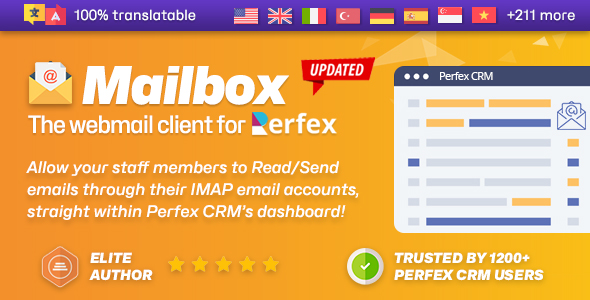
⚡ Centralize Staff Emails Directly in Perfex
Ever wanted a web-based email client built right into Perfex CRM’s admin area to handle all your daily communications with your customers?
We’ve got you covered! With our powerful Mailbox module, your staff members can send, receive, draft, organize, and label emails from their own IMAP accounts – directly inside their Perfex dashboard.
Seamlessly convert emails into Tasks, Support Tickets, Leads, or even assign them to Customers as internal conversations – streamlining your workflow without switching tools.
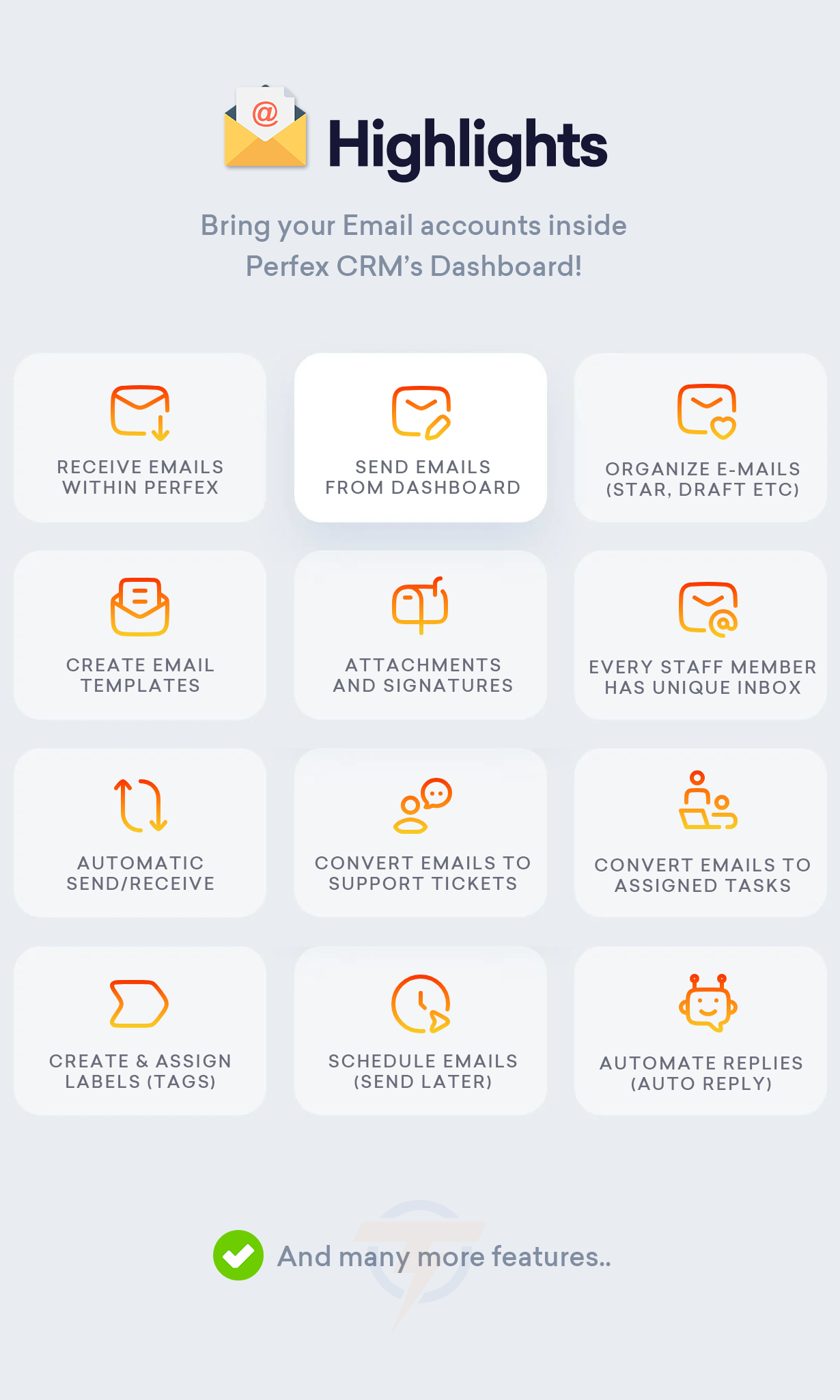
✔️ Multi-account support every staff member has his/her own Inbox
 ✔️ Schedule emails to send later, right when it matters
 ✔️ Auto-replies to keep conversations going while you're away
 ✔️ Create & assign labels (tags) to stay organized
 ✔️ Localized interface for global teams
 ✔️ SSL/TLS secured IMAP support for peace of mind
 ✔️ OAuth2 authentication for Gmail and Outlook - no passwords needed
 ✔️ Enterprise-grade security with encrypted password storage
 ✔️ Per-staff IMAP configuration - each staff member can use their own email provider
 ✔️ Sync read status to email server - keep Gmail/Outlook in sync with Perfex
 ✔️ Gmail-style interface - familiar, compact webmail design
 ✔️ Email threading - collapsible conversation threads
 ✔️ Archive and Snooze - keep inbox organized
 ✔️ Email rules - automate email management
 ✔️ Assign emails to Customers/Tasks/Tickets/Leads for a great efficiency
It’s email – fully integrated into Perfex CRM, the project management tool you rely on – designed to simplify your team’s daily workflow. Cool, eh?
✉️ Online Documentation and Demo


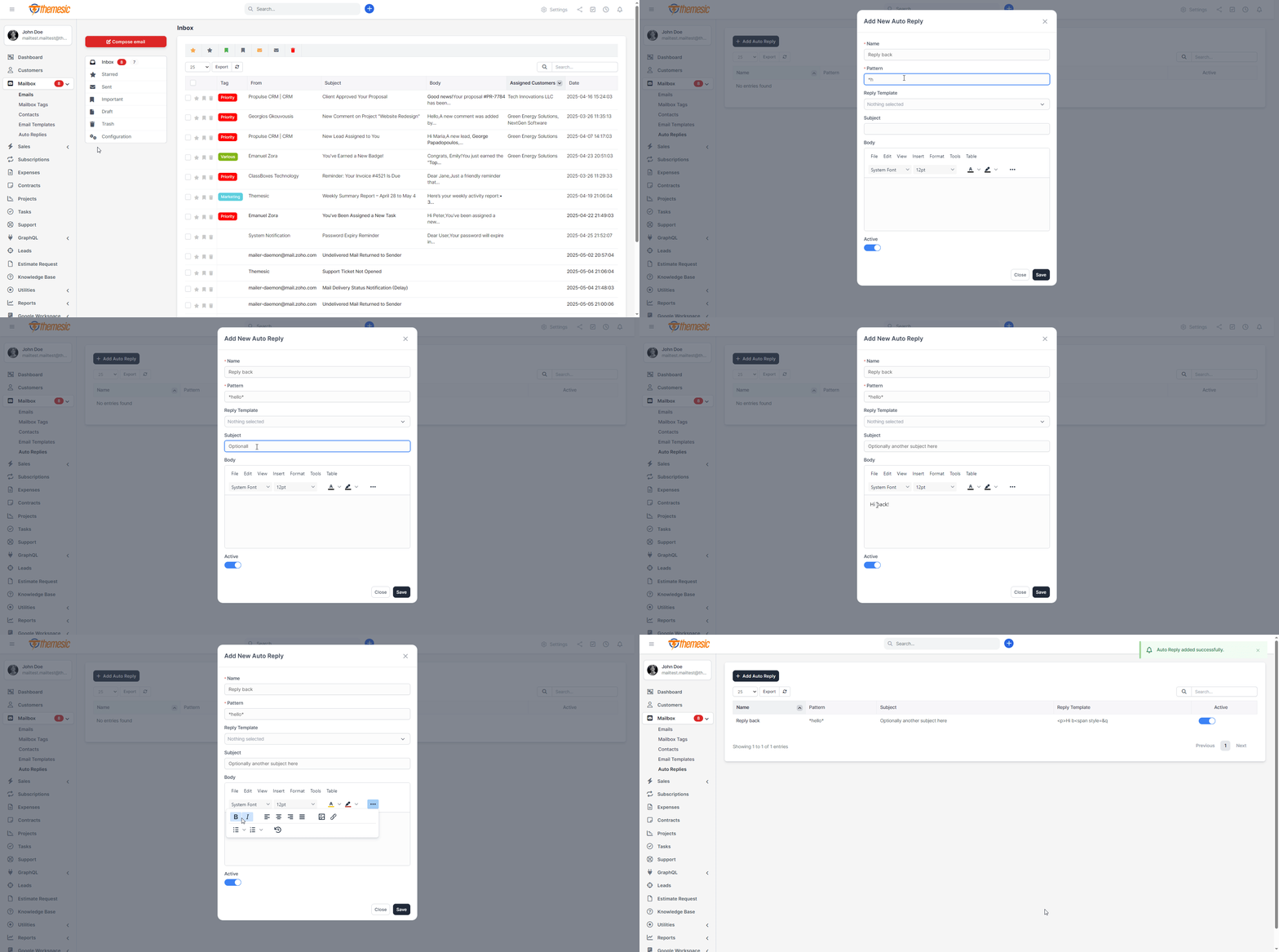
↪️ Auto Replies & Email Templates
Streamline your customer communication with powerful auto-reply rules and custom email templates built right into Perfex CRM’s mailbox module. Automatically send personalized messages when leads, tickets or clients reach specific stages in your workflow, saving time and ensuring consistent follow-up every time.
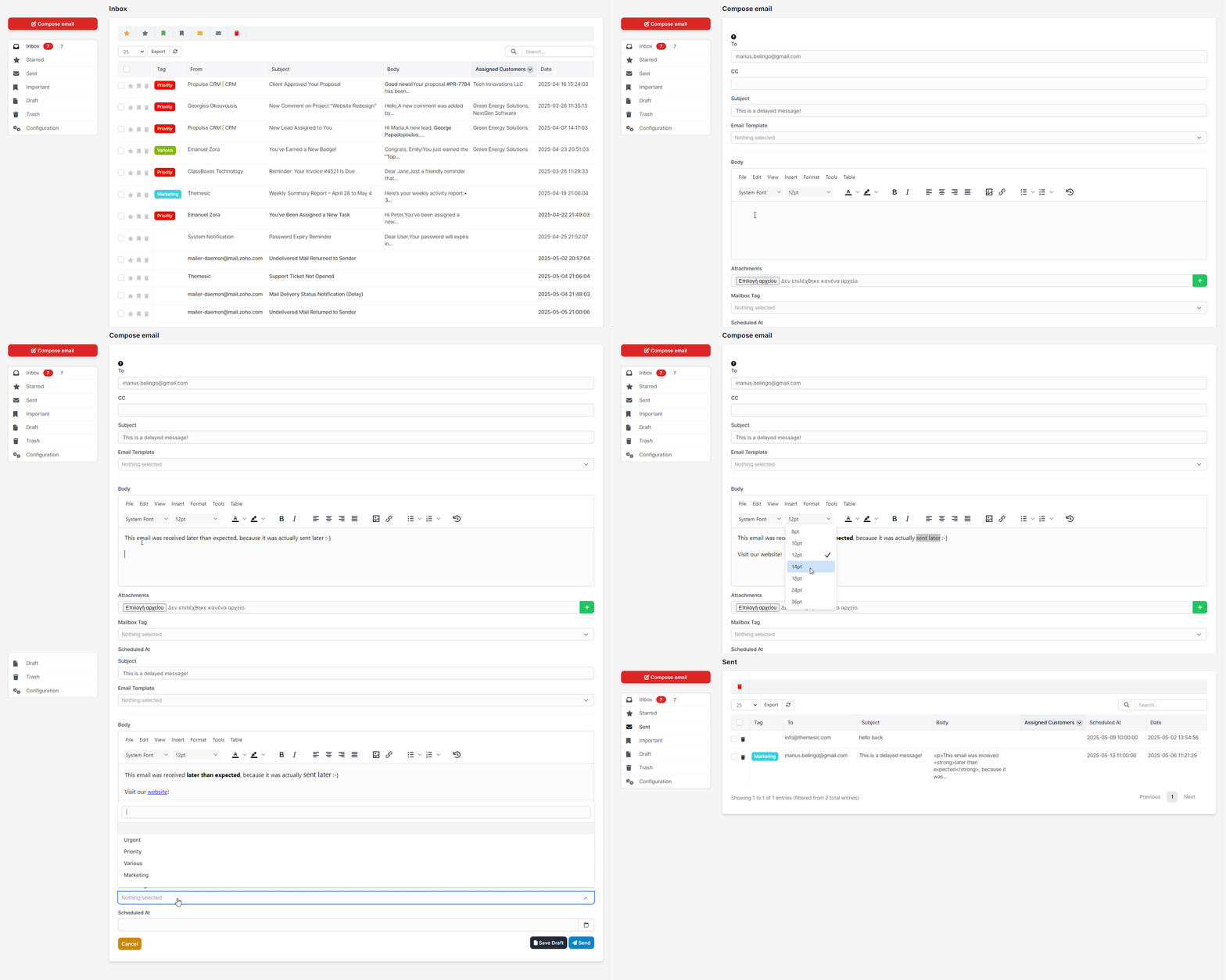
⏰ Schedule Emails (Send Later)
Never miss the ideal send-time again: compose your emails now and schedule them to go out at the perfect moment. Whether you’re syncing with global teams or planning drip campaigns, “Send Later” ensures your messages hit inboxes when engagement is highest.
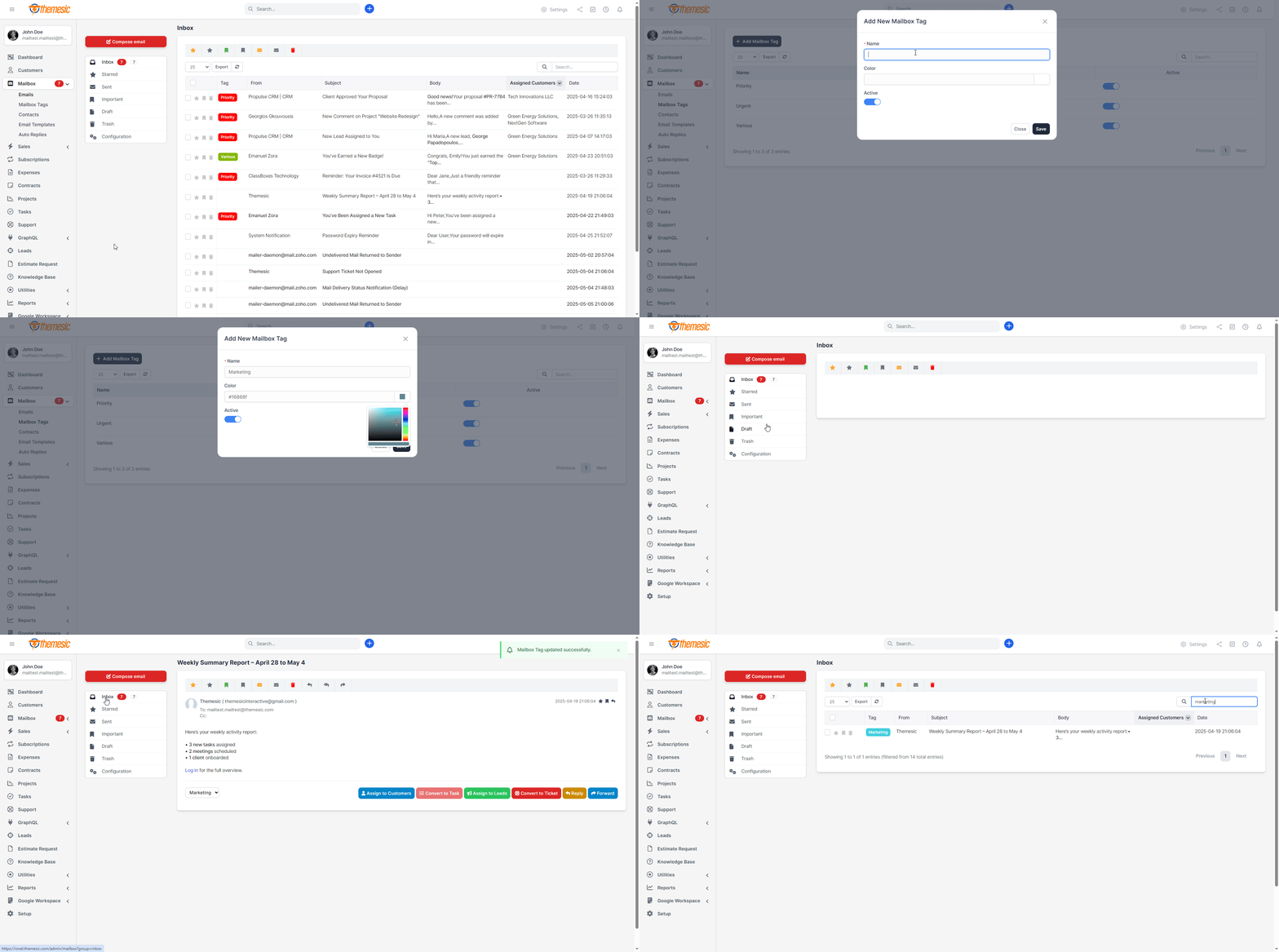
⬜️ Custom Email Tags (Labels)
Organize hundreds of conversations at a glance by applying color-coded tags and labels. Create, edit and filter by tags like “Important,” “Support,” or “VIP Lead” to segment your mailbox, prioritize responses and keep your inbox clutter-free for maximum productivity.
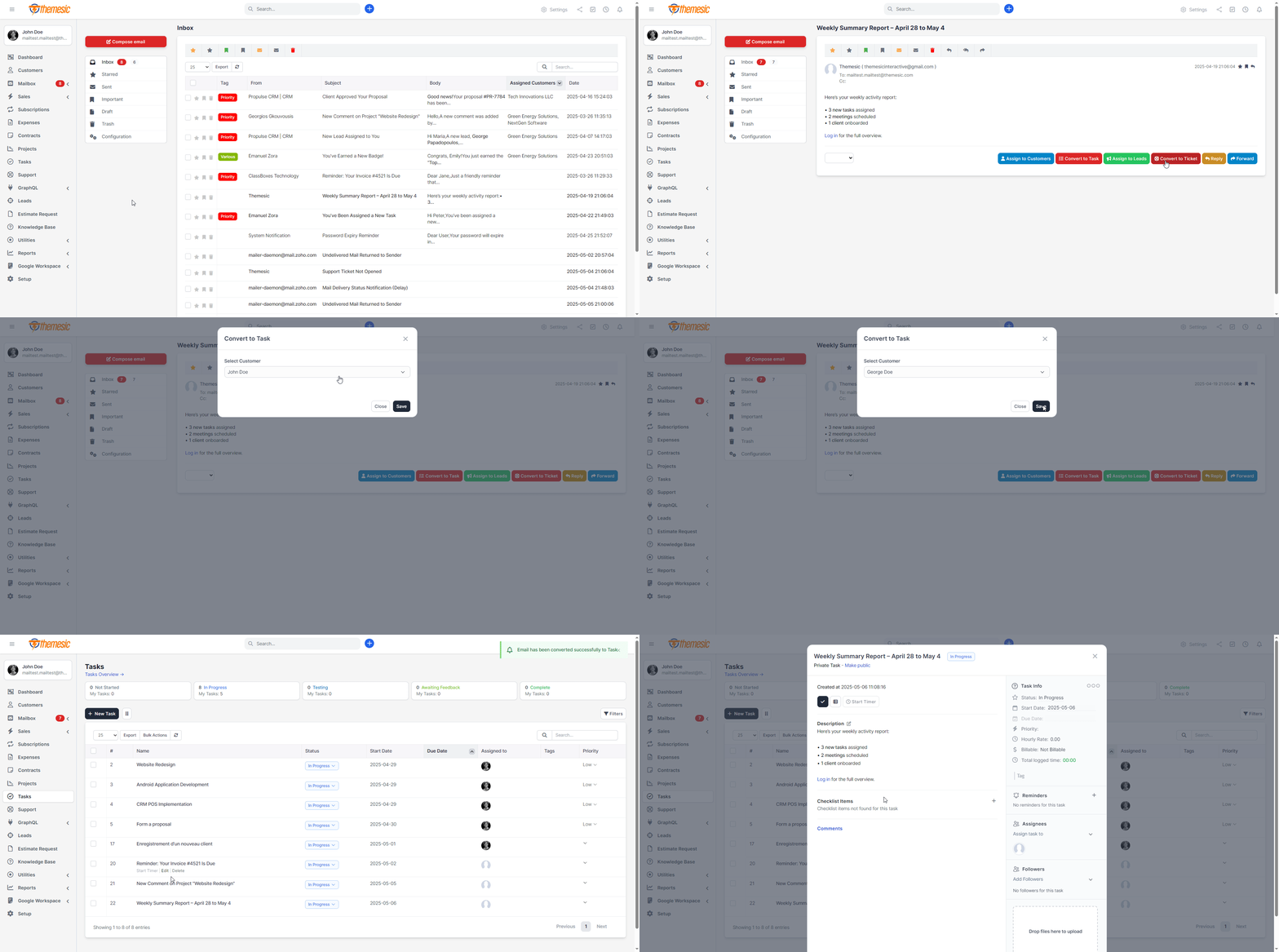
✏️ Assign Emails to Tasks
Convert any incoming email into a Perfex CRM task in seconds. With one click, assign it to your team, set deadlines and track progress – all without leaving your mailbox. Keep every to-do item linked directly to the original conversation for seamless project management.
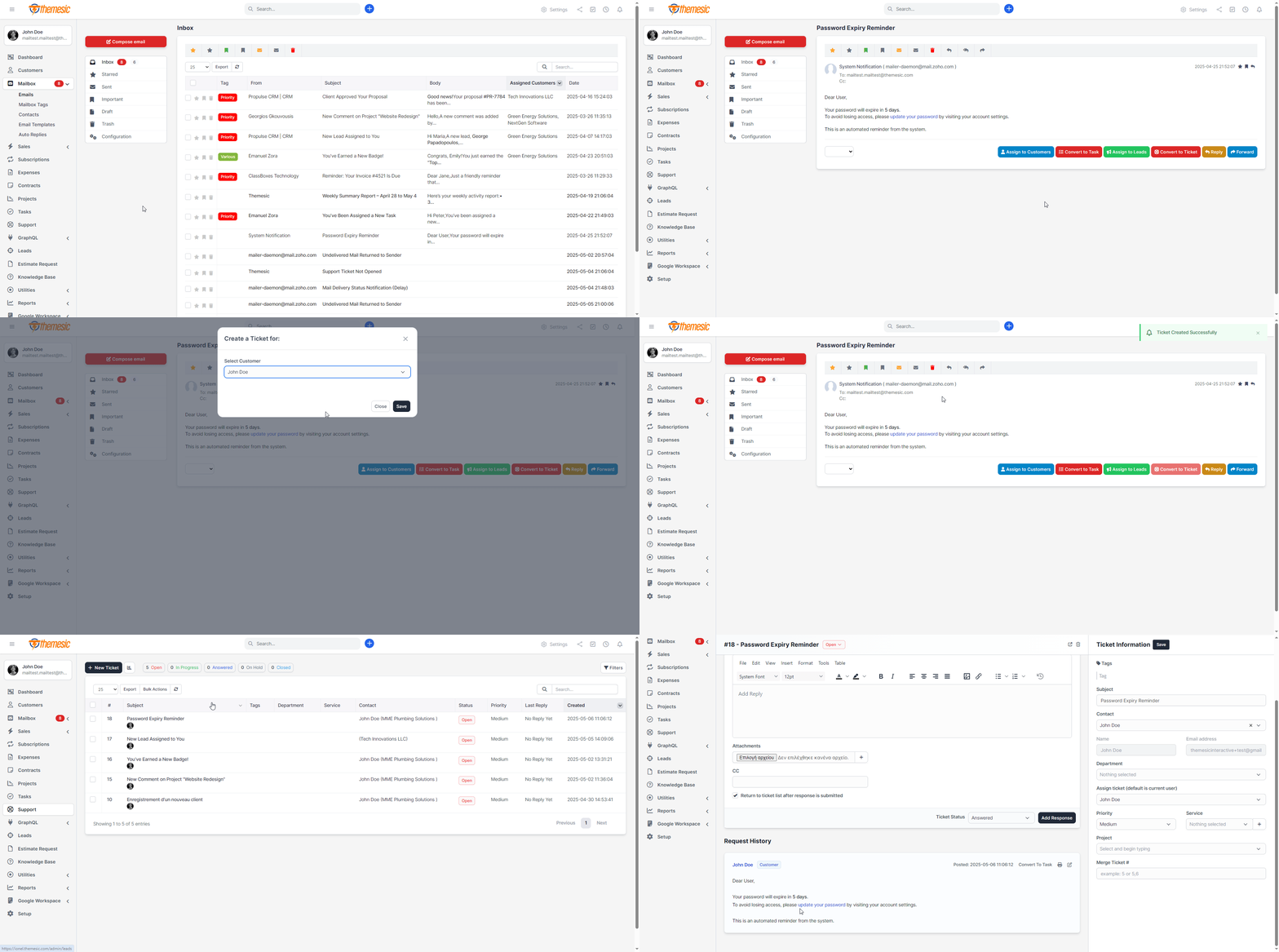
⤵️ Convert Emails into Support Tickets
Transform customer inquiries into fully-featured support tickets inside Perfex CRM. Automatically tag, prioritize, and route emails to the right department, ensuring no request slips through the cracks and your support team stays fully aligned.
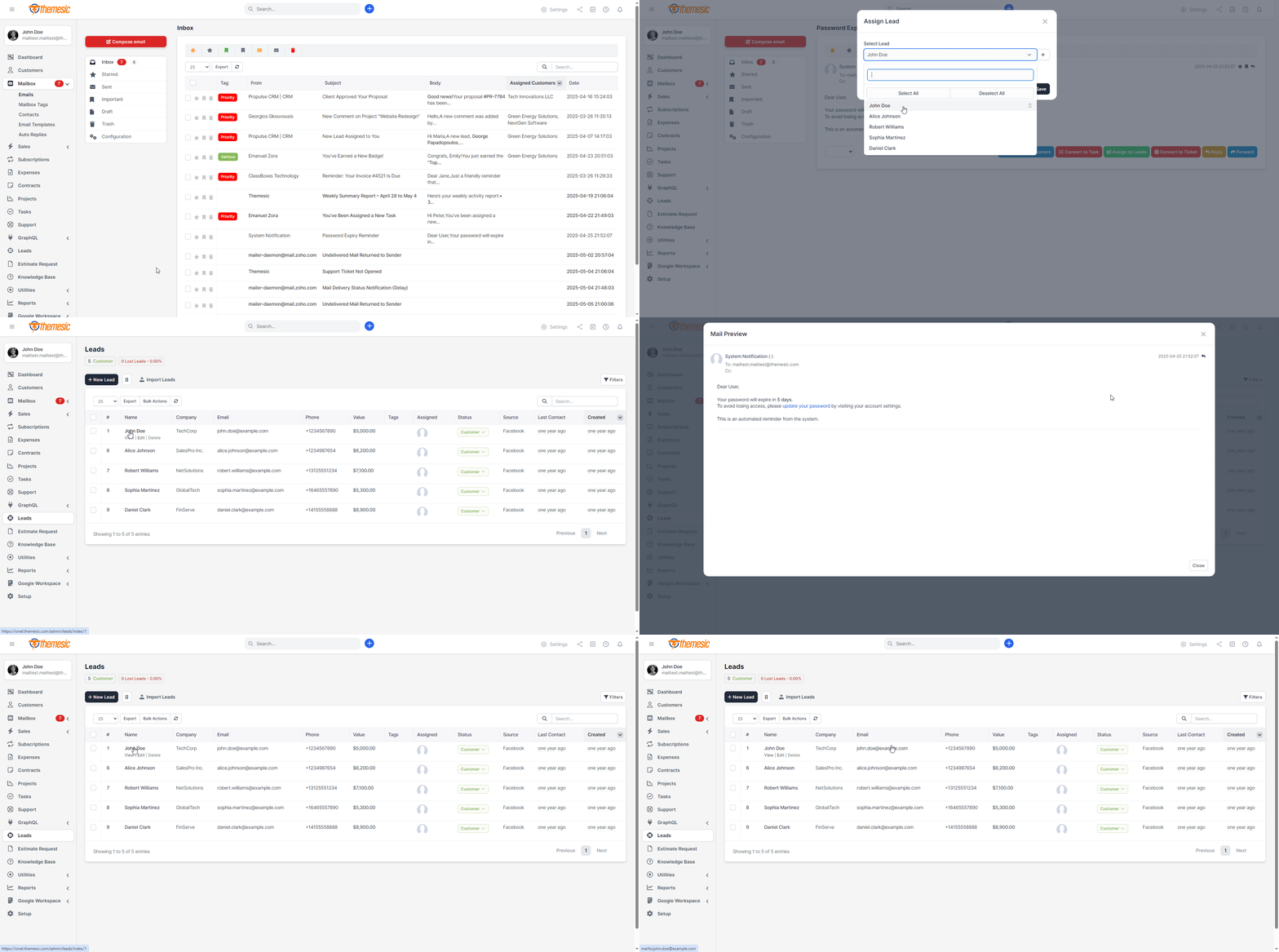
➡️ Link Emails to Leads
Seamlessly associate inbound messages with your sales pipeline by assigning emails directly to leads and opportunities. Track every conversation, set reminders, and build a complete history to close deals faster with context-rich communication.
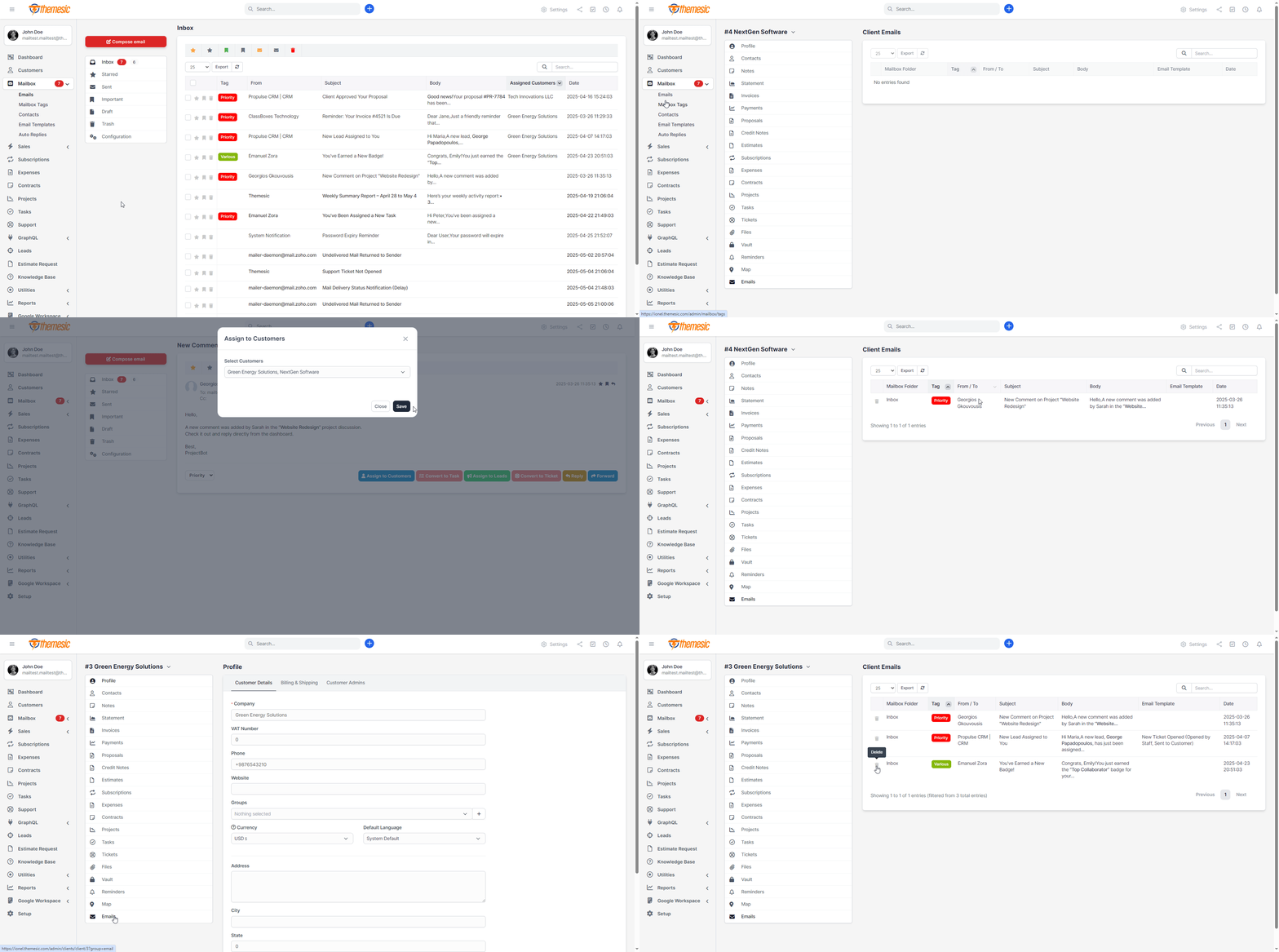
☑️ Assign Emails to Customers
Never lose sight of client conversations. Link each email to existing customers or create new contacts on the fly. Access past interactions, invoices or project details instantly, delivering personalized service that builds trust and loyalty.
✍️ Contact Management & Autocomplete
Maintain a unified contact list with full CRM integration. Add, edit or merge contacts directly from the mailbox interface, complete with profiles, communication logs, and custom fields – keeping your address book always up to date and adding autocomplete functionality.
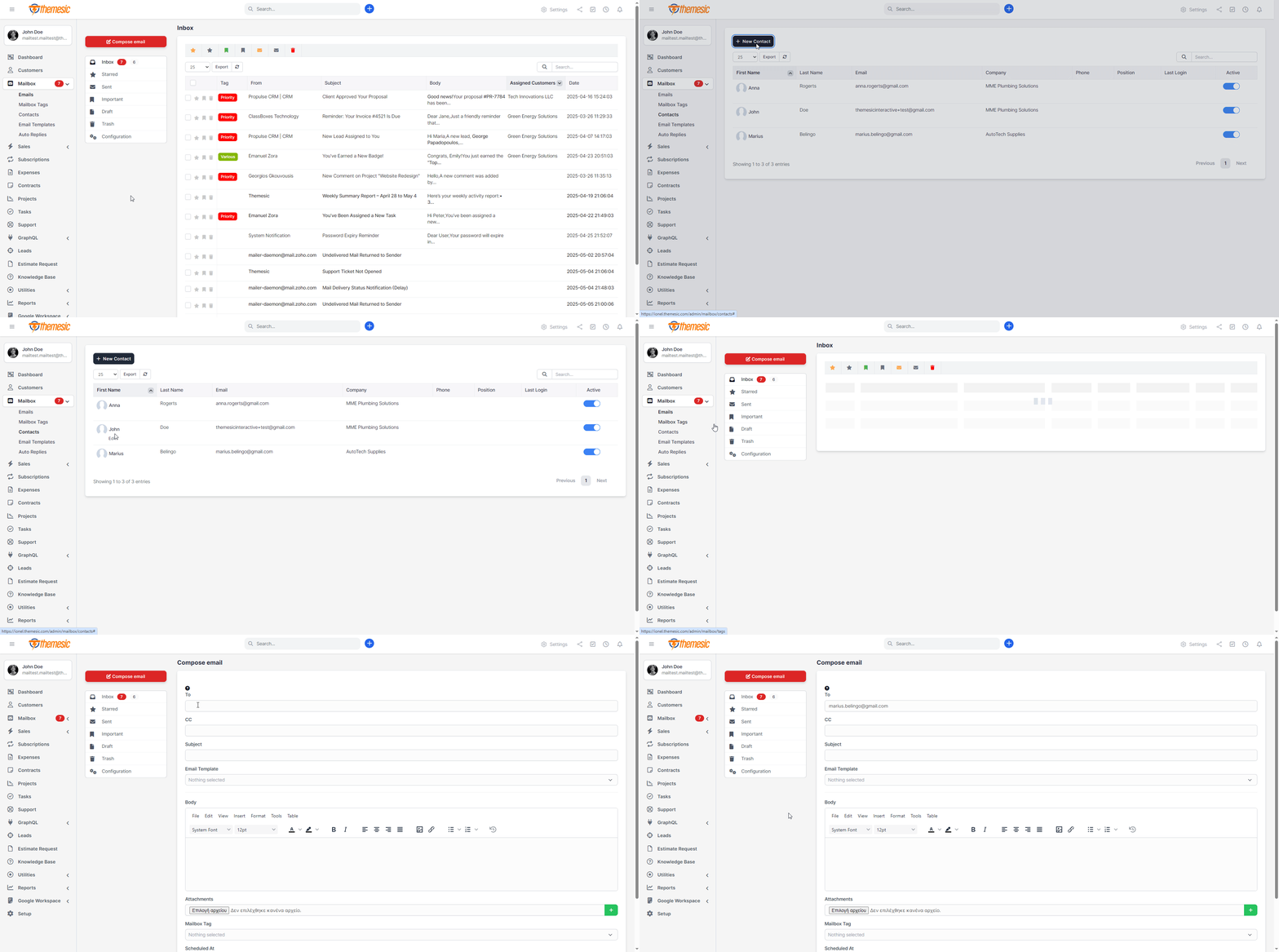
⚙️ Advanced Mailbox Organization
Keep your inbox tidy with nested folders, smart, live filtering and quick-move actions. Tag conversations by project, client or department, and access any tag in just one search – perfect for teams managing high volumes of email daily.
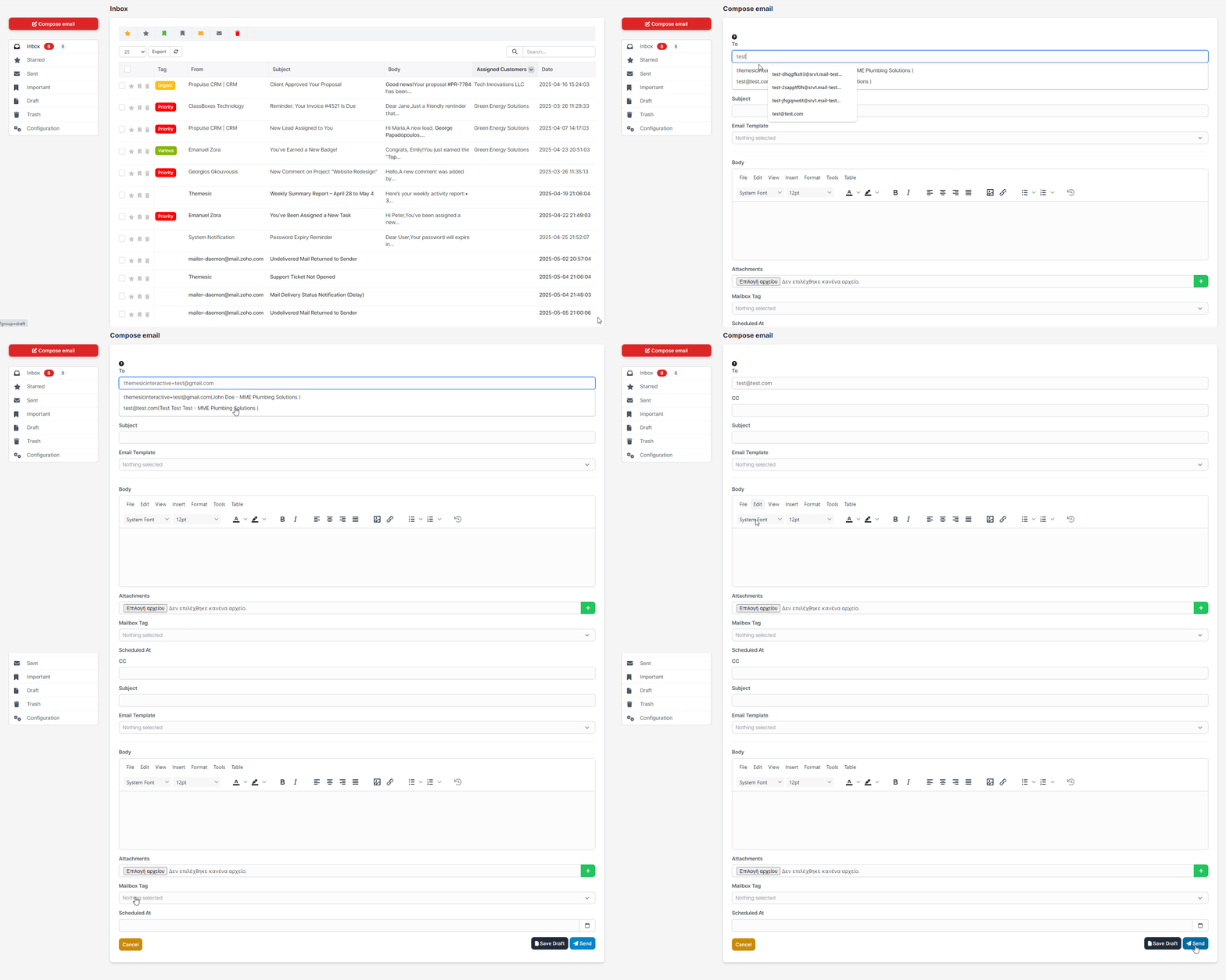
✒️ Rich Compose Experience
Craft professional emails with full WYSIWYG editing, file attachments, inline images and dynamic merge fields. Save time with reusable templates, signature management, and keyboard shortcuts – ensuring every message is polished and on-brand.
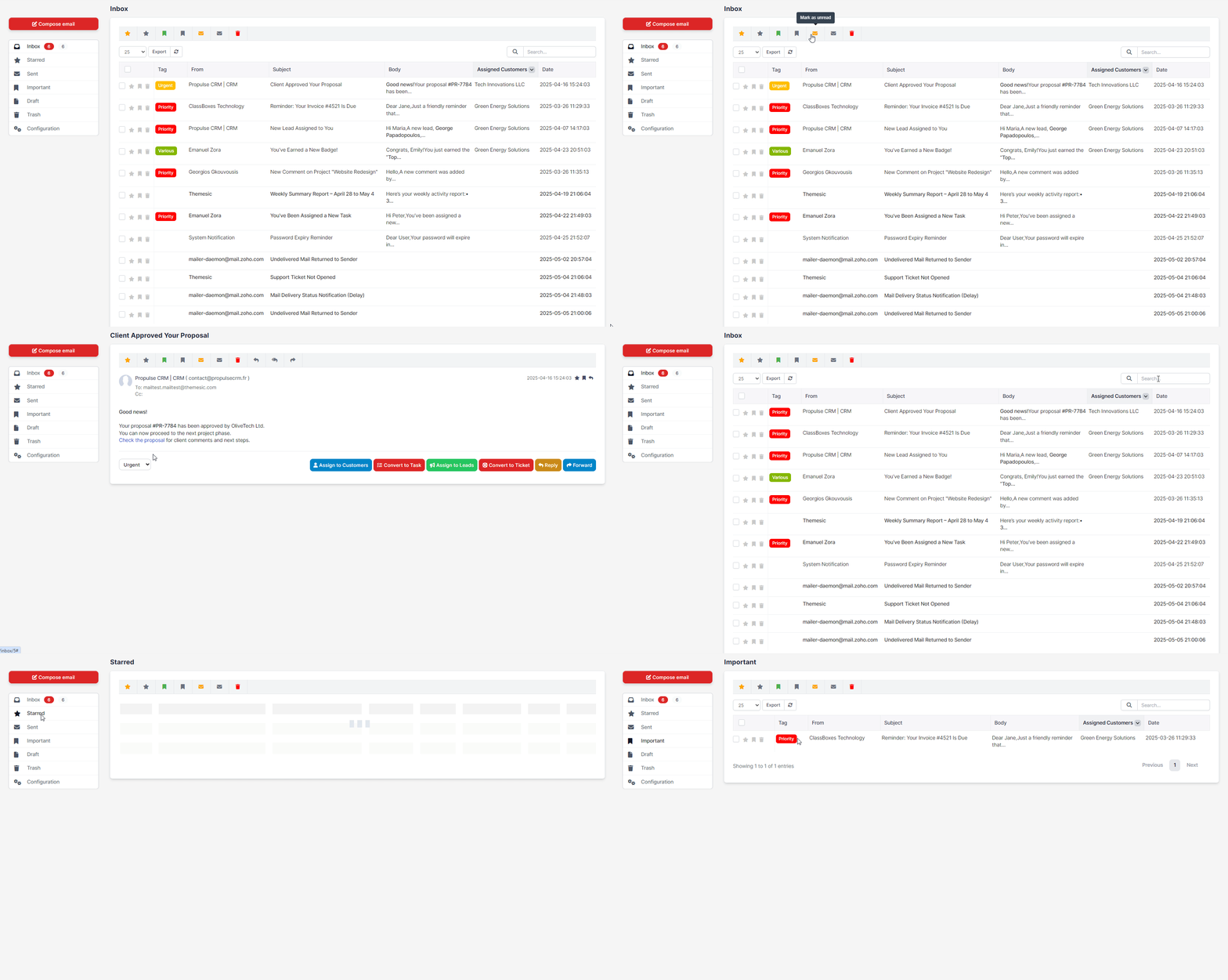
✔️ Mailbox Module for Perfex – Continuous Improvements
The Mailbox module has evolved significantly since its initial release, introducing powerful features that streamline communication and enhance customer relationship management within Perfex CRM.From the introduction of the “Conversation” tab that links emails directly to leads, to the ability to create support tickets and tasks from emails, the module continues to grow with your operational needs in mind. Each update brings meaningful improvements designed to boost productivity, improve collaboration, and simplify email management.
Last Version introduces a comprehensive suite of powerful features that transform email management within Perfex CRM.
Experience a modern Gmail-style compact interface with email threading that groups conversations, a split-view preview pane for quick scanning, and advanced organization tools including Archive and Snooze features.
Automate email management with a powerful Rules System that filters and organizes emails based on custom conditions, while Advanced Search helps you find any email instantly using multiple criteria.
Enhanced security comes with OAuth2 authentication for Gmail and Outlook (no passwords needed), enterprise-grade password encryption, and per-staff IMAP configuration allowing each team member to use their own email provider.
The latest update adds per-staff read status sync, keeping your Gmail or Outlook inbox perfectly synchronized with Perfex – when you read an email in Perfex, it’s automatically marked as read on your email server.
Additional productivity features include multiple tags per email, density views for personalized layouts, column visibility controls, and a modern IMAP library with active maintenance.
This comprehensive update represents a major evolution in email management, combining powerful automation, modern security, and intuitive design to streamline your team’s daily workflow.
Stay tuned – more smart features are always on the horizon to help you manage your customer communications even more efficiently.

⚪️ Prerequisites:
- You need an IMAP account which can accept connections over SSL/TLS from a third party app (your Perfex installation). If you are running under a 2-way factor authenticator or oAuth type, you need to disable it. Elsewise, connections wont be accepted by your server. For Gmail and Outlook, you can now use OAuth2 authentication for secure, password-free connections.- You need to have cronjob of Perfex set up correctly, as per instructions found here: https://help.perfexcrm.com/setup-cron-job/
- You wont be able to use IMAP functionalities under a POP account. Make sure that your account is an IMAP-based one.
- This module was made in order to be able to view/respond to all incoming emails, within Perfex. Sent emails from this module will be stored into its ‘Sent’ folder and will use Perfex’s outgoing email settings.
- Actions like Star/Trash/Important will affect your local inbox (Perfex) and they will be stored in the database, along with their attachments in the appropriate folder. This module has no control over your IMAP server – it is an one-way sync module that will fetch your unread Inbox mails. However, with the new read status sync feature, you can optionally sync read status back to your IMAP server.
- Our module uses staff member account’s email address for login to the IMAP server (every staff member can change his/her own email from his/her profile though).

Support
It takes only a few seconds to be installed, activated and have a fully working Mailbox Perfex client.
If you have any questions, feel free to raise a support ticket at our support area.
Guys from support department will get back to you as soon as possible with a reply.




Version 2.1.7
- Per-Staff IMAP Read Status Sync to Email Server - Auto-Mark as Read Control in Preview Pane and Single View - IMAP UID Storage for Read Status Syncing - Enhanced Activity Logging with Minimal Verbosity - CSS Scoping Fixes for Pagination Styles - Migration 217: Added sync_read_status_to_server and uid columns
Version 2.1.6
- Per-Staff IMAP Server Configuration (Server, Port, Encryption) - Per-Staff OAuth Credentials for Gmail and Outlook - Per-Staff Folder Mappings (Sent, Drafts, Trash, Spam, Archive) - Per-Staff Preferences (Import Unread Only, HTML Rendering) - OAuth Email Sending for Gmail and Outlook - Enhanced OAuth Token Refresh with Better Error Handling - Manual Email Sync Endpoint - Migration 212-214: Per-staff configuration support
Version 2.1.5
- OAuth2 Authentication for Gmail and Outlook/Microsoft 365 - Enterprise-Grade Password Encryption (AES-256-CBC) - Modern IMAP Library Integration (Webklex/php-imap v4.x) - Automatic OAuth Token Refresh - OAuth Token Encryption for Maximum Security - Enhanced Error Handling and Logging - Database Performance Indexes - Migration 206-211: OAuth and security features
Version 2.1.4
- Gmail-Style Compact Webmail Interface - Density Views (Cozy, Comfortable, Compact) - Column Visibility Toggle - Preview Pane with Split-View and Search - Email Threading with Collapsible Conversations - Archive and Snooze Features - Email Rules System with Conditions and Actions - Advanced Search with Multiple Filters - Multiple Tags per Email Support - Enhanced Bulk Actions - Improved Pagination Alignment and Styling
Version 2.1.3
- Settings Cleanup and Reorganization - Per-Staff Settings Migration - Auto-Refresh Interval Fix - Auto-Mark as Read in Preview Pane Fix - Comprehensive Settings Audit
Version 2.1.2
- Enhanced Tag System with Multi-Tag Support - Improved Contact Management - Enhanced Email Templates - Improved Auto-Replies - Enhanced Scheduled Emails - Multiple Pagination Fixes
Version 2.1.1
- Database Performance Indexes - Migration 210: Added Missing Columns and Tables - Enabled All Features by Default
Version 2.1.0
- Complete UI Redesign with Modern Compact Interface - Gmail-Style Layout - Responsive Design Improvements - Three-Dots Action Menu - Enhanced Bulk Action Capabilities
Version 2.0.7
- Major UI/UX Improvements - Email Threading - Preview Pane - Archive Support - Rules System - Increased Mail Signature Field Size
Version 2.0.6
MAJOR UPDATE - OAuth2 Authentication & Security Enhancements NEW FEATURES: - OAuth2 authentication support for Gmail and Outlook/Microsoft 365 - Secure password-free email connections using industry-standard OAuth2 - Enterprise-grade password encryption (AES-256-CBC) for stored credentials - Automatic OAuth token refresh - tokens update seamlessly before expiration - Modern IMAP library integration (Webklex/php-imap) with active maintenance - Enhanced error handling and logging for better troubleshooting - Database performance indexes for faster email queries - Incremental email sync support using UID tracking SECURITY IMPROVEMENTS: - All passwords encrypted before database storage - OAuth tokens encrypted for maximum security - Secure token management with automatic refresh - Enhanced connection error handling PERFORMANCE OPTIMIZATIONS: - Database indexes added for mail_inbox, mail_outbox, and mail_attachment tables - Optimized email sync queries for better performance - Improved connection management and error recovery TECHNICAL IMPROVEMENTS: - Updated to modern PHP IMAP library (Webklex/php-imap v4.x) - Backward compatible with existing password-based accounts - Improved email body processing and attachment handling - Enhanced MIME header decoding for international characters USER EXPERIENCE: - One-click OAuth connection for Gmail and Outlook - Easy OAuth setup in Settings → Mailbox - Seamless transition from password to OAuth authentication - Better error messages for connection issues This update represents a major security and functionality enhancement, making the Mailbox module future-proof and ready for modern email providers that are moving away from password-based authentication.
Version 2.0.5
- Assign Email to Customer(s) - Convert Email to Support Ticket - Tags System (Email labels) - Automatic Replies - Send Later (Email scheduling) - Advanced Live Filtering - Contacts Book - Address Autocomplete
Version 2.0.4 (Perfex v3.2.1+ required)
- Option to fetch also read emails added - Allow/disallow HTML in body content option added - Convert to task option added - Settings Improvements - Security Enhancements - Improved Logging - Fix: Encoding for non UTF-8 senders/subjects
Version 2.0.3b
-Support for non-UTF8 sender names added
Version 2.0.3
-New Feature: Emails can now be assigned to Leads (Assign to Lead button) -New Feature: "Conversation" tab in Leads view, that includes all assigned emails -New Feature: Email conversations can now be converted to a Support Ticket
Version 2.0.2
-Read emails counter added
Version 2.0.1
-Support for single attachment forward (Inbox/Outbox) added
Version 2.0.0
-Compatibility fixes for Perfex core v3.0 (minimum required version) -Minimum PHP version required: 7.4
Version 1.0m
-Ukranian language added - Contributor: Andrii Perevertun
Version 1.0l
-Changed default sorting to date received -Trimmed body content in preview, to avoid overlapping of lines -Removed name from reply addresses, which used issues in some SMTPs
Version 1.0k
-Fixed issue related to the signatures in >Perfex 2.7.0 installations -Spanish language added - Contributor: Ariel Ramos
Version 1.0j
-Fixed issue which prevented draft emails from being deleted in some cases. -Fixed search issue - datatables' data are now filtered properly -Fixed mass delete redirection rule - you are now redirected back to the previous folder -Fixed sort by date filter - you can now use it on every folder
Version 1.0i
-Added dependencies in order to support Perfex CRM 2.7.0 installations
Version 1.0h
-Support for signatures
Version 1.0g
-Support for attachments with spaces in their filenames
Version 1.0f
-Italian Language added
Version 1.0e
-Addressed issue of non redirecting back to inbox after marking a message as important
Version 1.0d
-Addressed issue of Compose button that was not visible under mobile view
Version 1.0c
-Aesthetic bugfixes (profile picture/wrapping of email body text)
Version 1.0b
-Resolved conflict that caused Inbox/Sent folder to list identical data
Version 1.0
-Initial version, fully compatible with the latest version of Perfex CRM
What's Your Reaction?
 Like
0
Like
0
 Dislike
0
Dislike
0
 Love
0
Love
0
 Funny
0
Funny
0
 Angry
0
Angry
0
 Sad
0
Sad
0
 Wow
0
Wow
0

.png)