
























![HUSKY - Products Filter Professional for WooCommerce [former WOOF Filter]](https://previews.customer.envatousercontent.com/files/469342547/husky590-min.jpg)

































Astero - WordPress Weather Plugin
Astero WordPress Weather Plugin Astero utilizes Ajax technology and local caching for fast loading of weather forecasts that supports a fixed location or user

Astero WordPress Weather Plugin
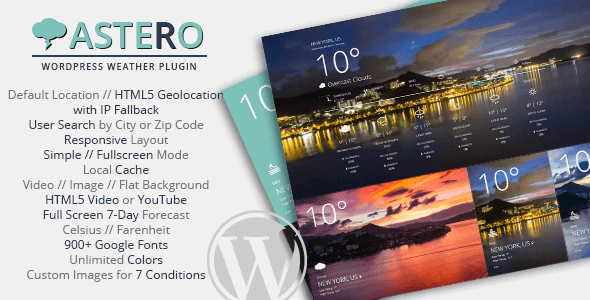
Astero utilizes Ajax technology and local caching for fast loading of weather forecasts that supports a fixed location or user geolocation. Optional search function lets users look up the weather with a city name or zip code, and choose their preferred units! Create stunning weather widgets with animated backgrounds, custom images or a clean and minimalist look easily with the shortcode builder. Scripts and styles are loaded conditionally to minimize HTTP requests, and Html5 caching is enabled to increase loading speed and avoid API call limits. Use as a widget, shortcode, or both!Advanced Features
- OpenWeatherMap API Weather Forecast with Ajax
- 5 or 7 Days Weather Forecast (Requires Onecall 3.0 API Subscription with 1000 free calls per day)

- Default Location or Html5 Geolocation with GeoIP Fallback
- Search by City or Latitude and Longitude directly with Shortcode
- Local Cache for 1 Hour
- IP Detection Only avoiding user Geolocation prompt with free Maxmind GeoIP Database
- Fully Responsive Layout
- CSS3 Animations and Transitions for Better Mobile Performance
- Supports Multiple Weather Displays on the Same Page
- Responsive Elements: Full Forecast Layout Displays Content According to Element Size
- Optional User Search Function by city name or zip code with a choice of units
- Supports WordPress Multisite!
- Supports Http or Https Sites
- OpenWeatherMap Languages Support (49): Albanian, Afrikaans, Arabic, Azerbaijani, Basque, Belarusian, Bulgarian, Catalan, Chinese Simplified, Chinese Traditional, Croatian, Czech, Danish, Dutch, English, Finnish, French, Galician, German, Greek, Hebrew, Hindi, Hungarian, Icelandic, Indonesian, Italian, Japanese, Korean, Kurmanji (Kurdish), Latvian, Lithuanian, Macedonian, Norwegian, Persian (Farsi), Polish, Portuguese, Português Brasil, Romanian, Russian, Serbian, Slovak, Slovenian, Spanish, Swedish, Thai, Turkish, Ukrainian, Vietnamese, Zulu.
3 Background Styles
- Html5 Video (.mp4, .webm, .ogg) – or – YouTube Background
- Original – or – Custom Image Backgrounds for 7 Weather Conditions
- Clean Minimal Background For Flat UI Design
2 Layout Modes
- Simple Layout with Fullscreen Overlay
- Full Forecast Layout
Easily Customisable
- 1400+ Google Fonts
- Unlimited Background and Font Colors
- Set Overall Font Size and/or Temperature Font Size
- Customize Border Style
- Optional Rounded Corners
- Choose to Display °C | °F as Temperature Units or Simply °
Detailed Weather Info
- Full Screen Weather Forecast with Humidity, Wind, Cloudiness, Sunrise and Sunset Data
- 5 or 7-Day Weather Forecast with Temperature, Humidity and Cloudiness Information
- Choice of °C or °F
- Fully Translatable and includes all .mo and .po files
How to Install Plugin
- Upload plugin and activate.
- Go to Settings > Astero Weather, and enter OpenWeatherMap key (required).
- Create a new weather by going to Dashboard > Astero Weather > Add New Weather.
- Insert weather into your site through shortcode or widget.
How to Use Shortcode
- You must at least have created a weather display under Dashboard > Astero Weather > Add New Weather
- You can add the shortcode anywhere on your site. Example:
[astero id='1234']
- Use a dynamic location with shortcode by providing latitude and longitude. Example:
[astero id='1234' lat='40.712776' lon='-74.005974']
- Use a dynamic location with shortcode by providing city and country code (requires Google Map API Key). Example:
[astero id='1234' city='New York, US']
FAQ
Please make sure you have entered an OpenWeatherMap API key under Settings > Astero Weather.
The API key may require a few hours to activate. If you have recently signed up or created the API key, please be patient and try again later.
Please sign up for an Openweathermap Onecall 3.0 API subscription and enable in the Astero settings. 1000 free calls / day are included. Set a daily limit in the Openweathermap settings to control your budget.
Changelog
Version 2.1.0 (7 Sep 2024) - Support up to PHP 8.X - Support for WP 6.6 - Updated to Openweathermap Onecall 3.0 API - Removed Google Map for geocoding - Updated MaxMind GeoIP database - Updated Google Fonts list - Updated Openweathermap language list Version 2.0.0 (10 Apr 2020) - Changed weather provider to Openweathermap - Support for WP 5.4 - Added shortcode to query weather by city and country name or latitude and longitude - Updated Google Fonts list - Updated MaxMind GeoIP database Version 1.4.3 (24 Sep 2018) - Fixed Google Map not loaded when using Geolocation Version 1.4.2 (19 Jun 2018) - Fixed js bug that sometimes causes weather not to load Version 1.4.1 (17 Jun 2018) - Fixed js file not minified Version 1.4 (16 June 2018) - Removed Openweathermap - Improved CSS for theme compatibility Version 1.3.5 (1 Feb 2018) - Geocode display city instead of full address Version 1.3.4 (8 Sep 2017) - Fixed bug: plugin script not requiring jQuery Version 1.3.3 (22 Jul 2017) - Added option to skip load Google Map Version 1.3.2 (16 Apr 2017) - Fixed bug in location not showing for Geolocation Version 1.3.1 (30 Jan 2016) - Fixed bug in Forecast.io weather search to improve weather accuracy Version 1.3.0 (27 Jan 2016) - Added option to enter Google Map API to support weather search - Implement Maxmind Geoip database Version 1.2.9 (21 Nov 2016) - Updated Forecast.io supported languages Version 1.2.8 (8 Oct 2016) - Load javascript when document ready to prevent problems - Load Google fonts over HTTPS Version 1.2.7 (13 Jul 2016) - Fixed bug for weather not loading when iframe ratio is defined - Updated weather conditions for translations Version 1.2.6 (1 Mar 2016) - Fixed geocoder script for js - Manually input latitude and longitude - Added Google geocoder API - Changed GeoIP service provider - IP only Version 1.2.5 (7 Jul 2015) - Fixed small css bug Version 1.2.4 (27 Jun 2015) - Round off weather forecast details Version 1.2.3 (26 Jun 2015) - Fixed bug showing error for Forecast.io weather Version 1.2.2 (22 Apr 2015) - Improved compatibility for https Version 1.2.1 (31 Mar 2015) - Fixed localStorage throwing error in iOS devices Version 1.2.0 (16 Mar 2015) - Added Forecast.io to choice of weather service providers - Support for Https (Forecast.io only) - Allow own translation when using Openweathermap - Improved javascript compatiblity with themes Version 1.1.6 (6 Feb 2015) - Allow customized location name Version 1.1.5 (29 Jan 2015) - Changed stylesheet enqueue method - Fixed unix time bug Version 1.1.4 (17 Jan 2015) - Fixed @font-face conflict - Fixed date translation bug Version 1.1.3 (7 Jan 2015) - Support WordPress Multisite Version 1.1.2 (30 Dec 2014) - Fixed max/min temperature - Fixed weather forecast bug - Improved css to avoid conflicts Version 1.1.1 (24 Dec 2014) - Fixed small bug for Rounded Corners not saving Version 1.1 (17 Dec 2014) - Added Search Function Version 1.0.4 (25 Nov 2014) - Improved IP based location accuracy - Fixed localization file loading bug - Fixed background image class bug Version 1.0.3 (18 Nov 2014) - Added option to display temperature units Version 1.0.2 (17 Nov 2014) - Added option for simple layout or full forecast layout - Minor css fixes Version 1.0.1 (14 Nov 2014) - Important Geolocation bugfix
What's Your Reaction?
 Like
0
Like
0
 Dislike
0
Dislike
0
 Love
0
Love
0
 Funny
0
Funny
0
 Angry
0
Angry
0
 Sad
0
Sad
0
 Wow
0
Wow
0
.png)