




































MailTrixy | Multi-channel Inbox and Customer Messaging Flutter Mobile App
Hello! MailTrixy – Multi-channel Inbox and Customer Messaging Flutter Mobile App is a modern and powerful cross-platform mobile application built with Flutter a

Hello!
MailTrixy – Multi-channel Inbox and Customer Messaging Flutter Mobile App is a modern and powerful cross-platform mobile application built with Flutter and Dart. It is the mobile client for the MailTrixy multi-channel customer messaging platform — allowing support teams, freelancers, and agencies to handle email, WhatsApp, SMS, Telegram, and Slack conversations from a single shared inbox on the go.
MailTrixy provides a seamless and intuitive experience for teams that need to reply quickly to customer messages across multiple channels. Users can read full conversations, reply, forward, compose new emails, send quick replies, and use AI-powered summarization to catch up on long threads — all from a clean mobile-first interface.
The application is built with clean architecture, a professional UI, role-based collaboration, in-app billing & subscriptions, and built-in privacy controls. It is designed for businesses that already use the MailTrixy web platform and want a native, mobile-first experience for their team.
Authorization for App Demo
Username: user@mediacity.co.in
Password: 12345678
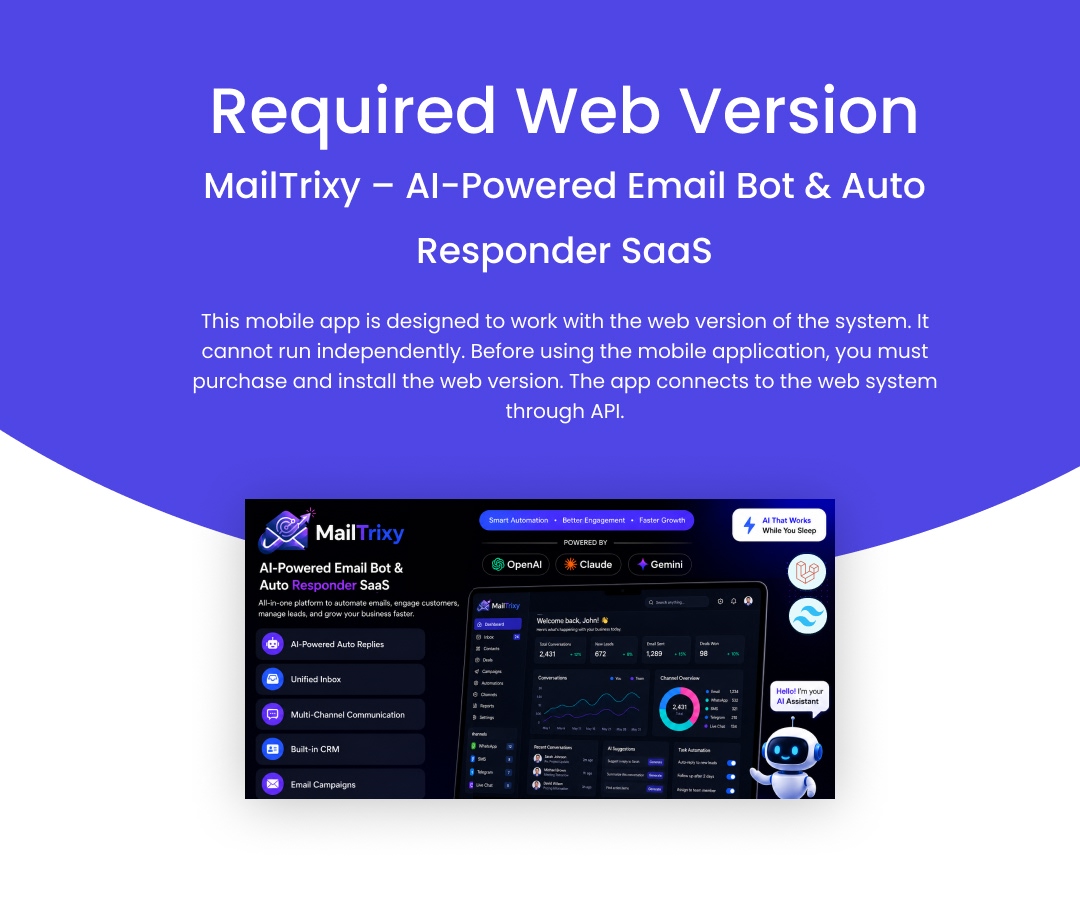
Required Web Version
This mobile app is designed to work with the web version of the MailTrixy system. It cannot run independently. Before using the mobile application, you must purchase and install the web version. The app connects to the web system through the REST API.
Web Version: MailTrixy – AI-Powered Email Bot & Auto Responder SaaS
Important — Third-Party Services & Additional Costs
MailTrixy can connect to several optional third-party services to enable specific features. These services are provided by external companies, are not part of this item, and are not included in the purchase price. You will need your own account with each provider, and these providers may charge their own usage or transaction fees:
- AI features (AI Summarize, smart replies) require an API key from an AI provider such as OpenAI. Usage is billed directly by that provider.
- WhatsApp Business messaging requires a WhatsApp Business / Meta account and may incur per-conversation charges.
- SMS messaging requires an account with an SMS gateway (for example, Twilio) and is billed per message.
- Payment gateways (Stripe, Razorpay, PayPal, Paystack, Flutterwave) require your own merchant account; transaction fees are charged by the gateway.
This item does not include any API keys, credits, or subscriptions for third-party services. All such costs are the responsibility of the buyer.
Who is it For?
- Freelancers & Solopreneurs: Manage all client emails and chats from one inbox with AI-powered replies that save hours of manual work.
- Small & Medium Businesses: Centralize customer communication across email, WhatsApp, SMS, Telegram, and Slack in a single dashboard.
- Customer Support Teams: AI-assisted responses, canned replies, and team assignment workflows to resolve tickets faster.
- Marketing Teams: Email campaigns with contact segmentation, open/click tracking, and detailed analytics.
- Sales Teams: Reach out to contacts, track conversations, and use quick replies for repeatable outreach.
- SaaS Companies: Multi-tenant workspaces with subscription plans and billing for running your own messaging SaaS.
- Agencies: Manage multiple client accounts and inboxes with team workspaces and role-based access control.
Use Cases
- Customer support & helpdesk
- Email marketing & campaigns
- Multi-channel customer communication
- Team inbox & collaboration
Key Features
Unified Inbox & Conversations
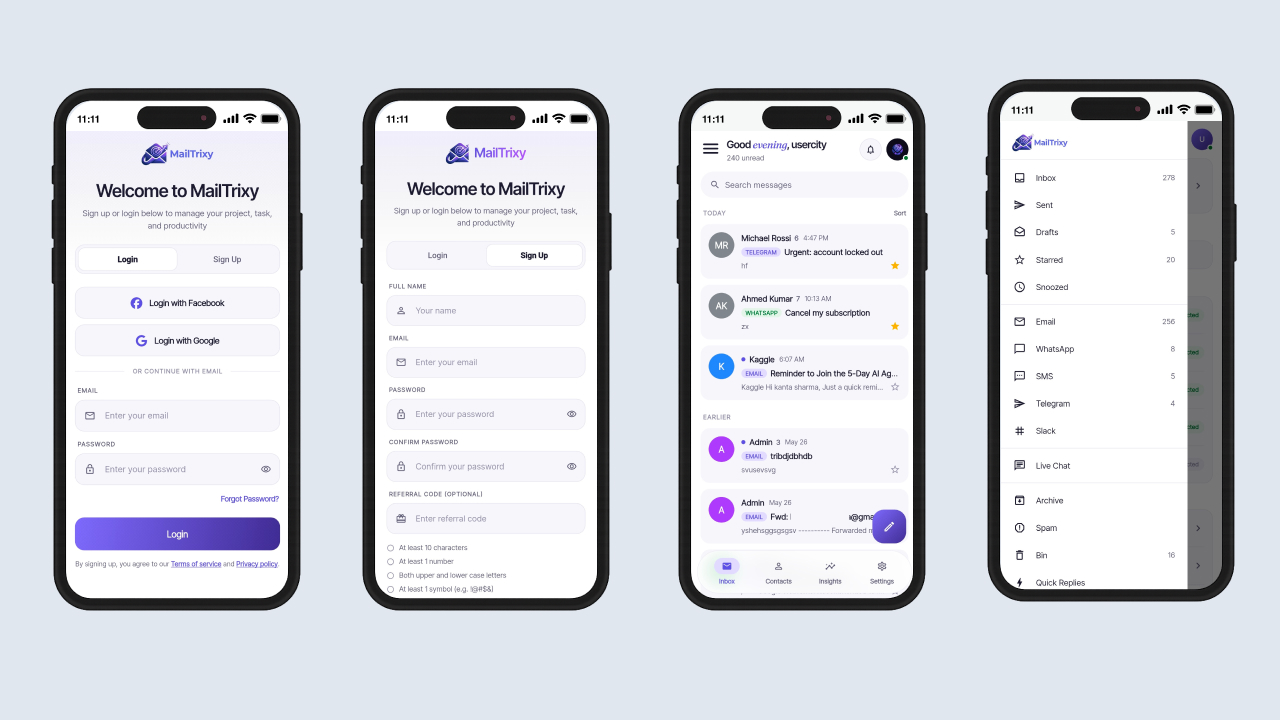
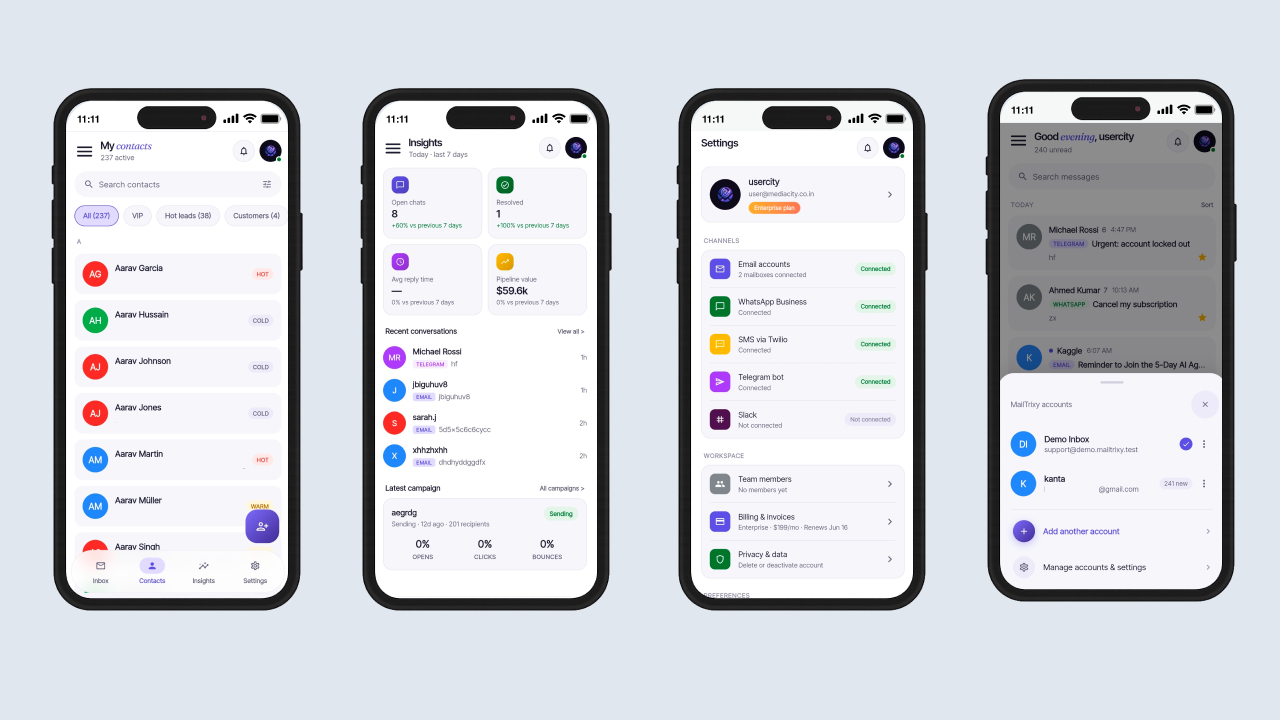
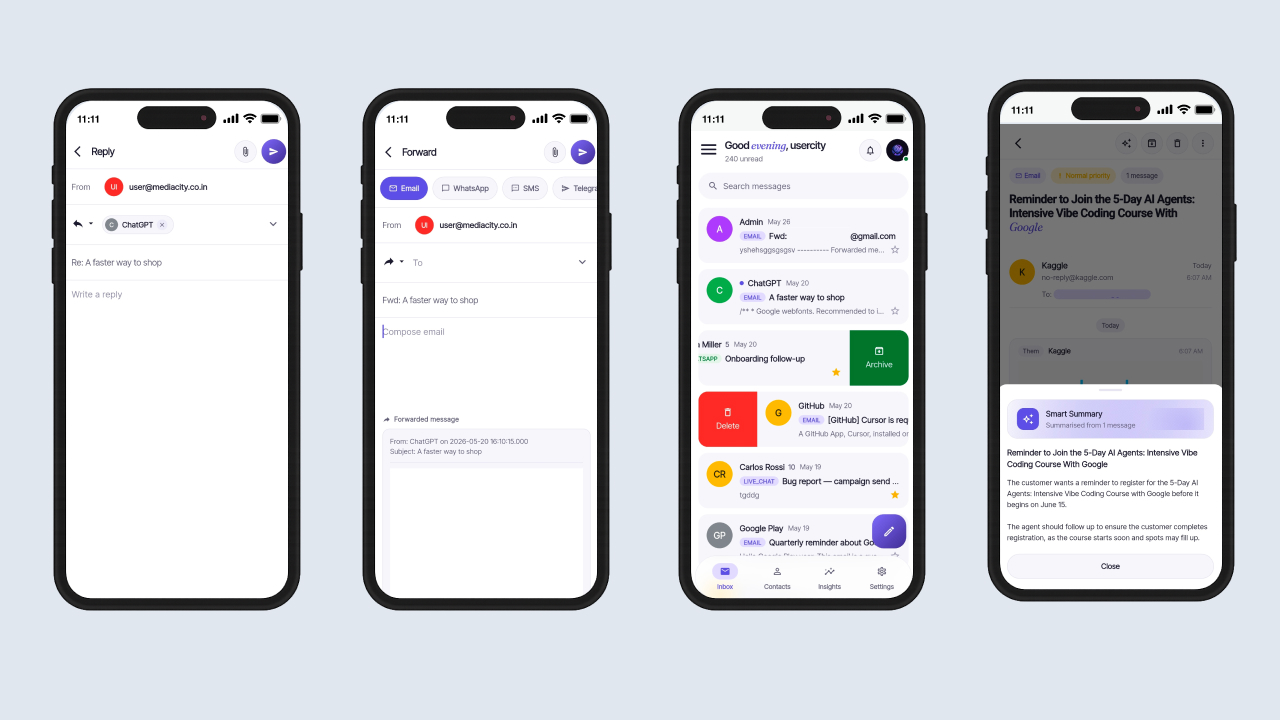
- Shared Inbox: View all conversations from every connected channel in a single list.
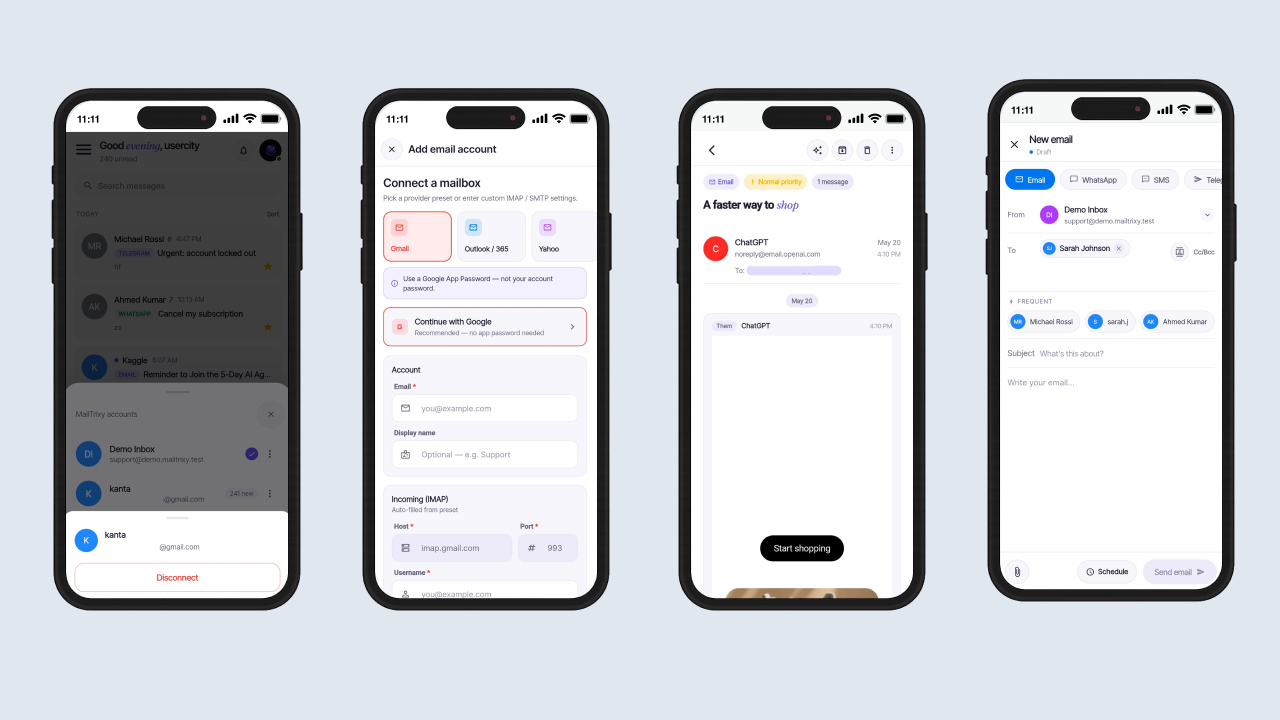
- Conversation Detail: Read the full thread with accurate HTML email layout.
- Reply & Forward: Compose replies or forward any message with attachments.
- Compose New: Start brand-new outbound conversations from the compose screen.
- Sent Folder: Review every outbound message your team has sent.
- AI Summarize: Generate one-tap AI summaries of long conversation threads.
- Conversation Actions: Star, snooze, archive, and unarchive conversations with filter support.
Channels & Email Accounts
- Email Accounts: Connect multiple email inboxes using IMAP/SMTP or OAuth providers.
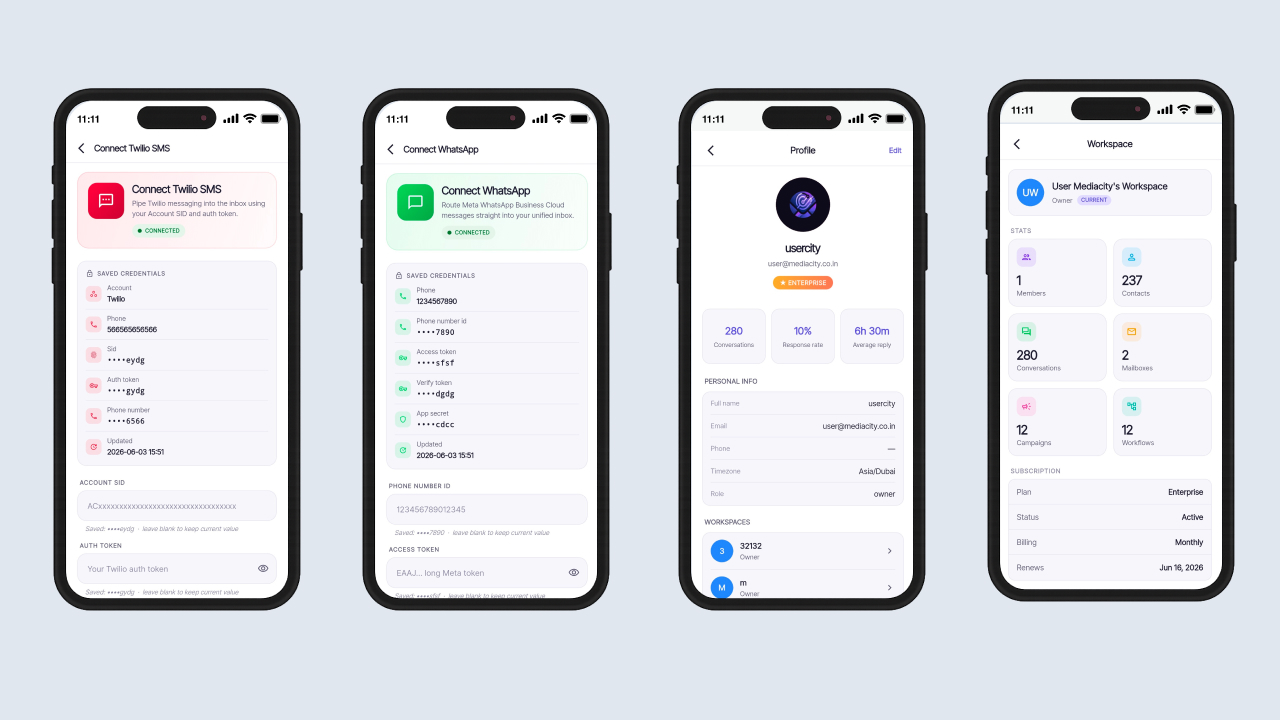
- WhatsApp Connect: Step-by-step WhatsApp Business channel onboarding.
- SMS Connect: Connect SMS providers for two-way text conversations.
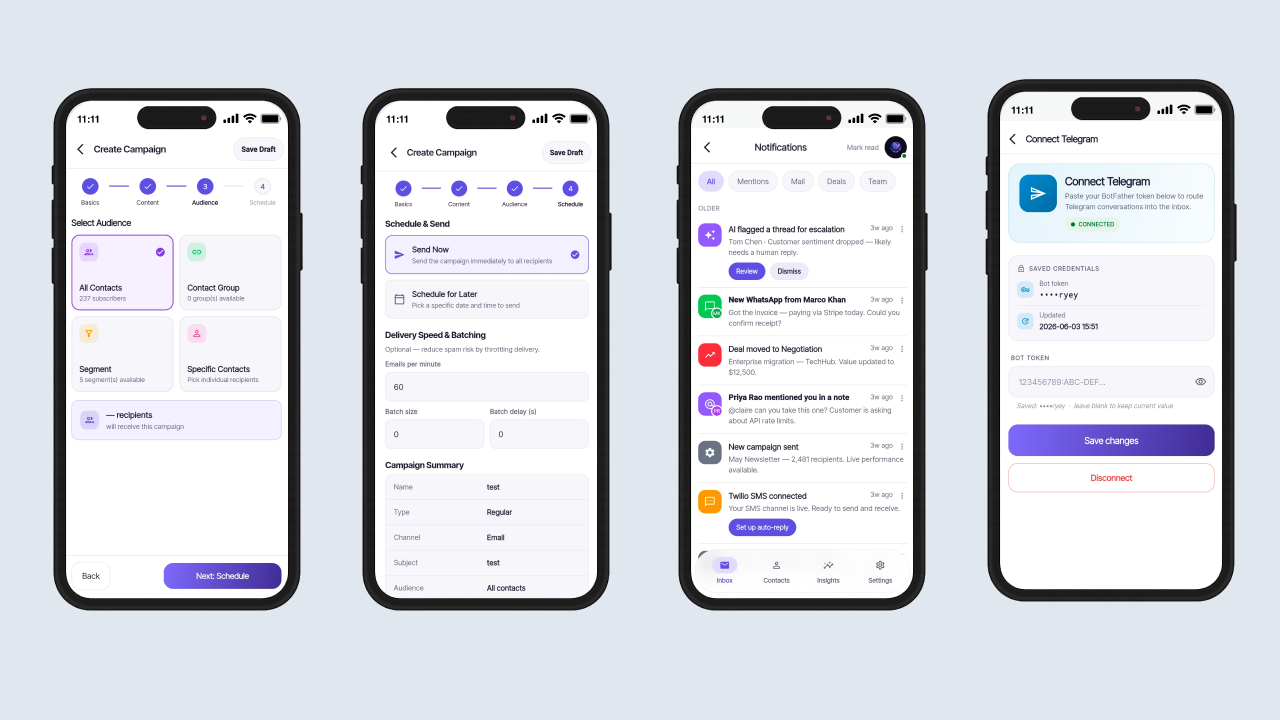
- Telegram Connect: Pair a Telegram bot for customer communication.
- Slack Channel: Route messages from Slack workspaces into the shared inbox.
- Connection Test: Validate channel credentials before saving.
Contacts & CRM
- Contacts List: Browse, search, and filter contacts by date.
- Frequent Contacts: Quickly access top contacts from compose and reply screens.
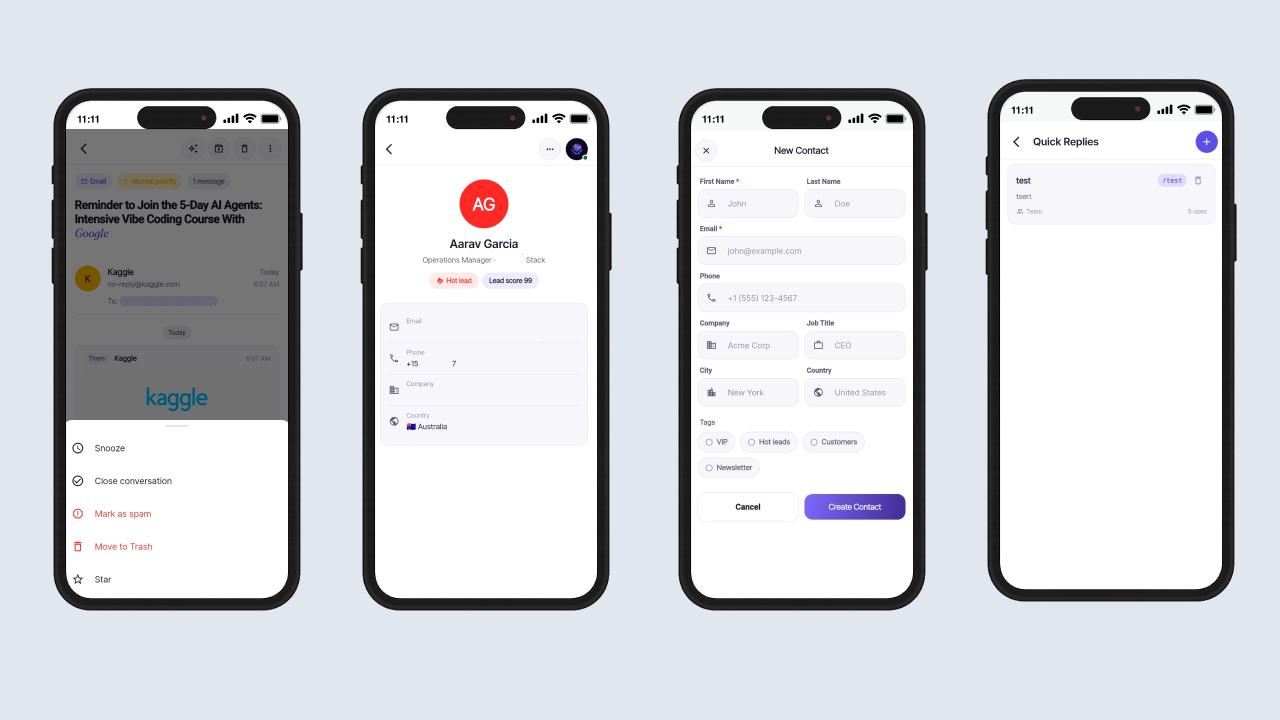
- Contact Detail: View complete profiles, conversation history, and actions.
- Create & Edit: Add new contacts or update existing records.
- Search: Instantly find contacts by name or email.
Team Collaboration
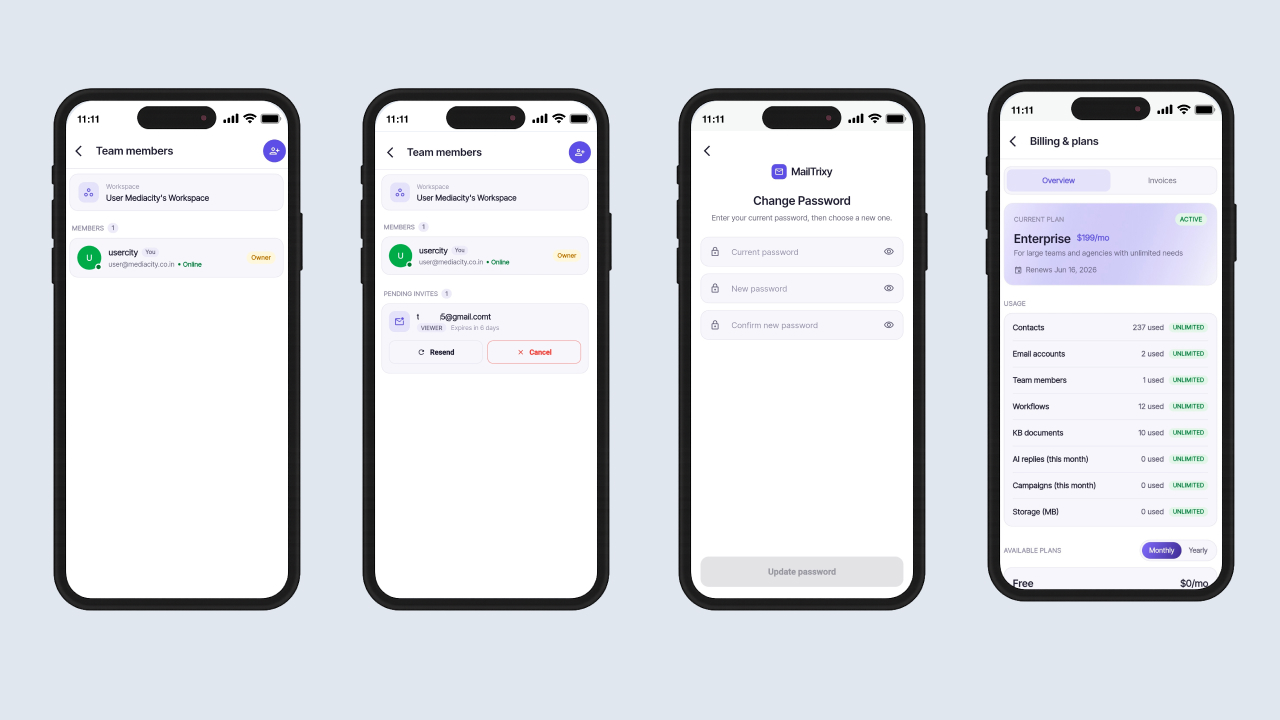
- Team Members: View all teammates with roles and member counts.
- Invite Members: Send email invitations to collaborators directly from the app.
- Resend / Cancel Invites: Manage pending team invitations.
- Roles & Permissions: Support Owner, Admin, and Agent roles via backend controls.
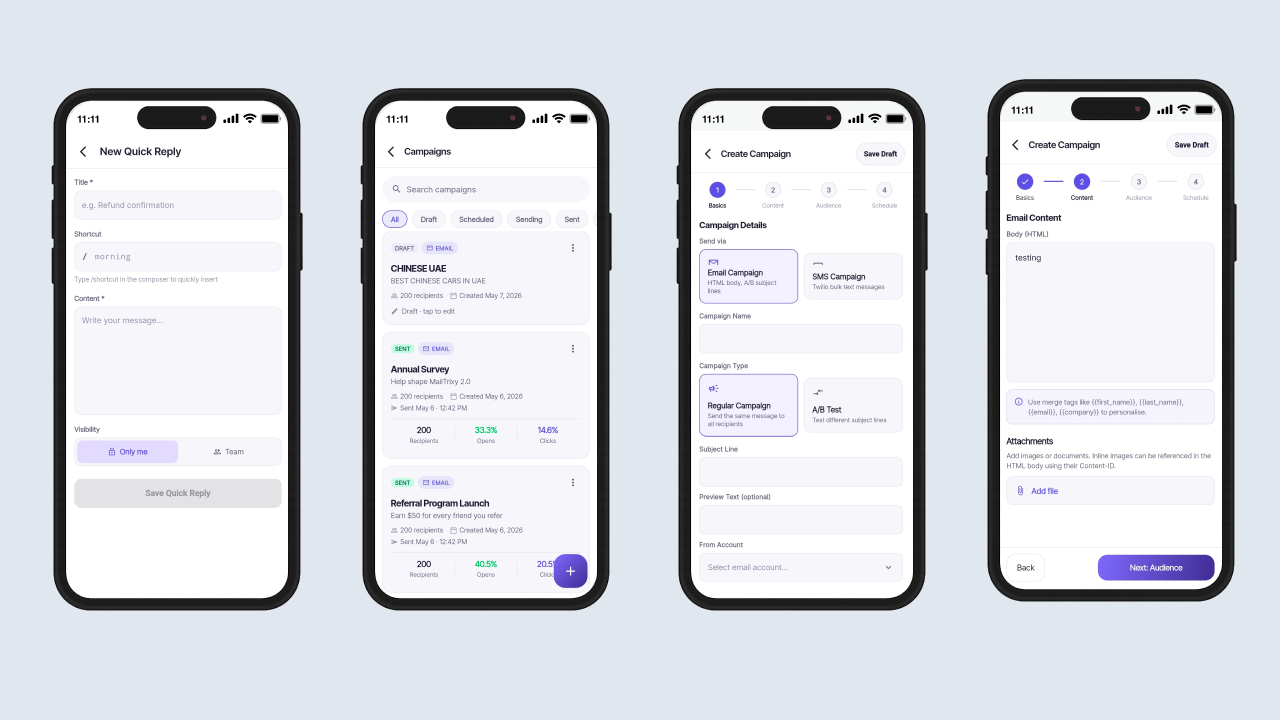
Quick Replies (Canned Responses)
- Library: Browse, create, edit, and delete reusable response templates.
- One-Tap Insert: Insert saved responses into messages instantly.
- Per-User: Each team member maintains a personal quick reply library.
Email Campaigns
- Campaign Types: Support for Regular and A/B Test campaigns.
- Compose & Schedule: Create campaigns and send immediately or schedule for later.
- Audience Targeting: Select recipients using the built-in audience picker.
- Email Templates Library: Save and reuse campaign templates.
- A/B Testing: Test multiple variants with split percentages and automatic winner selection.
- Attachments: Attach files and embed inline images.
- Campaign Analytics: Monitor sent count, open rate, click rate, and bounce rate.
- Status Lifecycle: Draft → Scheduled → Sending → Sent, with paused and failed states.
Insights
- Summary Metrics: Track Open Chats, Resolved Conversations, and Average Reply Time.
- Selectable Date Range: Recalculate metrics for custom reporting periods.
- Recent Conversations: View the latest interactions from all connected channels.
- Latest Campaign: Monitor recent campaign performance at a glance.
- Notification Center: Manage alerts with mark-all-read functionality.
Authentication & Security
- Email & Password: Secure sign-up and login with strong password validation.
- Google Sign-In: One-tap authentication using Google accounts.
- Facebook Sign-In: One-tap authentication using Facebook accounts.
- Forgot Password: Three-step OTP recovery process.
- Change Password: Update passwords securely from settings.
- Two-Factor Authentication: Optional PIN-based 2FA setup and management.
- Persistent Session: Automatic login restoration and secure logout.
Billing & Subscriptions
- Current Plan: View active subscription, renewal date, and usage limits.
- Upgrade Flow: Upgrade subscriptions directly within the app.
- Invoices: Access invoice history and downloadable PDF invoices.
- Customer Portal: Self-service subscription and billing management.
- Coupons: Apply and validate discount codes during checkout.
Payment Gateways
- Stripe: Secure card payments using PaymentSheet.
- Razorpay: Native Razorpay checkout integration.
- PayPal: Secure payments via PayPal accounts.
- Paystack: Embedded Paystack checkout popup.
- Flutterwave: Embedded Flutterwave payment integration.
- Multi-currency: Currency-aware subscription pricing.
- Server-Verified Payments: All payments verified before subscription activation.
Help Center & Support
- Submit Tickets: Create support tickets directly from the app.
- Ticket Detail: View threaded conversations and support history.
Privacy & Data Controls
- Account Deletion: Submit and manage account deletion requests.
- Deactivate Account: Temporarily disable accounts when needed.
Profile & Settings
- Profile: View and update personal information and avatar.
- Settings: Manage notifications, channel defaults, and signatures.
- Theme Switcher: Light, Dark, and System theme modes.
- Language Switcher: Support for 6 localized languages.
App Experience
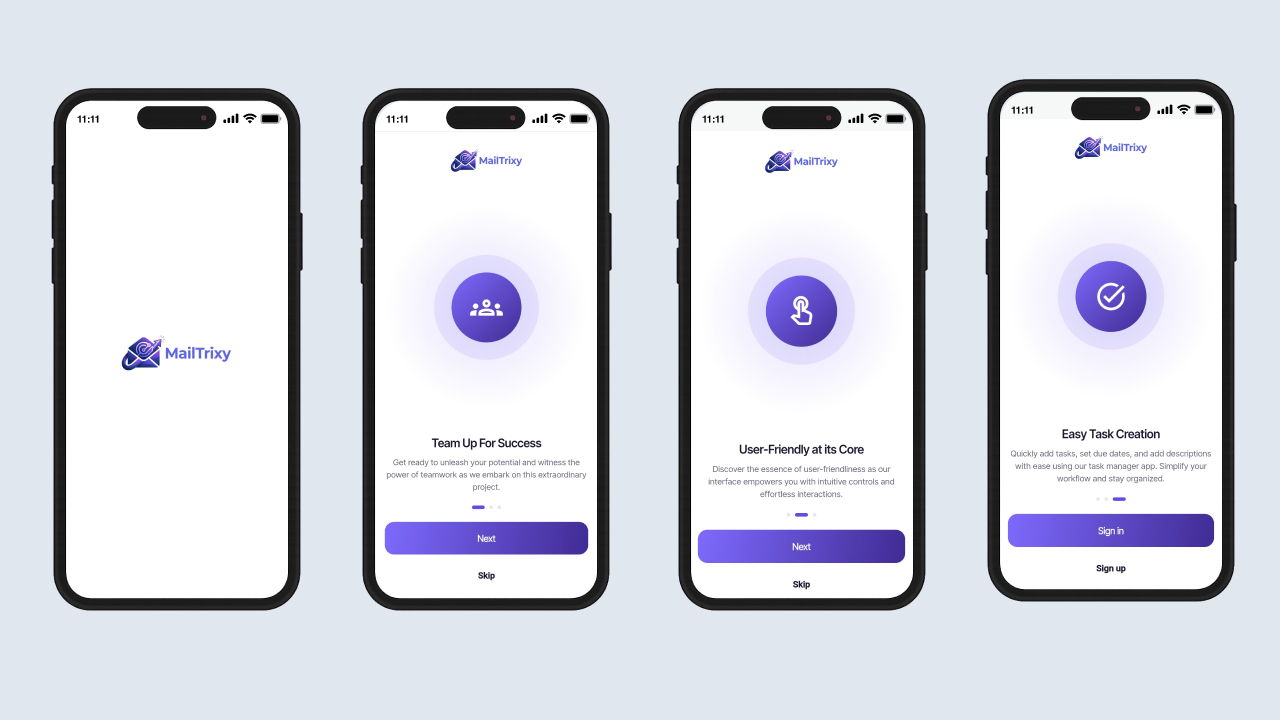
- Splash & Onboarding: Smooth first-run experience for new users.
- Smooth Page Transitions: Custom fade animations throughout the app.
- Portrait Lock: Optimized portrait-only mobile interface.
- Legal Pages: Built-in Privacy Policy and Terms & Conditions pages.
- Built with Flutter: Single codebase supporting Android and iOS.
Technology Stack
- Framework: Flutter 3.41.7 (cross-platform mobile app)
- Language: Dart 3.11.5
- API Integration: RESTful API with JSON data exchange
- State Management: Provider
- Internationalization: 6 languages (English, Arabic, Spanish, French, Hindi, Chinese)
What’s Included
- Full Flutter source code (Dart) for both Android and iOS
- Clean, well-structured project following clean architecture
- Placeholder configuration files for Firebase, Facebook Login, and Google Sign-In
- Step-by-step documentation covering installation, configuration, build & release, and a troubleshooting / FAQ section
Detailed setup instructions — including REST API base URL configuration, Firebase setup, social login keys, and payment gateway configuration — are provided in the included documentation. This app is a client for the MailTrixy web platform; the server installation, database, and environment configuration are documented in the web version’s own documentation.


Note: Any media — images, icons, or logos used in previews are not included in this item and you need to contact the authors to get permission in case you want to use them in your commercial or non-commercial projects. Read the help file for more details after you purchase the script.
What's Your Reaction?
 Like
0
Like
0
 Dislike
0
Dislike
0
 Love
0
Love
0
 Funny
0
Funny
0
 Angry
0
Angry
0
 Sad
0
Sad
0
 Wow
0
Wow
0